Wednesday, October 28, 2009
3 Google Voice Invites
If you need one, drop me an e-mail -- first come, first served until they're gone.
Monday, October 26, 2009
Some thoughts about Tesla Motors
 For those of you that follow me on Facebook, you know that I was luckily enough to be invited to a very VIP event prior to the opening of the Tesla Motors gallery in Boulder this past Friday evening.
Here are some things that I learned and observed:
- Elon Musk (co-founder of Pay Pal and CEO and major investor in Tesla) is a committed guy and very well-spoken. He fielded questions from a small, but influential group of people with aplomb, converting technical questions into easily understandable answers that not only provided digestible technical information, but showed his passion for the brand. Furthermore, he was very approachable at the individual level and I enjoyed the few minutes that he spent speaking with me.
- Tesla currently only produces their roadster and the sedan is still a couple of years off. All of the profits from the sale of the roadster are plowed back into the development of the sedan -- they are using a limited production, expensive showpiece to fund mass market vehicles, so everyone that purchases a roadster becomes an investor.
- Colorado currently offers a $40K+ tax rebate that, combined with Federal tax incentives, brings at total of $50K+ in rebates, provided that you receive delivery of the vehicle by December 31, 2009 in Colorado -- this is a pretty powerful motivator as it cuts the price of the roadster by about 50%.
- Tesla did receive $400mil+ as part of the whole bailout program, but Elon claims that they have not experienced any problems with government involvement from the investment; the "problems" that they have with government entities are the strict regulations and "hoops" they have to jump through to be able to sell the cars as drivable in the Unites States.
- Repairs for Tesla automobiles are currently performed by "Repair Rangers" -- basically the repair guys make house calls at the price of $1 per mile for travel plus the cost of repairs.
- Tesla is not only manufacturing their own vehicles, but also providing electric drive trains to others, notably the forthcoming ElectricSmart.
- The timelines for production are considered "impossible" by normal automakers -- their cycle for the sedan is 3 years from concept design to production.
- Individual consumers cannot purchase "beta" models of new production automobiles, but those that put down deposits on the forthcoming sedan will be invited to take rides in pre-production models.
- In talking with representatives of EV cell manufacturers and other alternative energy source manufacturers, you truly could, given enough money at this point, install a solution in your home that would power your Tesla with no fossil fuel required.
- The environmental manufacturing cost of vehicles, according to Elon, with some exceptions, is roughly equal to the retail cost, so the environmental manufacturing cost of a Tesla at around $100K is about the same as a $100K Lotus.
- Tesla aims for 5-star crash ratings for all of its vehicles, and those ratings get harder to achieve each year.
 The cars themselves are gorgeous and are made for Tesla by Lotus, so they are similar in size to the Lotus Elise, though the cockpit seems a little bigger and there are definite exterior and interior design differences. Fully loaded, the Tesla Roadster Sport will run you about $150K and it looks fast just sitting still. Due to the nature of the engine and drive train, the Roadster Sport does 0-60 in 3.7 seconds (they actually were postulating that it did closer to 3.5-3.6 seconds in the higher altitude due to the thinner air and drag; the altitude has no effect whatsoever on the engine performance) because every bit of torque is available from the second you hit the gas.
Link -- Tesla Motors
PS -- the food and space at The Kitchen in Boulder was spectacular and I was glad to meet Kimbal, the Chef-Owner and Elon's brother; I look forward to returning for a great meal.
PPS -- If you want to schedule a test drive in Boulder, call Tony Longhurst at (303) 440-3758 and he'll take care of you.
PPPS -- If you have been looking at buying one of these and want to chat about me purchasing one on your behalf prior to December 31, drop me an e-mail as I am a Colorado resident eligible for the tax incentives.
Saturday, October 10, 2009
The problem with AIROPTIX Night & Day Aqua contacts and what to do about it
 I've worn Focus Night and Day contacts without significant problems for a number of years; basically since they came out. This past August I went in for my Colorado state-mandated annual prescription review for contacts and was informed that Ciba Vision, owner of the Focus brand, had "improved" the Focus Night & Day line by taking the same lens, coating it with some sort of fancy, buffered coating and by adding a tint and lettering on the lens that said "ok" if the lens was in the correct position (i.e., not flipped the wrong way). I popped in the new sample lenses at the optometrist's office, they seemed fine, and so I ordered a year's worth of lenses. That's when the problems started.
Never before had I really needed to remove my lenses to clean them, but it seemed like I had to do it daily; never before had I had a problem sleeping in my lenses, but I was waking up needing to clean them. Although it seemed like some of the itching and burning in my eyes may have been allergy-related, I've never really had allergies, and when I removed my contacts, the symptoms seemed to almost immediately disappear; it got to the point where I was either carrying a contact lens case with solution or throwing lenses away when I was at work because I couldn't take the irritation.
Finally a couple of weeks ago I decided to take a break from the lenses and even went to see if I was a candidate for laser surgery as I had promised myself that if I could no longer wear extended wear lenses, I would get the surgery. While I was at the laser eye surgery consultation answering questions, the assistant asked if I had any problems with the AIROPTIX because there apparently were massive problems with the lenses and that Ciba Vision was aware of the problem and exchanging lenses. I immediately called my optometrist and he confirmed that there were issues, Ciba was aware of the issues, and that Ciba would exchange out the AIROPTIX for stock of the old Focus Night & Day with no questions asked. Furthermore, he offered me a couple of free pairs of Bausch & Lomb PureVision lenses along with a prescription for those -- PureVision is the Buash & Lomb extended wear lens.
If you're having the same issues I was, here's what I suggest:
- Stop wearing the lenses immediately. If you think you have an infection or some other negative effect from the lenses, call your optometrist immediately.
- Call your optometrist that wrote the prescription -- chances are that they are aware of the issue and can get your lenses switched out by their Ciba rep. Chances are also good that they may have some samples of the older Focus Night & Day lenses that they can give you until Ciba gets you new lenses.
- Ask your optometrist to give you some samples of PureVision. I'm sure that Bausch & Lomb is loving that Ciba has screwed this up and is loading up optometrists with extra samples to convert customers.
- Should your optometrist be unwilling or unable to help you, call Ciba directly as they are aware of the issue -- (800) 875-3001.
Friday, October 02, 2009
Bay Cities Deli
 Those of you that have not lived in LA, and perhaps those of you that don't or didn't spend much time on the Westside and around Santa Monica, have probably never heard of Bay Cities Deli. The Deli is right on the corner of Lincoln and Colorado, just North of where the 10 hits Lincoln. Most of the time the parking lot is packed and on weekends they actually have someone in the parking lot to direct traffic into parking spaces.
Inside, Bay Cities is packed and cramped and full of fabulous food items from their cheese selection to their bakery to their wine selection to, of course, their deli. As you would expect, considering the word "deli" is in their name, Bay Cities has an incredible deli. You will not find better meat products, prepared foods, and salads; every meat to be sliced in the case if it is not some sort of custom product, is a Boars Head product. Of course, with all of the fabulous bread, cheeses, and meats, Bay Cities puts together some amazing sandwiches.
 When I lived in Venice, there were many Sundays when the line at the deli inside Bay Cities was 30-45 minutes long and all of us in line were willing to wait for sandwiches -- the best sandwich, in my opinion, however is the Godmother. Served on their fresh french bread, the base sandwich consists of Genoa salami, mortadella, coppacola, ham, prosciutto, and provolone -- no substitutions are allowed and if they description of ingredients got your mouth watering, you'll know why. Following the base sandwich, you can add the normal fixings, but most get it with "the works", which consists of mayonnaise, your choice of mustard, onions, pickles, tomatoes, lettuce, Italian dressing, and you choice of mild or hot pepper salad. A word of warning: if you get the sandwich with the works, eat it within 15 minutes or so of it being assembled or all of the amazing oils will begin to make the bread mushy; not that it tastes bad, but it may cease to function in the classical sandwich manner (i.e., you might need a fork and knife).
Due to the popularity and potential length of line, it was always challenging for me to grab a sandwich on my way out of town. However, Bay Cities now has online ordering, which is amazing. Allow me to note that this is not automation for automation's sake -- the automation in this process truly solves a problem for customers like me that know exactly what they want: I can get in and out without waiting in line. To support the online ordering, they carved out a corner of the store well away from the normal deli line that only fulfills online orders and catering orders. I will admit that the online ordering system is rudimentary (i.e., not very fancy), but it works and it works easily on my iPhone. Just log on to the site, put in your order, and they'll make it; you need to give them 45-60 minutes (they won't even talk to you about your order not being up if it hasn't been 60 minutes since you ordered). Once you arrive, you stand with the rest of the people that have ordered online and sift through the orders on the gorilla rack -- they just print out the order sheet and wrap it around the sandwich, so look carefully for your e-mail address.
I was just in LA last Sunday, placed an order on my iPhone during brunch, ran into the store while my friend waited in the alley (far enough away for the parking guy to not yell at him), ran up to the rack, found my sandwich, and was out in less than 5 minutes. The sandwich that I brought on the plane only had mustard, lettuce, and pickles on it because, to be honest, everyone on the plane starts drooling with the smells coming off just the base sandwich; if you load it up with the works, you will assuredly send the smell of all that stuff throughout the entire plane air system in addition to the complications you may face with the sandwich getting mushy from all the oil.
If you live in LA, it's definitely worth a trip; if you're traveling through and flying out of LAX, bear in mind you can swing by, hop on Lincoln, and take Lincoln straight to the airport.
Link -- Bay Cities main
Link -- Bay Cities online ordering
Thanks to The Delicious Life for the pic
Sunday, September 06, 2009
Get the USBConnect Mercury to work with Snow Leopard
This isn't too hard, but annoying that no one really has a good set of instructions, so here you go:
Enjoy.
- Leave the modem out of your machine's USB port
- Download this software from SierraWireless if you've previously installed SierraWireless software
- Run the "Watcher Remover"
- Restart your machine
- Open "System Preferences"
- Click the icon that's likely blank with a phone icon
- From the drop-down that likely says "Default", select "Add Configuration"
- Label it something like "ATT"
- Click "Advanced"
- Select "SierraWireless" from the "Vendor" list
- Select "GSM" from the "Model" list
- Click "Ok"
- Make sure you check the box that says "Show Modem Status in Menu Bar"
- Close your Preferences (you should now have the little phone icon on the upper right of your screen where the time is typically displayed)
- Insert the USB modem
- From the phone/modem icon in the upper right, select "Connect" (if the connection profile you just created is the only one you have, it will automatically have a check mark next to it; with multiple connections, make sure the connection profile is checked)
Enjoy.
Monday, August 24, 2009
Is the leather armrest on your Yukon/Tahoe cracked? I've got the solution
 I like my Yukon and I've always enjoyed my Chevy and GMC vehicles, but they do not use the best quality leather when wrapping the seats, meaning that around 40,000 or 50,000 miles, depending on use, the leather on the driver's armrest will probably start to crack. Not only is this leather cracking aesthetically unpleasing, but it also is uncomfortable on your arm; and if you store the armrest back in the seat, the geometry of the cockpit doesn't feel right.
My first sop in my quest to fix this problem was Pep Boys: although they admitted that this is a very common request (look at suburban streets in Colorado and every other driveway seems to have a Yukon or Tahoe in it), the only solution that they had was to stretch a lambskin steering wheel cover over it -- no. Then I ordered a neoprene cover, but because it was designed to fit over the leather without the armrest being removed, the velcro straps kept coming loose and it kept falling off (plus it looked really goofy). Finally I found The Seat Shop on the internet.
Here are a few tips about removal and installation:
- Have the video handy somehow -- a nice laptop screen in the vehicle with you is helpful.
- The leather of your seat cover has a lot of give, so don't be afraid to really stretch it to get at the ball and joint mechanism.
- Before you start removing parts and pieces, you should jam a plastic shopping bag or some white paper into the opening behind the joint that leads into the seat -- anything you drop will sind up contained within the area around the joint and not fall into the seat.
- You have to remove a rubber o-ring (they call it a "rubber band") -- don't lose it. I recommend using some 90 degree needle-nose pliers and/or tying a string to it before you remove it. Luckily if you do lose it (I didn't), it's about the size of a standard scuba tank o-ring, which you should be able to locate (probably free of charge) from a nearby scuba dive shop.
- After to remove the rubber o-ring, you have to remove a u-shaped clamp. I recommend loosening the clamp as shown and then bending a paperclip around the convex "u" portion as the clamp is under pressure and jumps when you remove it.
- Pull the armrest off.
- Put the clamp and o-ring back on the joint as soon the armrest is off and tuck the leather from the seat cover back in.
- Follow the instructions in the video to apply the leather sleeve (note that you really have to stretch the leather and get the sleeve zipped on before going any further). Once the sleeve is on, cut (yes, cut) the leather as shown in the video.
- Put the armrest back into place and push in on it hard until you hear the clamp click -- when you move the armrest up and down, it should not move laterally once the clamp is in place.
I messed up this process and lost the u-shaped clamp, which is not a part that GMC stocks. There are a few options, though I employed the last one:
- Lean your seat all the way forward, unclip the leather cover from the bottom, and fish around until you find the clamp. You can watch the cover installation video to try and get the cover back together or can leave it unclipped once you recover the clamp.
- The Seat Shop can fax you instructions on how to modify a medium binder clip to work -- basically you just clip the thing with some wire cutters and create (as best you can) your own u-shaped clamp.
- AutoZone sells a package of u-shaped window handle clips -- the largest clip in the package is almost too small, but it works; you just have to be patient on getting the o-ring around the flanges.
During this process I did have a chance to talk to one of the guys at The Seat Shop. Not only are they very friendly guys, but they really are knowledgeable about what they are doing. He ran through all of the options above and was luckily able to get me headed in the right direction to get my armrest working. Additionally, I had initially ordered the wrong color, so he sent me a new cover in the correct color free of charge. He did tell me that a lot of his business is direct to consumers that then take their products to an installer; he told me that he makes covers by purchasing 20,000 yards of leather and sewing off of that as opposed to local shops that buy in much smaller yardages and charge a lot more.
I'll tell you that the quality of the leather on The Seat Shop covers is visibly and texturally superior to what GMC uses. If ever my seats start to crack, I will be ordering replacement covers from these guys and having them installed. Note that, although my vehicle already has a third row of seats, The Seat Shop also sells the brackets, parts, and covers to install an aftermarket third row in your vehicle.
I'll tell you that the quality of the leather on The Seat Shop covers is visibly and texturally superior to what GMC uses. If ever my seats start to crack, I will be ordering replacement covers from these guys and having them installed. Note that, although my vehicle already has a third row of seats, The Seat Shop also sells the brackets, parts, and covers to install an aftermarket third row in your vehicle.
Link
Wednesday, August 19, 2009
Book review: Never Eat Alone
 Never Eat Alone is not a new book, in fact, it was written before Keith Ferrazzi's new book, Who's Got Your Back, that I reviewed a a few weeks ago. There are a number of references to NEA in WGYB and I had been meaning to read it for a long time, but noting that there were somewhat tactical references to it in the more recent book, I bumped it to the top of my reading list.
Unlike many other business authors that can seem to abandon ideas in their previous books, I actually think that you can get more value in reading NEA after reading WGYB. Although my review of WGYB states that there is a good amount of tactical tips that are actionable, NEA is, in my opinion, a tactical companion to WGYB -- WGYB adjusts your mindset in a certain way and NEA gives a lot more actionable steps about how to reach the goals of your WGYB mindset.
Among the strategies in NEA are specific actionable toolkits such as getting past assistants that view their job as protecting their boss from speaking to you and making cold calls. There are lists of steps to ensure that networking interactions are worthwhile and that your expectations are correctly set, for example with cold calls:
- Conveying credibility
- Stating your value proposition
- Imparting convenience and urgency
- Being prepared in advance to offer compromise
As with WGYB, there are a lot of reviews that bash on Ferrazzi for name-dropping and for fake modesty. In my opinion (still) the name-dropping adds legitimacy to a lot of the real-world examples of putting the tactics to work and I think that Ferrazzi has a good personal story that shows how he made his way out of growing up in a blue collar town.
Worthwhile read.
Kindle version available.
Link -- book
Link -- Kindle version
Worthwhile read.
Kindle version available.
Link -- book
Link -- Kindle version
Thursday, August 06, 2009
Mint.com launches Financial Fitness

Mint.com is hands-down my favorite online money management site; I used it all the time via the web interface when it first launched and now extensively use it via the iPhone interface. I like that I can set budgets, that it derives budgets based on spending behavior, that it send my e-mails when bills are due, and that it allows me to track everything (bank accounts, mortgages, owned assets, etc.) to derive total net worth. As some of you may remember, Mint.com even caught some fraudulent activity on one of my credit cards that I never would have noticed until it was too late.
There is a new beta feature of Mint.com that allows you to track financial fitness. The Financial Fitness product does analysis on your accounts and spending behavior and provides actionable recommendations for you to be able to improve your financial fitness, specifically ways to improve your financial standing.
Check out Mint.com via the link below.
There is a new beta feature of Mint.com that allows you to track financial fitness. The Financial Fitness product does analysis on your accounts and spending behavior and provides actionable recommendations for you to be able to improve your financial fitness, specifically ways to improve your financial standing.
Check out Mint.com via the link below.
Link
Wednesday, August 05, 2009
My thoughts on the Apple Tablet
 Rumors are swirling about the Apple Tablet ("applet" as I'll refer to it) and here are some thoughts:
- Lots of people are assuming that this is an oversize iPod Touch with some high-def video capability. If that's the case, then it should run the the Kindle application, which means that it becomes an additional hardware vector for Kindle content rather than a "Kindle killer".
- Ideally it well have support for basic document types (i.e., Word, Excel, etc.). If it supports at least opening and entering presentation mode for PowerPoint and Keynote files, and it includes some sort of common video out, that will make it an even more useful business tool.
- It's possible that it will include a 3G component, but it's hard to say. If there is a 3G option, hopefully it can subsidized through an agreement, but hopefully there is also a non-3G version available to those that do not want/need that functionality.
- Rumored price point of $699-$799 seems like it's probably correct, depending on functionality.
- The Septemberish announce date for a launch that puts the devices into Apple Stores in time for the holiday season seems to make sense -- it could wind up being the must-have for this Christmas if they can launch it by that point. Note that in the past a lot of rumored pre-Christmas launches by Apple have been held over for various reasons into the next calendar year.
- Apple might be working with record labels on something to make the "music experience" different, but, honestly, I can't imagine that it would be so cool as to re-energize full album sales and/or create a premium purchasing tier.
- Provided that the tablet platform supports iPod/iPhone applications, I'm very interested to play around with Citrix on it.
- As I've always hoped with internet tablets, I will state my hope here that the applet support bidirectional USB and allows devices like digital cameras and digital video cameras to dump content to the device (think, at the very least, a tablet version of iPhoto).
- It will probably run on a custom processor from P.A. Semi, which Apple bought out. Honestly, I don't care what it runs on as long as it's fast and it works.
- The accessory lines for the applet are going to be insane, dependent upon functionality: this opens up lines of portable accessories (covers, etc.), home accessories (docking stations, adapters for home a/v systems, etc.), and business accessories (docking devices, mounts that allow it to be used an secondary monitor or Wacom-type tablet, etc.).
- Bidirectional wireless connectivity to Mac desktops and laptops would be ideal for internet connection sharing, syncing, and advanced functions such as using it as a secondary monitor, using it as a drawing tablet, etc. The obvious choice for this would be Bluetooth, but it's certainly not outside the realm of possibility that Apple would choose to adopt a higher standard like UWB or something similar that allows for dramatically faster transmission.
- Bluetooth connectivity for wireless mice and keyboards seems like a safe assumption.
- I'm eventually going to see someone walking around with one of these things somehow strapped to their belt and I will treat them most harshly.
Rendering from AppleTablet.net
Are you managing the symptoms or the root problem?
When I was engaged in consulting, specifically in process re-engineering and strategy, the reason that we were usually brought in was to bring and independent point of view and ensure that clients were really getting to the root cause of problems instead of just addressing symptoms of root problems. Working inside a business, it's very easy to become reactionary to symptoms and to address symptoms quickly and assume that you've addressed root problems.
I never really had a term for symptom management vs. root problem management, but Seth Godin has coined this term:
Seth has some great examples of bear shaving on his post (link below), but think about this:
Link
I never really had a term for symptom management vs. root problem management, but Seth Godin has coined this term:
Let's define "bear shaving" as the efforts we go to do deal with the symptoms of a problem instead of addressing the cause of the problem.That's awesome! Love calling it bear shaving -- brief, to the point, and interesting in conversation.
Seth has some great examples of bear shaving on his post (link below), but think about this:
- Record companies complain about lack of album sales and the rise of the sales of singles, but are not investing money to find bands that can produce great albums (they only seem to be finding new bands that can produce singles).
- Book publishers constantly express concern over a $9.99 price point for new release books when there are virtually no production and distribution costs instead of re-imagining their industry as their traditionally greatest costs head towards zero (how do you judge an e-book by its cover, especially when it's in grayscale and the size of a postage stamp on your Kindle?).
Link
Friday, July 31, 2009
Removing the "on behalf of" using other Google Apps accounts

Google announced that they have a solution to get rid of the "on behalf of" notification in Gmail by using the SMTP (send mail) server of the address that you are sending mail on behalf of. The process is quite simple:
- Log into your Gmail account
- Click "Settings"
- Click "Accounts"
- In the "Send mail as" section click "Edit Info" next to one of the accounts
- Set your name and click to the next screen
- Click "Use the other e-mail provider's SMTP servers"
- You will be presented with SMTP server address, username, and password fields along with a SSL checkbox and a port drop-down
- The SMTP server is: smtp.gmail.com (by default the system pre-populates the custom domain, so you need to make sure that you change this)
- Your username is:
@ (i.e., nowhere@loopback.com | you have to put your entire e-mail address in there for the Google SMTP server to authenticate you) - You password is: whatever password you use for that other account (not necessarily your primary Gmail account password)
- Click the SSL box; the port automatically sets correctly
- The system will verify your credentials and will only return you to the configuration screen if there is a problem.
Wednesday, July 22, 2009
A quick air travel tip
 Here's something you should know: solid deodorant/antiperspirant sticks are not liquids and do not need to fit in your zip bag. The only time that you need to put deodorant/antiperspirant into the 3qt baggie is if you use a liquid form (these typically roll on). You should never have a reason to need to purchase a travel size deodorant/antiperspirant stick; just toss it somewhere else in your bag and make some room for the things that are actual liquid.
PS -- once you clear security, toss your 3qt bag into a one gallon, heavy-duty freezer bag; I've seen 3qt bags fail in containing sandwiches and I definitely don't need it failing while containing spilled liquids.
Picture from bosconet
Monday, July 13, 2009
Serket Telson Watch
Serket, maker of some of the coolest boutique watches in America and owned by a friend of mine, has just released its newest model: Telson.


The Telson is a big watch at 48mm, but unlike Serket's previous two diver-style models, the Telson is a more straightforward and classy design. Additionally, unlike previous models, the Telson is available with different colors in the face: white, blue, and yellow (shown here).
Like the previous Reef Diver 2.0, the Telson has an exhibition back that shows off the Cotes D' Geneve mechanism, which is an extraordinarily dependable manual Swiss mechanism. The watch ships with both a black leather band and a stainless steel strap; the leather strap is pictured above in both shots.
As usual with the Serket collections, only 200 of each collection is produced, so not only do you get a high-quality, beautifully designed watch with a manual Swiss mechanism, but you also get a limited production piece of art.
Link
Wednesday, July 08, 2009
Book Review: Who's Got Your Back?
 I didn't (haven't yet) read Keith Ferrazi's first book, Never Eat Alone. It's sitting here on my shelf (I can see it), but I never cracked it; it was an unfortunate victim of my shift to strictly electronic books and so it's sort of been caught in limbo (sorry, Keith).
Keith's new book, Who's Got Your Back?, had dropped across my radar after reading about it on some blogs, but it wasn't until I listened to Keith's appearance on the first Author Teleseminar with Seth Godin and some others that I knew that I wanted to read the book. In the recording that I was listening to, Keith was talking about "lifeline relationships", the success of forums at the YPO and EO, and how important it is to have strong, trusting group relationships that encourage success and mitigate failure. The timing was interesting for me because I've been evaluating joining groups such as YPO and Vistage, along with re-evaluating the dynamics of interaction within my company.
This book sat on the list on my Kindle for a few days and jumped into it at the gym I couldn't put it down. Unlike some business books that are compelling for the first few pages and then spend the remaining hundred plus pages hammering home the same point, Keith provides useful content and real-world examples throughout the course of the book. Although many other reviewers have criticized Keith for gratuitous name dropping throughout the book, I look at the name dropping as affirmation that Keith is presenting sound concepts that are agreed to be powerful people throughout the world.
There is a good mix of tactical and actionable steps along with theory and real-world examples that make this book one that I will continue to come back to as a strong reference tool. For me personally, I was able to use the book not only to understand more completely how my business teams could be incredibly stronger through lifeline relationships, but also how much I am missing those same kinds of relationships outside my organization; it also helped me more fully realize the value of professional organizations such as Vistage and the YPO (not that you necessarily need them, but it does make you more fully understand what they are trying to accomplish).
Whether you fully embrace everything that Keith has to say in his book is entirely up to you. However, even if you don't believe all of it, there are some worthwhile take-aways:
- Four Mindsets to building lifeline relationships: intimacy, generosity, vulnerability, and candor. (How many of these mindsets permeate your relationship interactions?)
- The need for healthy conflict, what Keith terms "sparring".
- Active listening and the importance of engaging in it.
- Leading by example.
- Happiness and meaning in what you are doing; following dreams.
- Commitment, accountability, and ownership.
- The dramatic importance of teams vs. flying solo -- how a team working together can produce vastly greater results than individuals working separately.
There's a lot more than the list above, of course, but my guess is that everything above is enough to get you to read the book. Here's the main thing that Keith wants you to take away from the book: "I hope you'll take away the idea that there is great power in vulnerability (the one mind-set with a bad rap)." My guess is that if you are like me, you never thought of vulnerability as a powerful leadership characteristic -- go pick up a copy of the book.
Kindle version available.
Kindle version available.
Link -- Amazon
Link -- Kindle version
Link -- Keith Ferrazzi promotion for buying 3 copies (free teleseminar and other items)
PS -- outside of how I will apply the principles of this book in the company where I work, the big thing that this book did was help me crystallize some thoughts that I have had for many years about a vacuum in my industry and provided a road map for creating a group, organization, whatever you want to call it to fill the vacuum. I'm excited about the project and I've invited some really talented people to help me with it. It will start out small (5-6 people to begin with) and will scale from there; I hope to share the project and process with you on this blog at some point in the future.
Thursday, June 18, 2009
Book Review: Ignore Everybody
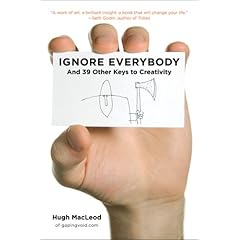 I've been following the growth of Hugh MacLeod through his blog, gaping void. I've always known Hugh as a guy that produces insightful blog posts and the guy that draws cartoons on the back of business cards. Hugh's drawings are cool and provocative and cause conversations; I have a number of them printed out in larger size and posted in my office to start conversations.
Hugh took a blog post that he wrote entitled "How to be Creative" (also available as a ChangeThis Manifesto), expanded upon it, and turned it into a book. In effect, I had already read a good portion of his book. I was aware Hugh was writing a book because I read his blog and he posted all about it and I follow him on twitter and he's been tweeting about it.
Ignore Everybody is exactly what I expected (hoped) that it would be: unflitered, unpolished, full of cool cartoons, and totally worth reading. I actually downloaded it to my Kindle right before my flight yesterday and read it during the flight with some time to spare (so, yes, it's a quick read).
In reading the book it's clear that Hugh did not compromise much to his editors at the publisher; he made the book the way he wanted it. I like books and blogs and articles that I imagine sound like the author talks and Ignore Everybody strikes me as exactly that kind of book; I could imagine having conversations on the topics in the book with Hugh and the language coming out exactly the same.
 This book is not about marketing (though it will give you ideas). This book is not about becoming an artist (though it may inspire you to move along that trajectory). This book is not a tactical manual (it's most definitely not an ordered, step-by-step process). This book is about thinking big and embracing ideas (especially the scary ones) and changing your mindset. And it's about The Sex and Cash Theory, which explains that there are 2 kinds of jobs: the sexy, creative one and the one that pays the bills -- read the book for further definition and why this is dramatically important as you evaluate your current mindset.
This book will push you, hard, outside your envelope in a good way -- I hope that you are like me and you're willing to let it.
Link -- Kindle version
Link -- Hardback version
PS -- this is one of the better graphic-intensive business books to read on the Kindle. Probably due to the fact that all of the graphics are business card-size, which makes them just a little smaller than the width of the screen on a Kindle 2.
Monday, June 15, 2009
A knife sharpener that works for under $10
 I decided to try out the AccuSharp knife sharpener based on the reviews on Amazon. To be honest: it looked to me like it should have had an "As Seen on TV" stamp on it, but for less than $10, I figured it was worth a try. Note that I did not read anything about it except for the glowing reviews.
When I received it, I was even more convinced that it should have been sold as a package with the food dehydrator (yeah, you know what I'm talking about). However, I figured that something that appeared to be so gimmicky couldn't have gotten the reviews it did for no reason, so I gave it a hard look:
- The device can sharpen serrated and plain blades, which is a neat trick, considering serrated blades normally require some specialized work.
- It's designed to work with the knife blade facing towards you so that you are using gravity to apply pressure against the blade and sharpening surface.
- There's a cover over the part of your fingers that might be exposed to the blade if the sharpener slipped.
- The sharpener blades are pre-angled and hit both sides of the blade.
- The sharpener blades are reversible (i.e., twice the life as would be expected) and replaceable.
- Most users average 5-10 years between blade replacements according to the literature -- guess it's not about giving the razor away and selling the blades.
To try it out, I used it on one of my pocket knives that was less than sharp -- within 25 strokes it had a razor edge, which is pretty incredible. Due to the fact that the knife I tried has serrations, I tried it on that portion as well and the AccuSharp put a razor edge on those as well with no special effort.
Besides looking cheap, this is a great knife sharpener to have around (and what do you care what your sharpener looks like as long as it works?).
Link -- AccuSharp via Amazon
Besides looking cheap, this is a great knife sharpener to have around (and what do you care what your sharpener looks like as long as it works?).
Link -- AccuSharp via Amazon
Wednesday, June 10, 2009
Google Apps Sync: Outlook and Google Apps seamlessly

Google announced and released today a Google Apps Sync, which allows a Windows user with Outlook to seamlessly connect Outlook to Google Apps Premier Edition. Instead of needing to use 3rd party products, employees that use Google Apps can seamlessly sync e-mail, contacts, and calendar data to Google's servers instead of an Exchange server. This software, as I've mentioned, is currently only available for Premiere Edition users, but at a cost of $50 per user per year, it's a small price as compared to yearly costs per user for Exchange.
Has the Exchange server in the computer room just become an artifact for small and medium (and maybe large) businesses?
Link -- Google Apps Sync download page
Phone decisions: N97 vs. iPhone 3Gs
I keep saving and redrafting and editing this post, so I'm just going to fire it out this morning because it could go on forever if I don't hit the Publish button soon. Here goes:
 So if it's going to cost me $699.00 to get a 32GB iPhone 3Gs or $699.00 to get an unlocked Nokia N97, which one do I get? I assumed that there would be a much larger price differential between the 2 and, generally when there's a $300 delta, it's easy to let the decision be made for me; in this case, the cost portion is neutral.
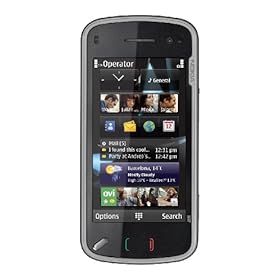 I'll be honest in saying that I have not ever held a N97 in my hands, whereas I am very familiar with the iPhone and a faster processor would be very cool (the rest of the features, such as video, that are not iPhone OS3-based aren't that cool to me as I will receive them as part of the OS3 update on my existing iPhone). Assuming that the N97 is as well made as other Nokia phones that I've used, and knowing that Google Sync is available for Symbian S60 devices, I do start to question which is the better device.
In the past Nokia had made US and non-US versions of its phones, and the US versions were generally crippled for reliable international use by the exclusion of a particular megahertz band, while the non-US versions did not include the most prevalent US frequencies. The N97, by comparison, is a quad band world phone, excluding none of the frequencies used by GSM carriers worldwide.
While both the iPhone and N97 have touchscreens, the N97 is a resistive touchscreen, meaning that it provides tactile resistance when pressed (i.e., it pushes back at you). Unlike the iPhone, the N97 includes a QWERTY keyboard that slides out from under the screen as an alternative to the touchscreen. However, the N97 uses a significantly slower processor (not sure why) than the iPhone 3Gs, which could lead to significant performance hits depending on how the OS handles background processes, simultaneous open programs, etc.
On all other specs, the N97 meets or exceeds the iPhone: 5MP camera vs. 3MP camera for iPhone, 32GB base memory with SD slot for an additional 16GB expansion vs. 32GB non-expandable for iPhone, unlocked GSM phone vs. contract-required iPhone locked to ATT network.
Probably the biggest hit against the N97 is the Apple Application Store. I've only been able to find a very small percentage of the Apps that I frequently use available in the Nokia Ovi Store -- all the apps are being written for the Apple Application Store. As many of you read, I tried to use the BlackBerry Bold and wound up switching back to the iPhone because the Apps were to critical to my daily workflow.
Decisions, decisions.
Link -- N97 on Amazon (for around $600 and available 6/25/09)
Link -- iPhone 3Gs on Apple's site
So if it's going to cost me $699.00 to get a 32GB iPhone 3Gs or $699.00 to get an unlocked Nokia N97, which one do I get? I assumed that there would be a much larger price differential between the 2 and, generally when there's a $300 delta, it's easy to let the decision be made for me; in this case, the cost portion is neutral.I'll be honest in saying that I have not ever held a N97 in my hands, whereas I am very familiar with the iPhone and a faster processor would be very cool (the rest of the features, such as video, that are not iPhone OS3-based aren't that cool to me as I will receive them as part of the OS3 update on my existing iPhone). Assuming that the N97 is as well made as other Nokia phones that I've used, and knowing that Google Sync is available for Symbian S60 devices, I do start to question which is the better device.In the past Nokia had made US and non-US versions of its phones, and the US versions were generally crippled for reliable international use by the exclusion of a particular megahertz band, while the non-US versions did not include the most prevalent US frequencies. The N97, by comparison, is a quad band world phone, excluding none of the frequencies used by GSM carriers worldwide.
While both the iPhone and N97 have touchscreens, the N97 is a resistive touchscreen, meaning that it provides tactile resistance when pressed (i.e., it pushes back at you). Unlike the iPhone, the N97 includes a QWERTY keyboard that slides out from under the screen as an alternative to the touchscreen. However, the N97 uses a significantly slower processor (not sure why) than the iPhone 3Gs, which could lead to significant performance hits depending on how the OS handles background processes, simultaneous open programs, etc.
On all other specs, the N97 meets or exceeds the iPhone: 5MP camera vs. 3MP camera for iPhone, 32GB base memory with SD slot for an additional 16GB expansion vs. 32GB non-expandable for iPhone, unlocked GSM phone vs. contract-required iPhone locked to ATT network.
Probably the biggest hit against the N97 is the Apple Application Store. I've only been able to find a very small percentage of the Apps that I frequently use available in the Nokia Ovi Store -- all the apps are being written for the Apple Application Store. As many of you read, I tried to use the BlackBerry Bold and wound up switching back to the iPhone because the Apps were to critical to my daily workflow.
Decisions, decisions.
Link -- N97 on Amazon (for around $600 and available 6/25/09)
Link -- iPhone 3Gs on Apple's site
Tuesday, June 09, 2009
Did su.pr just win as the status update portal?

One of my challenges with posting certain content to certain services (Twitter, LinkedIn, etc.) was the kludgy way that I had to do it through a mish-mash of various services and through the use of an independent URL shortener. Even with doing all that, my content was only getting on to StumbleUpon is if someone stumbled it.
Su.pr changes the game by allowing me to post content directly to the StumbleUpon population and to choose whether or not to post the same content to Twitter and/or Facebook (no LinkedIn support yet). Furthermore, su.pr is a URL shortener natively, so I get that service without having to use a separate site. Additionally, su.pr allows me to schedule posts into the future, which means more flexibility around shorter posts and microblogs; now I can actually schedule some of that instead of having to think about it throughout the day.
What's really cool is the level of analytics that su.pr provides that shows optimal posting time, click-throughs, etc. for everything; similar to what Google Analytics does, but drilled down to the individual post.
Su.pr changes the game by allowing me to post content directly to the StumbleUpon population and to choose whether or not to post the same content to Twitter and/or Facebook (no LinkedIn support yet). Furthermore, su.pr is a URL shortener natively, so I get that service without having to use a separate site. Additionally, su.pr allows me to schedule posts into the future, which means more flexibility around shorter posts and microblogs; now I can actually schedule some of that instead of having to think about it throughout the day.
What's really cool is the level of analytics that su.pr provides that shows optimal posting time, click-throughs, etc. for everything; similar to what Google Analytics does, but drilled down to the individual post.
Check it out -- su.pr
Friday, June 05, 2009
Higher utilization of your existing home network wiring
Wait, do you have a wired network in your home? Yes, everyone does: your electrical system.
Although technology to utilize existing powerlines to extend ethernet, phone lines, and crappy quality audio has been around for a while, a company called Averlogic is supposed to be providing a demo of the following 2 technologies:
Although technology to utilize existing powerlines to extend ethernet, phone lines, and crappy quality audio has been around for a while, a company called Averlogic is supposed to be providing a demo of the following 2 technologies:
- DVD-quality high-definition A/V streaming over powerline
- IP-based security camera connection via powerline
While the security camera side is slightly less impressive, consider the implications for being able to stream high definition audio and video via an existing power plug in your home. The high definition signal coming out of the receiver can be brought into your television via HDMI or component; HDMI being cooler because you'll receive the audio and video via a single cable (assuming your tv or A/V receiver supports it). Additionally, the receivers include remote controls that allow you to manipulate the transmitter unit (i.e., change the channel, switch between DVD and cable, etc.). In thinking about how I consume video in my house, I rarely, if ever, have multiple televisions going at once and this would allow me to consolidate all of my A/V equipment in the same room as all my computer equipment instead of having multiple satellite TV receivers, multiple DVD players, etc. Furthermore, I would actually save money by reducing the total number of DirecTV receivers that I have and I would be able to access my DVR recordings from all of my tvs.
No word yet on pricing, but imagine how much you could save on recurring monthly fees and custom A/V installer fees.
Link -- press release
No word yet on pricing, but imagine how much you could save on recurring monthly fees and custom A/V installer fees.
Link -- press release
Subscribe to:
Posts (Atom)