Tuesday, May 26, 2009

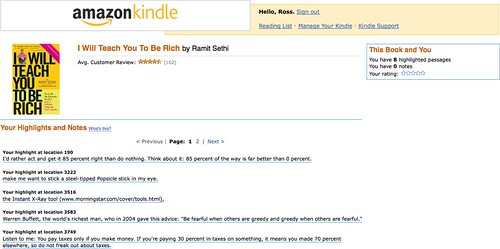
Kindle highlights and notes are now online

Amazon is finally linking my book notes and highlights from my Kindle to the cloud -- see below:


When I switched from my original Kindle to the Kindle 2, I had to connect the Kindle to a USB cable and pull off my highlights and notes as a TXT file, so I am glad to see that Amazon is now permanently storing and associating notes and highlights to my purchased books. I'll make the assumption that there will be more powerful search and organization features coming soon.

Link

Thursday, May 21, 2009

Steamed dumplings in spicy cilantro sauce

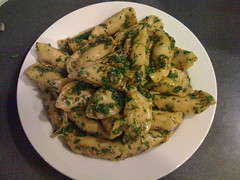
That was a big response; per my Tweet last night, here are some pictures and the recipe for steamed dumplings in spicy cilantro sauce.

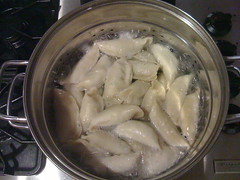
You can make dumplings by hand -- there are tons of recipes on the internet on how to do it. Essentially you need to get your hands on some skins (easy to do at an Asian market), make the filling of your choice, and crimp and seal the dumplings. If you're looking for a shortcut, however, simply pick up a bag of the Ling Ling dumplings at Costco (in the freezer section in a bright yellow bag); they go from frozen to steamed perfectly in boiling water in about 5-7 minutes. I used the Ling Ling dumplings last night due to the time restrictions and they always work well with this recipe.

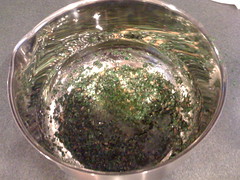
Here's what you need for the spicy cilantro sauce:
  • 1 bunch cilantro chopped fine
  • Splash sesame oil
  • Splash rice wine vinegar
  • Juice from 1 lime
  • 1 scoop of minced garlic (2-3 cloves)
  • 1/2 bunch parsley fine chopped
  • 1/3 cup vegetable oil
  • 2-3 hot peppers diced fine (I use either cilantro or jalapeno, though you could use habanero; I also throw in the seeds for more heat)
You can and should mix the cilantro sauce in a mixing bowl 30-60 minutes prior to making the dish -- the longer the mix sits with everything combined, the better the flavors combine. If you want, you can shortcut the chopping and dicing process by just throwing everything into a food processor and letting it to the work. I let the sauce sit at room temperature instead of putting it in the fridge, but if you're storing the sauce or making it well ahead of time, it's probably a good idea to refrigerate it.

Regardless of whether you made the dumplings or are using frozen dumplings, all you need to do is steam them so that the skins are soft and the inside filling is hot and cooked. I'll assume that you are using frozen dumplings for the purpose of this post, so get a pot of water boiling and put in the dumplings once it is boiling. Generally the dumplings only need to cook for 5-7 minutes in the boiling water, but that depends on the size of your pot and how many you are cooking -- you can check tenderness with a fork. Once you put the dumplings in, get a large mixing bowl and dump the sauce in the bottom; you're going to be moving all the dumplings into this, so it needs to be large enough to hold them and allow you mix them around.

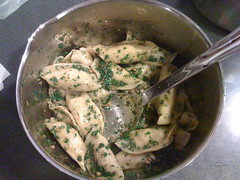
Remove the dumplings once cooked, drain out all of the water, and put them into the sauce hot. Mix the dumplings into the sauce until they are evenly coated, taking care not to break the dumplings open with your mixing spoon when you are mixing. After you have a good coat on the dumplings, you want to get a large plate or platter and pour out the dumplings and any remaining sauce.

If you are eating this as a main entree, a good rule of thumb is 8-10 dumplings per person; as an appetizer a good rule of thumb is 3-4 dumplings per person.

Amazon Web Services betas physical import/export


Amazon Web Services (AWS) is launching a beta program that allows you to send a physical hard drive for data import to or export from the Standard Storage Solution (S3) program. This is an interesting solution for those that want to get large amounts of data into or out of S3, but do not want to waste the time and bandwidth to do so.

Pricing and specifications are included in the link below.

Link

Tuesday, May 19, 2009

My Neat scanner isn't so neat right now

It's not liking scanning more than 1 page any more; it just hangs after the first page with both lights blinking and I have to restart the machine to get it going again. Not a productive environment, especially given what I was trying to accomplish with it.

I sent Neatco an e-mail this morning and, to their credit, they did get back to me this afternoon with this response:
Ross,

This is a known issue with our software and we are working hard on a fix. As a workaround, we've found that setting the scanner to scan Double-sided helps to reduce the crashing. Also, if you do have a crash with this scanner, instead of rebooting, unplug the scanner and go to Applications > Utilities > Activity Monitor. In there, select Neat ADF Scanner and click on Quit Process. Wait 10 seconds and plug the scanner back into the computer. We're sorry about the inconvenience and we hope to have a fix out there soon.

Thank you,
Ok, am I using a Mac device or has someone somehow switched my operating system to Windows? Seriously, don't the instructions above sound like something you'd have to do with Task Manager in XP?

Guess I'll try this tonight; sure hope that the software automatically deletes the blank page backs from the double-sided scanning.

Book Review: Rules of Thumb

Full Disclosure: I received a free copy of this book for review.

Additional Disclosure: I had already purchased this book myself before I received the free copy.

I remember the first issue of Fast Company: it came out in 1995, just before I started business school in 1996. What I remember most about the magazine as I read it during business school was how interesting and real the stories were, how much they talked about failure and success, and how much different and more relevant the stories were than what I was learning in class. There were many times that I ripped stories out of the magazine and brought them to classes to start discussions (some professors appreciated it, other did not). Fast Company introduced me to Seth Godin, got me more interested in Tom Peters, and made me aware of companies that generally weren't discussed in my classes until 6-12 months after I had already read about them. While I was forced to read Fortune for many of my classes, I chose (at my own expense) to read Fast Company.

Yes, this is a book review. It's a review of Rules of Thumb by Alan Webber, one of the two guys that started Fast Company (now all that stuff above about Fast Company makes sense, doesn't it?). As I stated above, I had already purchased the book before being contacted to review, though I probably would have done so regardless of whether I had been contacted for a review or not.

Put simply: this is a great book; it belongs on the bookshelf, desk, nightstand of every person in business today. The rules of thumb that the book provides are succinct and understandable without really needing to read the chapter -- you can skip to the last few pages of the book and rip out all of the rules in 3 pages, pages 265-267 (you can tell by the graphic with the scissors and perforation marks that these pages are designed to be removed). However, if you skip to doing this, you miss the greatest part of the book: stories and context.

Each rule of thumb is accompanied by a story, something that makes it real, something that makes it come to life. Following each story is a "so what?", in which Webber provides further context and information as why the rule of thumb is important. I'll jump off topic here for a moment and jump back in time to high school where I had a great English teacher that used to write SO WHAT? in big, red, capital letter across the first page of papers and make us re-write them. It took us all a while to realize that by doing that, he was turning us into great writers: we had to explain, had to take a position, had to make an argument, had to make the writing compelling. Jumping back to Webber's book: his adding in the "so what?" makes what could potentially be a good business book an extraordinary business book.

Webber makes no bones about the fact that all of the rules of thumb won't be applicable to everyone right now -- he encourages readers to pay attention to the ones that mean something to them now and to revisit the book later (weeks, months, years) and see what applies and doesn't apply in the future as situations and lives change. I will admit that most of the rules of thumb hit a chord with me, but some of them didn't, so I've gone back to those that didn't to try and figure out why; not that I feel like a failure for them not applying, but Webber's got many more years of experience and knowledge than me and I want to make sure I'm not missing something.

Normally in my book reviews I quote some lessons and main ideas, which is not quite that easy with this book because there are 52 lessons and main ideas. You'll just have to trust me in saying that this is a book you should go buy and read and keep and refer back to. A lot of people might say that the content in the book is common (business) sense, but the longer I live, the more I realize that common sense is just not that common; it's never a bad thing to reinforce what you believe to be common sense.

Kindle version available (and that's how I read it)

Link -- Amazon

PS -- rule 53 is wide open and Webber provides some ideas on a framework for us to start developing and collecting our own rules.

Friday, May 15, 2009

10.5.7 update

Although I've seen reports by others of problems with major Apple updates, I've never had a problem . . . until today.

Instead of using Software Update, I actually downloaded the updater from Apple's site -- took about a hour on a T1. I ran the updater, restarted, and my computer went into an infinitely looping blue screen on my Cinema Display.

Since I figured I was screwed regardless, I opened up my laptop, held down the power button to force a power down, hit the power switch to power up, and ran an errand for about 15 minutes. When I returned, I was presented with the login screen, but my Cinema Display wasn't displaying a picture. I logged in, ran a disk permission repair, restarted, and everything was good.

Now that I'm back up, I did a little Googling and it appears that my problem is not uncommon, so I would suggest doing a little searching yourself and arming yourself with some potential troubleshooting solutions before you run the update.

Good luck.

Thursday, May 14, 2009

This blog will be available in the Kindle Store


(in about 48-72 hours)

Used to be that only the "big" blogs were available for subscription on the Kindle -- Amazon has now opened it up to anyone (i.e., me) willing to go through the effort to publish their blog through the Kindle front-end.

Unfortunately there's no direct link that you can follow to get it, but take a look in the next 2 or 3 days.

What I will do is provide a link for other blogs that wish to do the same thing:

Link -- Kindle Publishing

Wednesday, May 13, 2009

Book Review: The Think Big Manifesto

I've enjoyed Michael Port's books in the past, so I was very interested to read his new book, The Think Big Manifesto.

Let me start off by saying that this book is a pretty radical departure from Michael's previous books. This is not a book with concrete lists of action steps at the end of each chapter, rather it is book that challenges you to change every aspect of your life; it is a book about thinking bigger than you are now about every aspect of your life, including your work.

It's interesting to hear Michael admit some of his fears and small thinking as he was writing the book . . . and how he got past those issues by thinking big. I like that he takes large departures from traditional writing modes by doing things such as using Fibonacci numbers to enumerate points instead of the traditional 1-10 list.

This is not necessarily a self-help book, but it is certainly a worthwhile read.

Think (big) about this not being a hard and fast system, but rather a thinking big framework about thinking big.

Kindle edition available.

Link

"Hey bud . . ."

What's happened with addressing people you don't know? Are people just unsure of how to address someone these days?

These seem to be the popular greetings these days:
  • "Hey bud . . ." (my name is not "Bud")
  • "Hey brother . . ." (you're not my brother, I don't have a brother)
  • "Hey bro . . ." (see comment in parenthesis above)
  • "Hey man . . ." (yes, I am a man)
  • " " (just starting talking to me, especially when not looking me in the eye is not effective)
What's amazing is how we seem to have lost the simple fallbacks of "sir" and "ma'am". To be clear: this hasn't been lost in some states in the South or by some customer service organizations, but, in general, it seems to be the exception rather than the rule. Further, you are very (very) unlikely to upset me (or any other man) by defaulting to "sir".

If all I did was make you pay attention to this and to think about your interactions, then, dude, I declare this mission complete.

Polite doesn't cost a thing.

Tuesday, May 12, 2009

The value equation

I was reading this post by Seth Godin about what he terms as the "value fraction", which is this simple mathematical argument:
Value = benefit/cost
As Seth correctly points out, there are 2 ways to have a net positive impact on this equation:
  1. Decrease cost. This is what everyone seems to be doing these days.
  2. Increase the benefit. This is what fewer people seem to be doing these days.
This equation is mostly applied to the consumer: the consumer wants a better value. However, this equation is equally as applicable to anything where value is required, including your job. If you work for someone else, chances are good that you do not want the cost (i.e., your pay, salary, etc.) to go down, so you need to focus on the benefit you provide to show a higher value.

The equation is easy, the math is simple . . . it's the execution that can be challenging.

Monday, May 11, 2009

Sake-glazed lamb chops with cilantro-mint vinaigrette

Ok, based on response to my Tweet about it last night, here's how to make the sake-glazed lamb chops with cilantro-mint vinaigrette.

Depending on how many people you're feeding, you'll want to get 4-6 chops per person. Costco actually has surprisingly good chops at a pretty reasonable price under the Kirkland brand -- you can generally find them in their meat section.

Once you're home with the rack of chops, you need to cut them down into individual chops. Use a sharp knife and cut in between the chop bones; use careful and sure strokes so that you don't mangle the meat as you cut it. Once you have them cut down, you will see a fat cap on the bone side of the chop -- cut off just the cap (i.e., only the portion covering the bone, not the portion covering the meat).

For the marinade, combine the following ingredients in a large zip bag with the chops:
  • 1 cup sweet sake (doesn't need to be premium sake)
  • 1 cup soy sauce
  • Dried chili flakes (I usually just dump in a bunch -- maybe a tablespoon)
  • 1-2 tablespoons minced garlic (2-3 cloves if you're doing it that way)
  • 1 minced shallot
  • 1 tablespoon sesame oil
You want the chops to marinade for a couple of hours at least -- the longer they marinade, the better the chops will be.

In a food processor, combine the following for the vinaigrette:
  • 3/4 bunch of cilantro
  • Full handful of mint leaves
  • 3/4 bunch of parsley
  • Chili oil (I pour liberally, but it's up to your heat tolerance)
  • Fresh ginger
  • 1/2 cup rice wine vinegar
  • 1 tablespoon honey
  • 1 cup peanut oil
Mix with the food processor until you get a salad dressing consistency with the bits of the greens still visible.

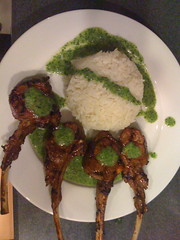
I made this with some sushi rice on the side, drizzled with the vinaigrette -- the rice or other sides are optional.

Cook the lamb until rare or medium rare on a grill. Let cool for a few minutes and place in a bed of the vinaigrette with a little more vinaigrette drizzled on top (I generally serve a bowl of the vinaigrette on the side as well).

Best eaten by simply picking the chop up -- fork and knife are not required for the lamb.

This is inspired by the famous lamb chops at Chinois on Main in Santa Monica.

Wireless carrier voicemail

I don't use Visual Voicemail on my iPhone. Haven't used it since I got it, don't need it, never plan on using it. In fact, I pay PhoneTag so that I don't have to use it -- when you call my cell phone, if I do not pick up, it actually forwards to the PhoneTag system to transcribe your voicemail for me (technically I use a combination of Google Voice and PhoneTage depending on the number you call, but explaining that would be confusing), so I truly use no capacity in the AT&T voicemail system.

What's interesting to me is that the iPhone data plan includes Visual Voicemail, which presume means that there is some sort of related value -- $3, $4, $5 per month? Actually, AT&T (whenever they launch it) is rumored to be charging $2.99 per month for Visual Voicemail on the BlackBerry, so let's call it $3 per month or $36 per year; that's a pretty good amount for me to put against my PhoneTag service -- it would contribute about 1/3 the cost.

Of course, AT&T won't give me a $3 per month discount even though I've never even initialized the Visual Voicemail service; the cost is just part of the data plan package for the iPhone whether I use it or not.

Perhaps they should make the Visual Voicemal an a la carte option with the next generation iPhone.

PS -- if you're looking for a more productive voicemail solution, I highly recommend trying PhoneTag out (this link will give you a 30-day free trial)

Monday, May 04, 2009

always make new mistakes

Refrigerator magnet with the quote from Esther Dyson:

Buy it here

Good stuff.

Stuck

If you're stuck, read these tips from Seth Godin to try to get unstuck.

It's not that hard folks.

Link

Picture from gonzalo_ar

Friday, May 01, 2009

10 Rules of Client Service

Check out this e-book by Matthew Homann at the [non] billable hour -- just a great, quick primer on providing extraordinary client service. Sure, it's aimed at lawyers, but you can remove the word "lawyer" in the text and insert your service instead.

Link

Tuesday, April 28, 2009

Scared

Chances are good that you are scared. Scared about your job, scared about the value of your home, scared about your investments. It's ok to be scared, but it's very worth turning scared into an opportunity. I would argue that scared is the best opportunity, especially as it relates to your job.

Let's be honest: even once the economy recovers, things are probably not ever going to be the same. Once it's been proven that profitability can be achieved with less people doing more things, most will not quickly go back to excess. How are you reacting to this? If you are continuing to do just enough to get by, you are probably really scared and very likely with good reason: 80% is no longer good enough (for that matter, many of you are probably being asked to or finding that you need to give 110%).

You are easily replaceable in your job because there so many people that don't have one. The focus has never been stronger on what you are achieving on a daily (hourly?) basis because your boss and your customers want high value for their dollar. If you only do the right thing when someone is watching, if you strive for nothing better than mediocrity, if you do as little as possible to just get by . . . it has never been more likely that you'll get noticed and not in a good way.

It's possible that you're lucky. It's possible that you have someone other than yourself (customer, boss, mentor, etc.) leading you that pushes you hard so that you provide high value. The push can make you scared because it can be intimidating and the intimidation may create fear. (i.e., make you more scared) Here's the thing: you wouldn't feel scared if you were already performing at high value. Think about it: if you stepped back from yourself and looked as an independent third party, would you be able to say that you performed at high value every hour? It's one thing to say that you are a high value employee or business owner or service provider, but it's quite another to prove it through observable action.

High value, 110%, however you describe it, may seem unsustainable. I disagree. It is sustainable with proper care and feeding. If you have someone pushing, hopefully whomever that is makes themself available as a resource, allows you to fail as long as you learn, and pushes you to balance your life between your high value work and your personal side. If you're pushing yourself, you have to be careful not to lose yourself to your work or burn yourself out.

It's ok to be scared, but use scared as an opportunity.

Picture from Melissa Segal

Follow-up: Neatco

At the end of my blog post yesterday about the NeatDesk, I mentioned that I was going to contact Neatco to get a credit for the promotional code that they had e-mailed me. I sent them an e-mail requesting a credit in the morning and received a credit memo, no questions asked, prior to the end of business yesterday.

That is the right way to do business.

Monday, April 27, 2009

NeatDesk for Mac

I've waited much too long to get a scanner at home, but I finally took the plunge and got the NeatDesk unit for my Mac. Although I've used Fujitsu ScanSnap scanner pretty extensively in various office environments, I was intrigued by the screenshots of the Neat software and the premise behind Neat's philosophy. Further, I liked the fact that the Neat hardware is incidental to the software -- Neat was started by a bunch of software that were looking to solve a problem and they happen to also make hardware (note that Neat's software for Windows and Mac is compatible with most scanners out there, including the Fujitsu ScanSnaps).

Neat's running a promo on their site right now with $100 off the retail price of the Mac NeatDesk plus free shipping. Normally I would have ordered a product like this from Amazon to get my free 2-day shipping, but the Mac version started shipping the day I ordered it last week from Neat, so it wasn't available for purchase on Amazon. Luckily enough for me, even though the free shipping was ground shipping, it still got to me within 3 days of my order, which was plenty fast.

Similar to the ScanSnap scanners, the form factor of the Neat device is pleasantly small and takes up very little desk space. I followed the quick instructions to install the software first and then plug the scanner into the USB port, and my computer didn't recognize it. Quick plug and unplug of the USB cable and it fired right up -- honestly I don't think that I gave the scanner enough time to power up the first time. I ran the calibration sheet that comes with the instruction packet through the scanner and was good to go; not that I need it yet, but I like the fact that Neat includes the necessary cleaning cloth with the package instead of making it an upsell item.

Once calibrated, I decided to test the scanning capabilities, so I threw in some tax forms that I had sitting on the desk. I must say that I was impressed with the speed at which the documents were scanned, even at the highest quality, and with how quickly they were available on the screen, considering the fact that all of the information had gone through the OCR process.

The Neat software is, well, pretty neat. It is obvious that the software was built as a Mac application and it feels very familiar; it even supports typical Mac views, including CoverFlow. Based on the size of paper, the software attempts to automatically categorize scanned items as documents, receipts, or contact cards; this can be manually overridden as needed. There are pre-created "collections" for what you scan in, but it was very easy to create custom collections (i.e., I created a collection for 2008 tax items so that I can scan in forms and receipts). I tried a business card and the OCR software performed remarkably well, accurately capturing all of the information and sending it directly to Address Book (a connector to Google Contacts would be cool since I've abandoned Address Book).

The scanner itself ships with a pretty interesting feeder attachment that is pre-sized to standard document width, standard receipt width, and standard business card width; the feeder is removable if you're doing high-volume document scanning. I put in the CD cover from the Neat software CD into the document feeder (not adjustable width-wise with the feeder in) and it managed to stay somewhat straight, but came through at a bit of an angle. Although the software did recognize that I put it in (intentionally) upside down and automatically rotated it, the rotation controls inside the software do not allow me to do incremental rotations, only 90 degree turns.

Overall I would say that the NeatDesk solution for the Mac is a worthwhile investment. I primarily bought it to get rid of all the paper in my house and to get a bunch of archived paper into digital format. However, the contact management and expense reporting tools make it a worthwhile investment for business use as well. I also bought it in order to be able to make copies (i.e., scan and print) at my house and to send faxes since I don't have a home phone line or fax machine at my house. For faxing, I just hit the "PDF" button on the front of the scanner and then upload the PDF to my internet faxing service to send it; obviously you can use the same process to send documents via e-mail.

Note: as I was writing this post, I got an e-mail from Neat about an additional $20 off that is good until 4/30/09, so I'll share the promo code with you: NEATDESKPREORDER. Now I need to shoot them an e-mail and get a $20 refund.

Link -- NeatDesk for Mac on Neat's site
Link -- NeatDesk for Mac on Amazon (still in pre-order at the time of writing)
Link -- NeatDesk for Windows on Amazon
Friday, April 24, 2009

Wilson Sonsini Term Sheet Generator

Wilson Sonsini Goodrich & Rosati (I'll always remember growing up hearing about them just as "Wilson Sonsini" from the lawyer in my family) has released a Term Sheet Generator for venture financing . . . free of charge. I played around with it and have to admit that it's extremely comprehensive; not only is it practically valuable, but simply seeing the process, going through all of the questions, and reading the comprehensive explanations seems to be a worthwhile exercise for anyone seeking venture funding. What was especially interesting in the generator was the fact that it highlights the most common question response, making it infinitely easier to evaluate the right decision as opposed to hoping that you are choosing the correct response.

Why would Wilson Sonsini do this? It's not really costing them anything -- by their own admission, it is a web-based, generic version of a tool that they already use in-house. Maybe the end result will work for some venture money, but my guess is that there's enough that's generic that you may need to call Wilson Sonsini for advice and/or customization: give away the artifact (i.e., the term sheet) and make your money on the resultant service. Will some other attorneys use this and charge their clients for it? Probably. But my guess is that Wilson Sonsini is not after the clients that would go to those types of attorneys.

I think there's a massive paradigm shift that needs to happen in the field of law. Instead of charging hours to create what are essentially templated forms, agreements, contracts, etc., why not just sell the template for, say, $200? Buy some Google AdWords and advertise for very little per month, especially if you are selling a very specialized document. People can buy the template 24/7/365 from your website and if it's good enough as is, then you are still making money while you sleep and the purchaser feels like they got a good value. However, if the purchaser needs further advice or reviewed changes or some other service related to the document, then you can work out an hourly (flat?) fee for the services. I would recommend taking it a step further and setting up your site with a blog and an opt-in e-mail list where visitors can receive a once or twice monthly newsletter with tips and information (that send them back to your site for the things that you are selling).

Someone's going to figure this out and Wilson Sonsini's starting the trend.

Hell, if you're an attorney that wants to take a crack at doing something like I described, drop me a note and I'd be glad to partner and help you.

Link

Picture from The Doctr

This is broken

And it's not fixed yet.

I sent this out to all of the Directors and Managers in my company to inspire them to step back and look hard at their operations to make sure that we are not broken.


Seth Godin at Gel 2006 from Gel Conference on Vimeo.

Link to Seth's blog post about this.