Friday, February 16, 2007

Windows Mobile 2007 Daylight Savings Time software update


I don't know why Microsoft has to make this so complicated, but they've got a whole few pages of instructions on how to update your Windows Mobile device for the Daylight Savings Time change that occurs this year and potentially will screw up your computer and device if you don't apply the patch.


In the interest of saving you a bunch of time, I'm boiling down the links for you:


  • Visit this link on your mobile browser to download the software over-the-air: http://www.microsoft.com/windowsmobile/default.mspx

  • If you don't want to go through the pain in the ass of entering that whole link above on your phone, then use this: http://snipurl.com/b8e0

  • If you want to just download the CAB file and install it with ActiveSync on Windows or MarkSync on Mac, click this link. 

  • If you, for some reason, want a standalone application for Windows to do everything for you, click this link.

  • Note that if you use Outlook for Windows, you should probably also download the application fix by clicking this link.


Ok, once you've figured out the best way to update your Windows Mobile device, then you have to follow these instructions:


  1. Go to Start > Settings > Clock & Alarms > Date and Time tab.

  2. Change the current time zone to any time zone other than the one that is currently selected.

  3. Click Done.

  4. Change the current time zone to the one you want to use.

  5. Click Done.


Why do you have to do all that?  Apparently installing the update is not enough to actually update your device, you actually have to do all that crap above in order to get the update to actually work.


If you need more information, just visit the link below.


Link 


PS -- if you are offering an over-the-air download, either make the URL mobile-friendly (i.e., assume everyone is using a standard, non-QWERTY keyboard) or do yourself a favor and use SnipURL , it's free. 


Bandwagon


Bandwagon logo


Full disclosure: Bandwagon is offering free accounts for 1 year to bloggers that write about their service and provide a link to their site -- details here.


Bandwagon is a service that competes with MP3Tunes, but focuses on trying to do more core features really well as opposed to offering some of the advanced features of MP3Tunes.  Both services provide for unlimited storage of iTunes tracks, but there are some pretty major differences:


  • Cost:

    • MP3Tunes -- unlimited storage for free with restrictions and advertising; $39 per year for unlimited storage with full features and no advertising.

    • Bandwagon -- unlimited storage for $70 per year.


  • Platform:

    • MP3Tunes -- Windows, Mac, and Linux clients.

    • Bandwagon -- Mac client only.


  • What's backed up?

    • MP3Tunes -- free plan backs up all non-DRM music; premium plan backs up all music.

    • Bandwagon -- backs up all music, play count, lyrics, album art, ratings, preferences, etc.


  • Back-up process:

    • MP3Tunes -- software-driven with Oboe Sync; user must define sync frequency.


    • Bandwagon -- softwar-drive with Bandwagon software; sync is event-driven (i.e., Bandwagon will automatically begin syncing withn new music is purchased, ripped, etc.)


  • Streaming your stored music:

    • MP3Tunes -- the premium and free accounts allow you to stream your stored music via a browser on any computer; the premium account also allows you to sream your music on a browser on any web-capable device (i.e., phone, PDA, etc.)

    • Bandwagon -- this is not a feature.


  • User experience:

    • MP3Tunes -- application is similar across platforms.  In comparison to the Bandwagon application, the MP3Tunes application is not nearly as straight forward and might even be a little intimidating to non-technical users.  Check out the Oboe Sync screenshots (scroll down the page a little), which happen to be for the Mac platform, making comparison with Bandwagon pretty easy.

    • Bandwagon -- the application is very Mac-specific, holding with the ease-of-use that I expect from Mac applications; this is likely the result of being very focused on the core philosophy of creating a very simple iTunes back-up solution only for the Mac.  Check out screenshots of Bandwagon.


I'm sure there are other things to compare, but everything above is probably enough to make an informed decision, especially because I've never used any of the Bandwagon software and therefore cannot comment on Bandwagon vs. MP3Tunes, which I have and do use.  Perhaps once I have a chance to use Bandwagon I will post a more detailed comparison.


These seem like the key questions to ask yourself if you are trying to choose between the 2 services:


  1. Do I use OS X exclusively?  If the answer to this is "no," then choose MP3Tunes or some other general back-up solution.

  2. Do I use iTunes?  If you're not using iTunes for your music, MP3Tunes does allow back up of your music from other application and also through a web interface; also, you might want to consider a standard online back-up service that backs up everything on your computer.

  3. Is cost an issue for me?  MP3Tunes works out to around $3.50 per month while Bandwagon is about $5.50 per month.

  4. Do I need the ability to stream my stored music?  If not, then Bandwagon might be a better choice.

  5. Do I want to back up all of my iTunes data, not just the music?  Bandwagon does this, MP3Tunes does not.

  6. Do I care about software complexity and ease of use?  Bandwagon seems damn easy to use vs. MP3Tunes, which is slightly more complex.


Link -- Bandwagon (this will be the main page when they launch on 2/22/07)


Link -- Bandwagon blog (if you want to read about things prior to 2/22/07)


Link -- MP3Tunes 


Thursday, February 15, 2007

Power of the internet -- repairing a Trane XE80 by ourselves


Ok, let me start by saying that I have absolutely no HVAC training and probably even less electrical training; with that said, I do know how to read and can certainly trace lines on a wiring diagram.


Last night I realized it was about 59 degrees in our house and about 20 degrees outside with the outside temperature falling -- not an ideal situation for winter in Colorado.  I held my hand up to a heat register and found that while it was blowing air, it was not blowing warm air, so I turned the thermostat up and went down to look at the furnace and found that the jets that normally are suppsoed to be creating combustion (read "fire") for the heat were absolutely not on and there was no heat around the unit at all.  Furthermore the little LED light was blinking, which did not seem like a good thing.


My wife came home and I told her that we needed to call someone and she was actually the one that decided to Google the problem with the model number of the furnace.  Turns out that this particular error has to do with some sort of open limit switch or some such nonsense.  Essentially what you do is turn off the power to the furnace, find the limit switch on the wiring diagram, and then trace back the wires from the switch, ensuring that each wire is fully seated -- the wiring inside of a furnace uses a bunch of bayonet-type fittings, which means that the female side of the wire needs to be firmly fitted to the male side that is attached to the fan motor, furnace, etc. or you wind up with an open loop.  Additionally, the limit switches themselves look like a khaki-colored dime and are located near the jets; the switches have 2 wires going in with the bayonet-type fitting and there's a little "button" (I use the term "button" very loosely because it is really nothing more than a little piece of thin rectangular plastic sticking up from the middle of the wires that maybe depresses about 1 millimeter when you press it) that you push to reset the switch (or furnace has 2 of these switches and there are apparently usually 2 or more switches depending on the furnace).


The first time we fired the furnace up, nothing happened, so I went back and did an absolutely thorough trace of the wires, finding that there was one fitting that was slightly loose -- I removed the wire and fully re-seated it.  When I turned the power back on, the jets fired up after about 30 seconds and then the furnace shut itself off; I had forgotten to reset the limit switches after reconnecting the wire.  After shutting the power off, resetting the switches, and firing it back up, the furnace stayed on and has been running well ever since.


I can't tell you how happy I am to have heat and to not have spent some ridiculous amount of money for an emergency heating call, and now knowing what was involved in fixing the problem, I would have been very upset in having paid someone to come check wire connections.


I'm not saying that it is appropriate in every situation and I am certainly not saying that there is no danger associated with repairing complex systems in your home, but it may be worth the time to do some searching before you make any calls they next time you have a problem in your own house. 


Wednesday, February 14, 2007

Google responds to everyone bagging on the Valentine's design


The "Google Doodle" as its known is getting a lot of attention today, mainly because it appears that Google forgot a consonant:


Here's what the Official Google Blog has to say about it:


When you look at the logo, you may worry that we forgot our name
overnight, skipped a letter, or have decided that "Googe" has a better
ring to it. None of the above. I just know that those with true romance
and poetry in their soul will see the subtlety immediately. And if
you're feeling grouchy today, may I suggest eating a strawberry.


" . . . true romance and poetry in their soul . . ." -- that's an new one on me.  Anyway, if you stare at your screen long enough so that your eyes get blurry, you can sort of see that the green "L" or maybe you just have to stare long enough to get some true romance and poetry in your soul . . . either way.


Link 


USBCell to offer phone and device batteries that can be charged via USB


USBCell makes some nifty regular size batteries (i.e., AA) that can be charged using USB -- super-useful if you use a lot of AA batteries; when I had the old pager-style Blackberry, I used to carry around a Ziploc bag full of rechargeable batteries because the charger was too big to drag around with me on business trips.  See the USBCell product below:


Now USBCell wants to get into the mobile phone and device game by creating batteries for devices like Blackberries and digital cameras that can be charged via USB.  Here's a shot of what the product will look like:


Ok, let me address the devices separately:


  • Phones, Blackberries, etc. -- the vast majority of mobile phones and devices these days are coming with the ability to charge via USB, in fact the RAZR in the picture above charges via USB.  What's nice about the USBCell product is that the USB cable is contained within the battery, so you don't have to worry about bringing a cable with you.  However, if you're anything like me, you'll probably have a USB cable with you anyway for some connection function, and it's not worth skipping the cable to risk losing the back cover of my device while traveling.  I suppose that one very useful application of this product would be if you are a person that uses multiple batteries throughout the course of the day; most spare battery chargers are big and cumbersome and this would be a much more ideal solution.


  • Cameras, electronics, etc. -- the vast majority of electronics do not support charging by USB and many require the removal of the battery for charging anyway, so being able to not have to carry a proprietary charger would be very cool; also, due to the fact that batteries have to be removed for charging, most electronics have some sort of system to prevent losing the battery lid.  A perfect example of why I would buy this product is my Cannon ELPH SD400 & SD500: both cameras require removal of the battery for charging, both cameras use a proprietary charger that requires physical insertion of the battery (i.e., it's a too big plastic box), and the proprietary charger unit is different for both cameras (i.e., if we are traveling with both cameras, we have to take both chargers).


I'll be keeping an eye on this product to see where it comes out from a pricing perspective.


Link  


MP3Tunes now offering free unlimited storage lockers


This actually seems like a pretty good deal if you have a lot of music that you not only want to get backed up, but also that you might want to listen to wen you're away from your library.  The premium plan that costs around $40 per year is still available, and there do seem to be a few unique differences between the 2 plans that should be paid attention to:


  • iTunes DRM -- the premium plan will back up, but no play your iTunes DRM music; the free plan makes no mention of the DRM files, so I'm guess that you may not be able to back those up.  If you don't have a lot of DRM files, this probably is not an issue for you.

  • Max file size -- the free plan will only store music 10MB or less per file while the premium plan stores music files of 50MB or less.  You probably need to go through your library and see how this would impact you; it doesn't impact me at all because I don't have any files over 10MB.

  • Album art viewing -- not sure why you would need this, but the free plan doesn't support it.

  • Advertising -- although it's not mentioned in the bulleted list, it is mentioned on the sign-up page that the premium plan has "no ads."  For those who aren't following along, the business model for the free plan is that it will be ad-supported.

  • Playing music on web-capable devices -- this is only supported in the premium plan and will probably become a more relevant feature as more and more people get high-speed capable phones and data plans (think EvDo revA and HSDPA).


If you don't back up your music library at all, then MP3Tunes is probably very worth looking at.


Link  


Tuesday, February 13, 2007

Is this the blogger Meyers-Briggs?


Nimmy over at Ah...ha! has a post that proposes 4 categories for bloggers:


  1. Creators

  2. Critics

  3. Collectors

  4. Couch Potatoes


Maybe someone will take this a step further and actually come up with a Meyers-Briggs-type test that all of the first 3 categories of bloggers above (read Nimmy's post to find out why the 4th category would only be a couch potato) could take to classify themselves.  Once the test was done, we could all then post our results on our blog somewhere and then someone would come up with a blog directory based on your classification.


Anyway, I'm pretty sure that I fall into all 3 categories, though if this post is any indication, I probably scale towards being a collector.


Link  


Monday, February 12, 2007

More thoughts on the Obama site


The more I thought about the Obama social networking site , the more it rang a bell for me with a Business 2.0 article that I read about Richard Rosenblatt's new company, Demand Media.  If it's not an implementation of Demand Media's offering, which it may not be, Obama's site certainly is exactly what Rosenblatt is betting on: creating the "micro-MySpace" on lots of different domains and giving small domains the ability to create their own brand with a "sprinkle" of Demand's applications.


I am now even more interested in seeing how Obama's experiment works out (and I'm guessing that Rosenblatt, directly involved or not, is paying even more attention).


Check out the graphic from Business 2.0's article:


Business 2.0 graphic


Link -- Demand Media 


Link -- Business 2.0 Article 


Non-political: Have you seen Barack Obama's website?


As it says in the title, this is a non-political post, rather someone shot me an e-mail told me to check you Barack Obama's website, specifically, the social networking portion of it, so I had to go check it out.


Holy crap!  This is a polished product for people that want to support the Obama campaign.  Furthermore, I don't think I've ever seen anything this robust on a political candidate's site before.  Of course I had to go poking around to try and see who built this for him, but there is simply no documentation of anyone having created it for him -- everything points to the social side of the site being hosted and property of Obama.  My guess would be that one of the bigger social networking companies created this custom software suite for Obama, and if they did, I'm sure that it cost his campaign a significant amount of money, but based on how much money is spent on interruption advertising during campaigns, my guess will be that the investment in this social networking portal will wind up being significantly more effective than the equivalent cash cost of television advertising.


Chances are good that it's going to be hard for the other candidates to catch up in a meaningful way in time for the next election and it will be interesting to see (assuming Obama releases the information) what kind of traffic the site gets.


I'll also be interested to see what other kinds of ways Obama's campaign uses the web and social networking to promote their candidate -- obviously Obama or someone on his campaign (or both) is pretty savvy about the way internet-based America is working these days. 


Pretty remarkable.


Link  


Saturday, February 10, 2007

Amazon Unbox + TiVo = interesting challenge to competitors


I recently wrote a post about how TiVo could be a real competitor to AppleTV and other living room video devices, but now it's officially been announced that Amazon Unbox will be able to deliver content directly to your TiVo.  Some of the cool features:


  • Purchased video are stored in your Amazon Media Library for re-download, meaning that you can delete them from your TiVo, but be secure in the knowledge that they haven't been deleted forever.  I'm assuming this is an implementation of Amazon's own S3 storage system, which would be theoretically infinitely scalable on a per user basis.

  • Unbox videos appear in the Now Playing list.  I guess this makes sense as the TiVo won't differentiate between recorded video and Unbox video from the TiVo interface.

  • Unbox videos will be of higher quality than those recorded at "best quality" on a TiVo Series2.


Interesting things to think about:


  • This only works for TiVo Series2 and Series3 boxes, which makes sense as Series1 boxes are not broadband-capable -- this should not be a surprise to anyone, though I do wonder whether it will work with DirecTiVo units and/or the Comcast boxes that are supposed to come out.


  • TiVo units accessing the service must be on your home network and not access the service via a phone line.  I wonder if this means that we may see a TiVo-branded 802.11n USB wireless adapter close to launch (that would be nice).

  • Movies can be loaded on 2 TiVos (or PCs, or combination thereof) and 2 portable devices at any given time.  Multi-room viewing features and TiVoToGo features will not work on Unbox videos.  I wonder how long it will take for someone to figure out how to manipulate Unbox videos once they've reached the TiVo; I'm guessing it won't take too long.

  • No mention of the ability to download videos that you already own to the TiVo and/or to upload those videos to the Amazon Media Library.  It's a big mistake if the TiVo can't play the DVDs that I've ripped and/or the TiVo content that I have archived in a compatible format, and it's a huge opportunity for Amazon to make some massive S3 money if they were to provide an option that allowed me to archive TiVo content for re-download in the Media Library as well as archive ripped content in the Media Library and get it off of my local storage.

  • I wonder if there is a way for Amazon to allow me to "rent" Unbox inventory on my TiVo.  If they could (and it would be really cool if they could), then it would not be unlikely to have a TiVo service plan that included a certain number of video rentals per month.

  • What if I don't want to use my TiVo to record television any more, but just want to use it as a gateway to the Unbox service?  I wonder if TiVo has contemplated this and whether or not they will have a no-cost service plan.  Furthermore, I wonder if TiVo has contemplated a stripped-down hardware device (maybe even co-branded with Amazon) that features higher quality audio and video outputs, but lacks all of the features to do video capture as a simple gateway living room device to the Unbox service.


Link -- TiVo site (this is also where you can sign up for notifications about the service)


Link -- Amazon site (this will also be the link to click to link your TiVo once the service is live) 


I missed the Alpha release of Joost for the Mac


Luckily the Joost site states that the beta should be available for download next week -- since the post is dated the 7th, I be looking for it around the 14th.  Instead of linking to Joost, I'm linking to the Technorati search on "Joost Mac Alpha" so that you can get details for yourself.


Those of you that are Joost alpha users and bloggers should post some thoughts to make the search more relevant.


Link  


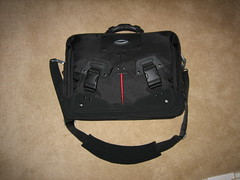
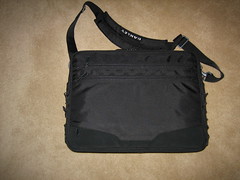
What's in my bag? (pictures of Oakley's new Computer Bag 2.0)


First off I have to say that I think I may have found the most impressive computer bag that I have ever used and that the bag, although it looks small on the outside, holds all of the stuff detailed below along with having a pocket big enough for a 15" MacBook Pro, which, those of you that have MacBook Pros, know is no small feat.  In most cases I would go and link to a picture on the manufacturer's site instead of taking a picture of the bag myself, but I guess the bag is so new that the manufacturer doesn't have any pictures of it yet, so I am including my own pictures below.


Frontside


back


When fully loaded, the bag contains all of the following items:


  • 15" MacBook Pro

  • Apple MagSafe charger

  • AirPort Express (I use the AirPort to charge all of my USB devices, including my iPod)

  • iPod Video with headphones

  • Nokia 770

  • Cannon Elph SD400

  • 4GB thumb drive (I have one of those SanDisk ones where the USB part retracts, which, having bent USB connectors before, is pretty cool)

  • USB to mini-USB cable

  • iPod USB cable


  • Nokia 770 charging cable

  • Cannon battery charger (works for the SD400, but the SD500 has a different battery -- so lame)

  • Retractable CAT5 cable

  • CAT5 crossover adapter (I am surprised at how many times I've used this)


  • Retractable telephone cord (I don't know why I have this as I do not have a dial-up ISP, but let's just say I have it in case I ever need to send a fax)

  • Moleskine 6-pocket organizer (I use this to sort receipts and business cards)

  • Moleskine unlined notebook

  • 3 clear folders from the Container Store that have those elastic straps on them so stuff doesn't fall out (great to be able to see the contents through the clear plastic)


  • Pen

  • Mechanical pencil

  • Click eraser

  • Business cards

  • Quarters (you can always use quarters)


  • Dollar bills (always handy)

  • Eyeglass case (nice to not scratch your glasses when you put them in your bag to go through airport security)

  • Eyeglass polishing cloth (stores inside the case and useful for removing fingerprints)


When I am flying, I generally also have the following:


  • Bottle or 2 of water depending on the length of the flight

  • Book(s)

  • Magazine(s)


The amazing thing about the Oakley bag is that it looks so slim when it's completely loaded up -- everything except the MacBook Pro is in the bag in the pictures and it's hard to tell that there's that much stuff in it.


Oakley's Computer Bag 2.0 has a suggested retail of $150.00 and is available for sure at the Oakley Store in Cherry Creek Mall in Denver.


Trackback to this link and tell me what's in your bag. 


UPDATE: I found it on the Apple online store as well listed as "Oakley Computer Brief ." (if the link doesn't work, just go to the Apple Store and search "Oakley")


AirPort Extreme draft-n installed and in use


Ok, so I got back from my trip and installed and set up my new AirPort Extreme.  The Extreme comes with a CD-ROM that installs new AirPort management software on your machine and also applies the draft-n software patch that otherwise has to be purchased from Apple for applicable machines; interestingly the AirPort software installer does not remove older versions of the AirPort management software from your Utilities folder, so you have to do that manually -- you want to have "AirPort Utility" and "AirPort Disk Utility" as the remaining AirPort applications in your Utilities folder after you have installed the new software.


Set up is very easy: simply plug the ethernet cable from your cable internet, DSL, etc. into the Extreme, plug in the Extreme, launch the AirPort Utility software to find the Extreme, and follow the instructions to set up the Extreme.  I should note that the instructions are vert straightforward and it should be very easy for even basic users to get the Extreme up and running.


Once the Extreme is configured, you'll want to go the "Base Station" menu and select "Manual Setup" so that you can tweak settings like broadcast channels, interface robustness, etc.  Note that if you do not enable the Manual Setup option, if you double-click the Extreme you will go right into the initial configuration that includes renaming the device, the network, etc.


A few thoughts/comments:


  • I renamed the network basically the same that it was on my old Extreme, but I added the "N" qualifier to the name.  It has been my experience that you can totally screw up your Keychain in OSX if you rebuild a network from scratch with the same name it had before.

  • I defaulted all of the AirPort Expresses that I am using for WDS just to make it easier to add them to the new network.  It's best to quit the AirPort Utility, default the Express devices, reopen the Utility and let the Utility configure the Express devices for WDS.  Note that the Utility now does all of the initial setup for AirPort devices, eliminating the need for the AirPort Setup Utility that had to previously be used.

  • The firewall cannot be configured.  According to Apple's sight, the firewall is immediately activated when the Extreme is connected to your cable, DSL, etc. -- I'd feel much better if I could specifically configure firewall settings myself and I hope that such configuration is forthcoming.

  • There is no area on the back that allows for the connection of an external antenna; I haven't had the need for an external antenna, but it's a little disappointing to see that it's not an option if I need it in the future.

  • The default configuration of the network is 802.11 draft-n/g -- in easy terms that means that the network is compatible with draft-n clients and 802.11g clients; you need to change these settings if you want to, for example, support 802.11b clients.

  • There are some people posting that you have to restart all of the computers prior to joining them to the new network -- I do not believe this to be true as long as you change the network name slightly as I described above (note that if you have a Mac with a draft-n card, you will have to restart that machine in order to install the draft-n software patch).  None of the machines on my network needed to be reset in order to join the new network.

  • Please use WPA security.  If for some reason you have a device on your network that doesn't support WPA either look at upgrading it, or hang your old wireless router off of one of the ethernet ports on the back of the Extreme and set it up for WEP.


I have not yet decided what to do with my now old AirPort Extreme.  I suppose that I should just go default it, plug it in somewhere, and WDS it to the new network, but with the new Extreme and the Express, I don't really have too many dead spots in my house.  If the old Extreme had an audio out on it like the Express, I'd ditch the Express and move the old Extreme into its spot.  Perhaps when I receive the AppleTV and no longer need the Express where it currently resides in order to stream audio, I can find another spot for the old Extreme. 


At some point I have to guess that Apple will be rolling out a new AirPort Express with draft-n (or maybe even ratified 802.11n) hardware, but the big question will be what the multimedia streaming capabilities of the 802.11n Express will be in light of AppleTV. 


Monday, February 05, 2007

Concert Industry Consortium


Outside of the live music world, many people don't know what CIC is, but it is one of the largest (if not the largest) conferences for the live music industry.  This year's CIC takes place in Los Angeles, Century City to be specific, and in looking at the registration list seems like it will be as big or even bigger than last year's event.


I'll be headed to CIC tomorrow and will be there through the afternoon on the 8th.  If you are going and want to get in touch with me, it's probably best to reach me on Skype (my username is Rhollman) -- I'll have Skype running on my phone, so I'll be able to text chat with you wherever I have service -- or you can shoot me an e-mail.


I'm not sure how much time I'll have to blog, but I'll do my best.  I realize that no one has really blogged about this event before, so I'll try to put out some content about the conference if I can.


You can get all the information about the event at the link below.


Link  


Mozy


Mozy seems like a really cool back up service: $4.95 per month for unlimited data back up with all kinds of synchronization and other stuff like version restoration and encryption.  Unfortunately Mozy is not available for OSX yet, but if you run Windows, you may want to check it out.


Link 


SpanningSync public beta reopens


After getting crushed when they opened their initial public beta, Spanning Sync has finally reopened their public beta.  What is Spanning Sync?  Well, if you're a Windows user, you can stop reading this now.


Spanning Sync is a piece of software that allows two-way (bidirectional) communication between your Google Calendar and iCal.  In basic terms that means that your Google Calendar and iCal will always display the same events with the same reminders, etc.  Although there are solutions out there that allow iCal to read Google Calendar events, this is the first functioning two-way product.


Imagine the ability to no be anywhere near your computer, log onto Google Calendar, view and update your calendar, and know that all of the information will be synchronized with your desktop calendar (and vice-versa).


What's also critically important with this software is that when you make a change to the calendar on your mobile phone/device and sync it back with iCal, that information will also sync with Google Calendar, ensuring that all of the ways that you access your calendar are in sync.


The simplest way to try the beta is to download it directly via the link below.  BE SURE TO READ THE README FILE -- there are documented instances of Spanning Sync deleting/corrupting Google Calendar and iCal data and the ReadMe tells you how to back everything up.


Link 


iLounge confirms that new Airport Exteme is the same footprint is the Mac Mini


This might go into the "who cares?" file, but it is interesting to see that the new Airport Extreme has exactly the same footprint as the Mac Mini though the Mini is a little bit taller.  The interesting question is whether or not you should stack these devices and if you do stack the devices what device should be on the bottom.


Visit the link below for more pictures, including pictures that compare power supply sizes (if you're into that sort of thing).  They also have some screenshots and comments about setting up and installing the software for the Extreme.


Unfortunately my Extreme won't arrive until the 7th and I won't have time to play with it until the 9th, but rest assured that I will be posting about it once I've had a chance to get it all set up. 


Link 


My take on the Superbowl


The most useful thing about the Superbowl for me was the development of my new rock-paper-scissors strategy -- those of you that saw the commercial know exactly what I'm talking about.


Be warned. 


Friday, February 02, 2007

Google Maps .CAB for Windows Mobile 5


If you go to the link below, you can download the .CAB file to install a Google Maps application on your Windows Mobile 5.0 phone.  What's cool about the application is that you are no longer running it in Java and it seems to be a little bit more snappy; unfortunately for me my phone doesn't have a GPS chip, so I unfortunately cannot play around with all the GPS functions.


Link  


Thursday, February 01, 2007

Isn't Microsoft in business to sell software?


I think the answer is "yes," especially when it comes to operating systems, but after reading some information on a Gizmodo post, I'm not so sure:


. . . if you have one of the Home editions of Vista, you can still run it on
Parallels on the Mac, but you'll be doing that illegally, violating
your End User License Agreement (EULA). Anyway, you can still legally
run any Windows Vista edition in Boot Camp on Mac OS X, but that will
require a reboot, and you can't use both Vista and OS X at the same
time.


Why should Microsoft care if you run their software on Parallels?  Why doesn't Microsoft care if you run their software on Boot Camp?  Obviously this is an attempt to force you into purchasing the Ultimate or Enterprise edition of Vista, which costs more, but can that be the only reason?


I'll just stick with OSX and run XP on Parallels until it isn't feasible to do so any more.


Link