Saturday, October 10, 2009

The problem with AIROPTIX Night & Day Aqua contacts and what to do about it

I've worn Focus Night and Day contacts without significant problems for a number of years; basically since they came out. This past August I went in for my Colorado state-mandated annual prescription review for contacts and was informed that Ciba Vision, owner of the Focus brand, had "improved" the Focus Night & Day line by taking the same lens, coating it with some sort of fancy, buffered coating and by adding a tint and lettering on the lens that said "ok" if the lens was in the correct position (i.e., not flipped the wrong way). I popped in the new sample lenses at the optometrist's office, they seemed fine, and so I ordered a year's worth of lenses. That's when the problems started.

Never before had I really needed to remove my lenses to clean them, but it seemed like I had to do it daily; never before had I had a problem sleeping in my lenses, but I was waking up needing to clean them. Although it seemed like some of the itching and burning in my eyes may have been allergy-related, I've never really had allergies, and when I removed my contacts, the symptoms seemed to almost immediately disappear; it got to the point where I was either carrying a contact lens case with solution or throwing lenses away when I was at work because I couldn't take the irritation.

Finally a couple of weeks ago I decided to take a break from the lenses and even went to see if I was a candidate for laser surgery as I had promised myself that if I could no longer wear extended wear lenses, I would get the surgery. While I was at the laser eye surgery consultation answering questions, the assistant asked if I had any problems with the AIROPTIX because there apparently were massive problems with the lenses and that Ciba Vision was aware of the problem and exchanging lenses. I immediately called my optometrist and he confirmed that there were issues, Ciba was aware of the issues, and that Ciba would exchange out the AIROPTIX for stock of the old Focus Night & Day with no questions asked. Furthermore, he offered me a couple of free pairs of Bausch & Lomb PureVision lenses along with a prescription for those -- PureVision is the Buash & Lomb extended wear lens.

If you're having the same issues I was, here's what I suggest:
  • Stop wearing the lenses immediately. If you think you have an infection or some other negative effect from the lenses, call your optometrist immediately.
  • Call your optometrist that wrote the prescription -- chances are that they are aware of the issue and can get your lenses switched out by their Ciba rep. Chances are also good that they may have some samples of the older Focus Night & Day lenses that they can give you until Ciba gets you new lenses.
  • Ask your optometrist to give you some samples of PureVision. I'm sure that Bausch & Lomb is loving that Ciba has screwed this up and is loading up optometrists with extra samples to convert customers.
  • Should your optometrist be unwilling or unable to help you, call Ciba directly as they are aware of the issue -- (800) 875-3001.
Link -- Bausch & Lomb PureVision

Link -- AIROPTIX Night & Day Aqua

Friday, October 02, 2009

Bay Cities Deli

Those of you that have not lived in LA, and perhaps those of you that don't or didn't spend much time on the Westside and around Santa Monica, have probably never heard of Bay Cities Deli. The Deli is right on the corner of Lincoln and Colorado, just North of where the 10 hits Lincoln. Most of the time the parking lot is packed and on weekends they actually have someone in the parking lot to direct traffic into parking spaces.

Inside, Bay Cities is packed and cramped and full of fabulous food items from their cheese selection to their bakery to their wine selection to, of course, their deli. As you would expect, considering the word "deli" is in their name, Bay Cities has an incredible deli. You will not find better meat products, prepared foods, and salads; every meat to be sliced in the case if it is not some sort of custom product, is a Boars Head product. Of course, with all of the fabulous bread, cheeses, and meats, Bay Cities puts together some amazing sandwiches.

When I lived in Venice, there were many Sundays when the line at the deli inside Bay Cities was 30-45 minutes long and all of us in line were willing to wait for sandwiches -- the best sandwich, in my opinion, however is the Godmother. Served on their fresh french bread, the base sandwich consists of Genoa salami, mortadella, coppacola, ham, prosciutto, and provolone -- no substitutions are allowed and if they description of ingredients got your mouth watering, you'll know why. Following the base sandwich, you can add the normal fixings, but most get it with "the works", which consists of mayonnaise, your choice of mustard, onions, pickles, tomatoes, lettuce, Italian dressing, and you choice of mild or hot pepper salad. A word of warning: if you get the sandwich with the works, eat it within 15 minutes or so of it being assembled or all of the amazing oils will begin to make the bread mushy; not that it tastes bad, but it may cease to function in the classical sandwich manner (i.e., you might need a fork and knife).

Due to the popularity and potential length of line, it was always challenging for me to grab a sandwich on my way out of town. However, Bay Cities now has online ordering, which is amazing. Allow me to note that this is not automation for automation's sake -- the automation in this process truly solves a problem for customers like me that know exactly what they want: I can get in and out without waiting in line. To support the online ordering, they carved out a corner of the store well away from the normal deli line that only fulfills online orders and catering orders. I will admit that the online ordering system is rudimentary (i.e., not very fancy), but it works and it works easily on my iPhone. Just log on to the site, put in your order, and they'll make it; you need to give them 45-60 minutes (they won't even talk to you about your order not being up if it hasn't been 60 minutes since you ordered). Once you arrive, you stand with the rest of the people that have ordered online and sift through the orders on the gorilla rack -- they just print out the order sheet and wrap it around the sandwich, so look carefully for your e-mail address.

I was just in LA last Sunday, placed an order on my iPhone during brunch, ran into the store while my friend waited in the alley (far enough away for the parking guy to not yell at him), ran up to the rack, found my sandwich, and was out in less than 5 minutes. The sandwich that I brought on the plane only had mustard, lettuce, and pickles on it because, to be honest, everyone on the plane starts drooling with the smells coming off just the base sandwich; if you load it up with the works, you will assuredly send the smell of all that stuff throughout the entire plane air system in addition to the complications you may face with the sandwich getting mushy from all the oil.

If you live in LA, it's definitely worth a trip; if you're traveling through and flying out of LAX, bear in mind you can swing by, hop on Lincoln, and take Lincoln straight to the airport.

Link -- Bay Cities main

Link -- Bay Cities online ordering

Thanks to The Delicious Life for the pic

Sunday, September 06, 2009

Get the USBConnect Mercury to work with Snow Leopard

This isn't too hard, but annoying that no one really has a good set of instructions, so here you go:
  • Leave the modem out of your machine's USB port
  • Download this software from SierraWireless if you've previously installed SierraWireless software
  • Run the "Watcher Remover"
  • Restart your machine
  • Open "System Preferences"
  • Click the icon that's likely blank with a phone icon
  • From the drop-down that likely says "Default", select "Add Configuration"
  • Label it something like "ATT"
  • Click "Advanced"
  • Select "SierraWireless" from the "Vendor" list
  • Select "GSM" from the "Model" list
  • Click "Ok"
  • Make sure you check the box that says "Show Modem Status in Menu Bar"
  • Close your Preferences (you should now have the little phone icon on the upper right of your screen where the time is typically displayed)
  • Insert the USB modem
  • From the phone/modem icon in the upper right, select "Connect" (if the connection profile you just created is the only one you have, it will automatically have a check mark next to it; with multiple connections, make sure the connection profile is checked)
That's it -- no additional software from SierraWireless required.

Enjoy.

Monday, August 24, 2009

Is the leather armrest on your Yukon/Tahoe cracked? I've got the solution

I like my Yukon and I've always enjoyed my Chevy and GMC vehicles, but they do not use the best quality leather when wrapping the seats, meaning that around 40,000 or 50,000 miles, depending on use, the leather on the driver's armrest will probably start to crack. Not only is this leather cracking aesthetically unpleasing, but it also is uncomfortable on your arm; and if you store the armrest back in the seat, the geometry of the cockpit doesn't feel right.

My first sop in my quest to fix this problem was Pep Boys: although they admitted that this is a very common request (look at suburban streets in Colorado and every other driveway seems to have a Yukon or Tahoe in it), the only solution that they had was to stretch a lambskin steering wheel cover over it -- no. Then I ordered a neoprene cover, but because it was designed to fit over the leather without the armrest being removed, the velcro straps kept coming loose and it kept falling off (plus it looked really goofy). Finally I found The Seat Shop on the internet.

I'm not an extraordinarily mechanically-inclined guy, but I can generally get around with good instructions, however, what scared me about messing with the seat is the fact that it has side airbags. When I looked at the leather cover on The Seat Shop's site, it was clear that the armrest needed to come off in order to install it. Luckily the guys at The Seat Shop anticipated the problem of installation and helpfully provide fully documented videos on how to install the products that they sell. Based on watching the video, I went ahead and ordered the cover and gathered my tools. When the cover arrived, I took my computer out to the car (connected to my home wifi), set it on the seat, cached the video, and paused it throughout the removal process.

Here are a few tips about removal and installation:
  • Have the video handy somehow -- a nice laptop screen in the vehicle with you is helpful.
  • The leather of your seat cover has a lot of give, so don't be afraid to really stretch it to get at the ball and joint mechanism.
  • Before you start removing parts and pieces, you should jam a plastic shopping bag or some white paper into the opening behind the joint that leads into the seat -- anything you drop will sind up contained within the area around the joint and not fall into the seat.
  • You have to remove a rubber o-ring (they call it a "rubber band") -- don't lose it. I recommend using some 90 degree needle-nose pliers and/or tying a string to it before you remove it. Luckily if you do lose it (I didn't), it's about the size of a standard scuba tank o-ring, which you should be able to locate (probably free of charge) from a nearby scuba dive shop.
  • After to remove the rubber o-ring, you have to remove a u-shaped clamp. I recommend loosening the clamp as shown and then bending a paperclip around the convex "u" portion as the clamp is under pressure and jumps when you remove it.
  • Pull the armrest off.
  • Put the clamp and o-ring back on the joint as soon the armrest is off and tuck the leather from the seat cover back in.
  • Follow the instructions in the video to apply the leather sleeve (note that you really have to stretch the leather and get the sleeve zipped on before going any further). Once the sleeve is on, cut (yes, cut) the leather as shown in the video.
  • Put the armrest back into place and push in on it hard until you hear the clamp click -- when you move the armrest up and down, it should not move laterally once the clamp is in place.
I messed up this process and lost the u-shaped clamp, which is not a part that GMC stocks. There are a few options, though I employed the last one:
  • Lean your seat all the way forward, unclip the leather cover from the bottom, and fish around until you find the clamp. You can watch the cover installation video to try and get the cover back together or can leave it unclipped once you recover the clamp.
  • The Seat Shop can fax you instructions on how to modify a medium binder clip to work -- basically you just clip the thing with some wire cutters and create (as best you can) your own u-shaped clamp.
  • AutoZone sells a package of u-shaped window handle clips -- the largest clip in the package is almost too small, but it works; you just have to be patient on getting the o-ring around the flanges.
During this process I did have a chance to talk to one of the guys at The Seat Shop. Not only are they very friendly guys, but they really are knowledgeable about what they are doing. He ran through all of the options above and was luckily able to get me headed in the right direction to get my armrest working. Additionally, I had initially ordered the wrong color, so he sent me a new cover in the correct color free of charge. He did tell me that a lot of his business is direct to consumers that then take their products to an installer; he told me that he makes covers by purchasing 20,000 yards of leather and sewing off of that as opposed to local shops that buy in much smaller yardages and charge a lot more.

I'll tell you that the quality of the leather on The Seat Shop covers is visibly and texturally superior to what GMC uses. If ever my seats start to crack, I will be ordering replacement covers from these guys and having them installed. Note that, although my vehicle already has a third row of seats, The Seat Shop also sells the brackets, parts, and covers to install an aftermarket third row in your vehicle.

Link

Wednesday, August 19, 2009

Book review: Never Eat Alone

Never Eat Alone is not a new book, in fact, it was written before Keith Ferrazzi's new book, Who's Got Your Back, that I reviewed a a few weeks ago. There are a number of references to NEA in WGYB and I had been meaning to read it for a long time, but noting that there were somewhat tactical references to it in the more recent book, I bumped it to the top of my reading list.

Unlike many other business authors that can seem to abandon ideas in their previous books, I actually think that you can get more value in reading NEA after reading WGYB. Although my review of WGYB states that there is a good amount of tactical tips that are actionable, NEA is, in my opinion, a tactical companion to WGYB -- WGYB adjusts your mindset in a certain way and NEA gives a lot more actionable steps about how to reach the goals of your WGYB mindset.

Among the strategies in NEA are specific actionable toolkits such as getting past assistants that view their job as protecting their boss from speaking to you and making cold calls. There are lists of steps to ensure that networking interactions are worthwhile and that your expectations are correctly set, for example with cold calls:
  1. Conveying credibility
  2. Stating your value proposition
  3. Imparting convenience and urgency
  4. Being prepared in advance to offer compromise
As with WGYB, there are a lot of reviews that bash on Ferrazzi for name-dropping and for fake modesty. In my opinion (still) the name-dropping adds legitimacy to a lot of the real-world examples of putting the tactics to work and I think that Ferrazzi has a good personal story that shows how he made his way out of growing up in a blue collar town.

Worthwhile read.

Kindle version available.

Link
-- book
Link -- Kindle version

Thursday, August 06, 2009

Mint.com launches Financial Fitness


Mint.com is hands-down my favorite online money management site; I used it all the time via the web interface when it first launched and now extensively use it via the iPhone interface. I like that I can set budgets, that it derives budgets based on spending behavior, that it send my e-mails when bills are due, and that it allows me to track everything (bank accounts, mortgages, owned assets, etc.) to derive total net worth. As some of you may remember, Mint.com even caught some fraudulent activity on one of my credit cards that I never would have noticed until it was too late.

There is a new beta feature of Mint.com that allows you to track financial fitness. The Financial Fitness product does analysis on your accounts and spending behavior and provides actionable recommendations for you to be able to improve your financial fitness, specifically ways to improve your financial standing.

Check out Mint.com via the link below.

Link

Wednesday, August 05, 2009

My thoughts on the Apple Tablet

Rumors are swirling about the Apple Tablet ("applet" as I'll refer to it) and here are some thoughts:
  • Lots of people are assuming that this is an oversize iPod Touch with some high-def video capability. If that's the case, then it should run the the Kindle application, which means that it becomes an additional hardware vector for Kindle content rather than a "Kindle killer".
  • Ideally it well have support for basic document types (i.e., Word, Excel, etc.). If it supports at least opening and entering presentation mode for PowerPoint and Keynote files, and it includes some sort of common video out, that will make it an even more useful business tool.
  • It's possible that it will include a 3G component, but it's hard to say. If there is a 3G option, hopefully it can subsidized through an agreement, but hopefully there is also a non-3G version available to those that do not want/need that functionality.
  • Rumored price point of $699-$799 seems like it's probably correct, depending on functionality.
  • The Septemberish announce date for a launch that puts the devices into Apple Stores in time for the holiday season seems to make sense -- it could wind up being the must-have for this Christmas if they can launch it by that point. Note that in the past a lot of rumored pre-Christmas launches by Apple have been held over for various reasons into the next calendar year.
  • Apple might be working with record labels on something to make the "music experience" different, but, honestly, I can't imagine that it would be so cool as to re-energize full album sales and/or create a premium purchasing tier.
  • Provided that the tablet platform supports iPod/iPhone applications, I'm very interested to play around with Citrix on it.
  • As I've always hoped with internet tablets, I will state my hope here that the applet support bidirectional USB and allows devices like digital cameras and digital video cameras to dump content to the device (think, at the very least, a tablet version of iPhoto).
  • It will probably run on a custom processor from P.A. Semi, which Apple bought out. Honestly, I don't care what it runs on as long as it's fast and it works.
  • The accessory lines for the applet are going to be insane, dependent upon functionality: this opens up lines of portable accessories (covers, etc.), home accessories (docking stations, adapters for home a/v systems, etc.), and business accessories (docking devices, mounts that allow it to be used an secondary monitor or Wacom-type tablet, etc.).
  • Bidirectional wireless connectivity to Mac desktops and laptops would be ideal for internet connection sharing, syncing, and advanced functions such as using it as a secondary monitor, using it as a drawing tablet, etc. The obvious choice for this would be Bluetooth, but it's certainly not outside the realm of possibility that Apple would choose to adopt a higher standard like UWB or something similar that allows for dramatically faster transmission.
  • Bluetooth connectivity for wireless mice and keyboards seems like a safe assumption.
  • I'm eventually going to see someone walking around with one of these things somehow strapped to their belt and I will treat them most harshly.
Guess we'll just have to wait and see.

Rendering from AppleTablet.net

Are you managing the symptoms or the root problem?

When I was engaged in consulting, specifically in process re-engineering and strategy, the reason that we were usually brought in was to bring and independent point of view and ensure that clients were really getting to the root cause of problems instead of just addressing symptoms of root problems. Working inside a business, it's very easy to become reactionary to symptoms and to address symptoms quickly and assume that you've addressed root problems.

I never really had a term for symptom management vs. root problem management, but Seth Godin has coined this term:
Let's define "bear shaving" as the efforts we go to do deal with the symptoms of a problem instead of addressing the cause of the problem.
That's awesome! Love calling it bear shaving -- brief, to the point, and interesting in conversation.

Seth has some great examples of bear shaving on his post (link below), but think about this:
  • Record companies complain about lack of album sales and the rise of the sales of singles, but are not investing money to find bands that can produce great albums (they only seem to be finding new bands that can produce singles).
  • Book publishers constantly express concern over a $9.99 price point for new release books when there are virtually no production and distribution costs instead of re-imagining their industry as their traditionally greatest costs head towards zero (how do you judge an e-book by its cover, especially when it's in grayscale and the size of a postage stamp on your Kindle?).
Don't let this happen to you and/or your business; as Seth suggests: call it when you see it.

Link

Friday, July 31, 2009

Removing the "on behalf of" using other Google Apps accounts


Google announced that they have a solution to get rid of the "on behalf of" notification in Gmail by using the SMTP (send mail) server of the address that you are sending mail on behalf of. The process is quite simple:
  • Log into your Gmail account
  • Click "Settings"
  • Click "Accounts"
  • In the "Send mail as" section click "Edit Info" next to one of the accounts
  • Set your name and click to the next screen
  • Click "Use the other e-mail provider's SMTP servers"
  • You will be presented with SMTP server address, username, and password fields along with a SSL checkbox and a port drop-down
Here's how to configure an account hosted on Google Apps:
  • The SMTP server is: smtp.gmail.com (by default the system pre-populates the custom domain, so you need to make sure that you change this)
  • Your username is: @ (i.e., nowhere@loopback.com | you have to put your entire e-mail address in there for the Google SMTP server to authenticate you)
  • You password is: whatever password you use for that other account (not necessarily your primary Gmail account password)
  • Click the SSL box; the port automatically sets correctly
  • The system will verify your credentials and will only return you to the configuration screen if there is a problem.
Easy enough.

Wednesday, July 22, 2009

A quick air travel tip

Here's something you should know: solid deodorant/antiperspirant sticks are not liquids and do not need to fit in your zip bag. The only time that you need to put deodorant/antiperspirant into the 3qt baggie is if you use a liquid form (these typically roll on). You should never have a reason to need to purchase a travel size deodorant/antiperspirant stick; just toss it somewhere else in your bag and make some room for the things that are actual liquid.

PS -- once you clear security, toss your 3qt bag into a one gallon, heavy-duty freezer bag; I've seen 3qt bags fail in containing sandwiches and I definitely don't need it failing while containing spilled liquids.

Picture from bosconet

Monday, July 13, 2009

Serket Telson Watch

Serket, maker of some of the coolest boutique watches in America and owned by a friend of mine, has just released its newest model: Telson.

The Telson is a big watch at 48mm, but unlike Serket's previous two diver-style models, the Telson is a more straightforward and classy design. Additionally, unlike previous models, the Telson is available with different colors in the face: white, blue, and yellow (shown here).

Like the previous Reef Diver 2.0, the Telson has an exhibition back that shows off the Cotes D' Geneve mechanism, which is an extraordinarily dependable manual Swiss mechanism. The watch ships with both a black leather band and a stainless steel strap; the leather strap is pictured above in both shots.

As usual with the Serket collections, only 200 of each collection is produced, so not only do you get a high-quality, beautifully designed watch with a manual Swiss mechanism, but you also get a limited production piece of art.

Link

Wednesday, July 08, 2009

Book Review: Who's Got Your Back?

I didn't (haven't yet) read Keith Ferrazi's first book, Never Eat Alone. It's sitting here on my shelf (I can see it), but I never cracked it; it was an unfortunate victim of my shift to strictly electronic books and so it's sort of been caught in limbo (sorry, Keith).

Keith's new book, Who's Got Your Back?, had dropped across my radar after reading about it on some blogs, but it wasn't until I listened to Keith's appearance on the first Author Teleseminar with Seth Godin and some others that I knew that I wanted to read the book. In the recording that I was listening to, Keith was talking about "lifeline relationships", the success of forums at the YPO and EO, and how important it is to have strong, trusting group relationships that encourage success and mitigate failure. The timing was interesting for me because I've been evaluating joining groups such as YPO and Vistage, along with re-evaluating the dynamics of interaction within my company.

This book sat on the list on my Kindle for a few days and jumped into it at the gym I couldn't put it down. Unlike some business books that are compelling for the first few pages and then spend the remaining hundred plus pages hammering home the same point, Keith provides useful content and real-world examples throughout the course of the book. Although many other reviewers have criticized Keith for gratuitous name dropping throughout the book, I look at the name dropping as affirmation that Keith is presenting sound concepts that are agreed to be powerful people throughout the world.

There is a good mix of tactical and actionable steps along with theory and real-world examples that make this book one that I will continue to come back to as a strong reference tool. For me personally, I was able to use the book not only to understand more completely how my business teams could be incredibly stronger through lifeline relationships, but also how much I am missing those same kinds of relationships outside my organization; it also helped me more fully realize the value of professional organizations such as Vistage and the YPO (not that you necessarily need them, but it does make you more fully understand what they are trying to accomplish).

Whether you fully embrace everything that Keith has to say in his book is entirely up to you. However, even if you don't believe all of it, there are some worthwhile take-aways:
  • Four Mindsets to building lifeline relationships: intimacy, generosity, vulnerability, and candor. (How many of these mindsets permeate your relationship interactions?)
  • The need for healthy conflict, what Keith terms "sparring".
  • Active listening and the importance of engaging in it.
  • Leading by example.
  • Happiness and meaning in what you are doing; following dreams.
  • Commitment, accountability, and ownership.
  • The dramatic importance of teams vs. flying solo -- how a team working together can produce vastly greater results than individuals working separately.
There's a lot more than the list above, of course, but my guess is that everything above is enough to get you to read the book. Here's the main thing that Keith wants you to take away from the book: "I hope you'll take away the idea that there is great power in vulnerability (the one mind-set with a bad rap)." My guess is that if you are like me, you never thought of vulnerability as a powerful leadership characteristic -- go pick up a copy of the book.

Kindle version available.

Link -- Amazon

Link -- Kindle version

Link -- Keith Ferrazzi promotion for buying 3 copies (free teleseminar and other items)

PS -- outside of how I will apply the principles of this book in the company where I work, the big thing that this book did was help me crystallize some thoughts that I have had for many years about a vacuum in my industry and provided a road map for creating a group, organization, whatever you want to call it to fill the vacuum. I'm excited about the project and I've invited some really talented people to help me with it. It will start out small (5-6 people to begin with) and will scale from there; I hope to share the project and process with you on this blog at some point in the future.

Thursday, June 18, 2009

Book Review: Ignore Everybody

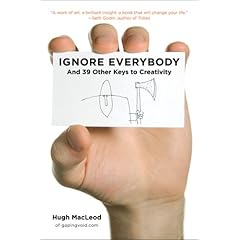
I've been following the growth of Hugh MacLeod through his blog, gaping void. I've always known Hugh as a guy that produces insightful blog posts and the guy that draws cartoons on the back of business cards. Hugh's drawings are cool and provocative and cause conversations; I have a number of them printed out in larger size and posted in my office to start conversations.

Hugh took a blog post that he wrote entitled "How to be Creative" (also available as a ChangeThis Manifesto), expanded upon it, and turned it into a book. In effect, I had already read a good portion of his book. I was aware Hugh was writing a book because I read his blog and he posted all about it and I follow him on twitter and he's been tweeting about it.

Ignore Everybody is exactly what I expected (hoped) that it would be: unflitered, unpolished, full of cool cartoons, and totally worth reading. I actually downloaded it to my Kindle right before my flight yesterday and read it during the flight with some time to spare (so, yes, it's a quick read).

In reading the book it's clear that Hugh did not compromise much to his editors at the publisher; he made the book the way he wanted it. I like books and blogs and articles that I imagine sound like the author talks and Ignore Everybody strikes me as exactly that kind of book; I could imagine having conversations on the topics in the book with Hugh and the language coming out exactly the same.

This book is not about marketing (though it will give you ideas). This book is not about becoming an artist (though it may inspire you to move along that trajectory). This book is not a tactical manual (it's most definitely not an ordered, step-by-step process). This book is about thinking big and embracing ideas (especially the scary ones) and changing your mindset. And it's about The Sex and Cash Theory, which explains that there are 2 kinds of jobs: the sexy, creative one and the one that pays the bills -- read the book for further definition and why this is dramatically important as you evaluate your current mindset.

This book will push you, hard, outside your envelope in a good way -- I hope that you are like me and you're willing to let it.

Link -- Kindle version

Link -- Hardback version

PS -- this is one of the better graphic-intensive business books to read on the Kindle. Probably due to the fact that all of the graphics are business card-size, which makes them just a little smaller than the width of the screen on a Kindle 2.

Monday, June 15, 2009

A knife sharpener that works for under $10

I decided to try out the AccuSharp knife sharpener based on the reviews on Amazon. To be honest: it looked to me like it should have had an "As Seen on TV" stamp on it, but for less than $10, I figured it was worth a try. Note that I did not read anything about it except for the glowing reviews.

When I received it, I was even more convinced that it should have been sold as a package with the food dehydrator (yeah, you know what I'm talking about). However, I figured that something that appeared to be so gimmicky couldn't have gotten the reviews it did for no reason, so I gave it a hard look:
  • The device can sharpen serrated and plain blades, which is a neat trick, considering serrated blades normally require some specialized work.
  • It's designed to work with the knife blade facing towards you so that you are using gravity to apply pressure against the blade and sharpening surface.
  • There's a cover over the part of your fingers that might be exposed to the blade if the sharpener slipped.
  • The sharpener blades are pre-angled and hit both sides of the blade.
  • The sharpener blades are reversible (i.e., twice the life as would be expected) and replaceable.
  • Most users average 5-10 years between blade replacements according to the literature -- guess it's not about giving the razor away and selling the blades.
To try it out, I used it on one of my pocket knives that was less than sharp -- within 25 strokes it had a razor edge, which is pretty incredible. Due to the fact that the knife I tried has serrations, I tried it on that portion as well and the AccuSharp put a razor edge on those as well with no special effort.

Besides looking cheap, this is a great knife sharpener to have around (and what do you care what your sharpener looks like as long as it works?).

Link -- AccuSharp via Amazon

Wednesday, June 10, 2009

Google Apps Sync: Outlook and Google Apps seamlessly


Google announced and released today a Google Apps Sync, which allows a Windows user with Outlook to seamlessly connect Outlook to Google Apps Premier Edition. Instead of needing to use 3rd party products, employees that use Google Apps can seamlessly sync e-mail, contacts, and calendar data to Google's servers instead of an Exchange server. This software, as I've mentioned, is currently only available for Premiere Edition users, but at a cost of $50 per user per year, it's a small price as compared to yearly costs per user for Exchange.

Has the Exchange server in the computer room just become an artifact for small and medium (and maybe large) businesses?

Link -- Google Apps Sync download page

Phone decisions: N97 vs. iPhone 3Gs

I keep saving and redrafting and editing this post, so I'm just going to fire it out this morning because it could go on forever if I don't hit the Publish button soon. Here goes:

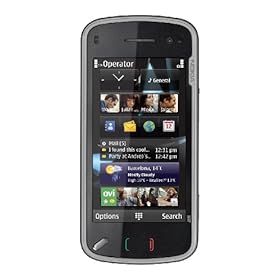
So if it's going to cost me $699.00 to get a 32GB iPhone 3Gs or $699.00 to get an unlocked Nokia N97, which one do I get? I assumed that there would be a much larger price differential between the 2 and, generally when there's a $300 delta, it's easy to let the decision be made for me; in this case, the cost portion is neutral.

I'll be honest in saying that I have not ever held a N97 in my hands, whereas I am very familiar with the iPhone and a faster processor would be very cool (the rest of the features, such as video, that are not iPhone OS3-based aren't that cool to me as I will receive them as part of the OS3 update on my existing iPhone). Assuming that the N97 is as well made as other Nokia phones that I've used, and knowing that Google Sync is available for Symbian S60 devices, I do start to question which is the better device.

In the past Nokia had made US and non-US versions of its phones, and the US versions were generally crippled for reliable international use by the exclusion of a particular megahertz band, while the non-US versions did not include the most prevalent US frequencies. The N97, by comparison, is a quad band world phone, excluding none of the frequencies used by GSM carriers worldwide.

While both the iPhone and N97 have touchscreens, the N97 is a resistive touchscreen, meaning that it provides tactile resistance when pressed (i.e., it pushes back at you). Unlike the iPhone, the N97 includes a QWERTY keyboard that slides out from under the screen as an alternative to the touchscreen. However, the N97 uses a significantly slower processor (not sure why) than the iPhone 3Gs, which could lead to significant performance hits depending on how the OS handles background processes, simultaneous open programs, etc.

On all other specs, the N97 meets or exceeds the iPhone: 5MP camera vs. 3MP camera for iPhone, 32GB base memory with SD slot for an additional 16GB expansion vs. 32GB non-expandable for iPhone, unlocked GSM phone vs. contract-required iPhone locked to ATT network.

Probably the biggest hit against the N97 is the Apple Application Store. I've only been able to find a very small percentage of the Apps that I frequently use available in the Nokia Ovi Store -- all the apps are being written for the Apple Application Store. As many of you read, I tried to use the BlackBerry Bold and wound up switching back to the iPhone because the Apps were to critical to my daily workflow.

Decisions, decisions.

Link -- N97 on Amazon (for around $600 and available 6/25/09)
Link -- iPhone 3Gs on Apple's site

Tuesday, June 09, 2009

Did su.pr just win as the status update portal?


One of my challenges with posting certain content to certain services (Twitter, LinkedIn, etc.) was the kludgy way that I had to do it through a mish-mash of various services and through the use of an independent URL shortener. Even with doing all that, my content was only getting on to StumbleUpon is if someone stumbled it.

Su.pr changes the game by allowing me to post content directly to the StumbleUpon population and to choose whether or not to post the same content to Twitter and/or Facebook (no LinkedIn support yet). Furthermore, su.pr is a URL shortener natively, so I get that service without having to use a separate site. Additionally, su.pr allows me to schedule posts into the future, which means more flexibility around shorter posts and microblogs; now I can actually schedule some of that instead of having to think about it throughout the day.

What's really cool is the level of analytics that su.pr provides that shows optimal posting time, click-throughs, etc. for everything; similar to what Google Analytics does, but drilled down to the individual post.

Check it out -- su.pr

Friday, June 05, 2009

Higher utilization of your existing home network wiring

Wait, do you have a wired network in your home? Yes, everyone does: your electrical system.

Although technology to utilize existing powerlines to extend ethernet, phone lines, and crappy quality audio has been around for a while, a company called Averlogic is supposed to be providing a demo of the following 2 technologies:
  • DVD-quality high-definition A/V streaming over powerline
  • IP-based security camera connection via powerline
While the security camera side is slightly less impressive, consider the implications for being able to stream high definition audio and video via an existing power plug in your home. The high definition signal coming out of the receiver can be brought into your television via HDMI or component; HDMI being cooler because you'll receive the audio and video via a single cable (assuming your tv or A/V receiver supports it). Additionally, the receivers include remote controls that allow you to manipulate the transmitter unit (i.e., change the channel, switch between DVD and cable, etc.). In thinking about how I consume video in my house, I rarely, if ever, have multiple televisions going at once and this would allow me to consolidate all of my A/V equipment in the same room as all my computer equipment instead of having multiple satellite TV receivers, multiple DVD players, etc. Furthermore, I would actually save money by reducing the total number of DirecTV receivers that I have and I would be able to access my DVR recordings from all of my tvs.

No word yet on pricing, but imagine how much you could save on recurring monthly fees and custom A/V installer fees.

Link -- press release

Tuesday, June 02, 2009

They


They said it couldn't be done.

They said I would never make it.

They said it wouldn't last.
Who are "they"? I look at statements like the ones above and wonder why those statements aren't worded like this:
They said that if anyone could do it, you were the one.

They said it would be hard, but I made it.

They said I could make it last if I wanted it badly enough.
The end result if we constantly find ourselves saying the former statements instead of the latter? Maybe some of us need to find a new "they."

(at least that's what they told me)

Picture from House of Sims

Thanks to Antony Bonavita for the unintentional inspiration

Tuesday, May 26, 2009

Kindle highlights and notes are now online

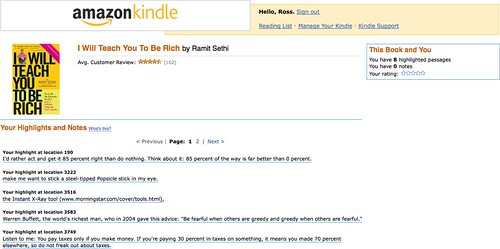
Amazon is finally linking my book notes and highlights from my Kindle to the cloud -- see below:


When I switched from my original Kindle to the Kindle 2, I had to connect the Kindle to a USB cable and pull off my highlights and notes as a TXT file, so I am glad to see that Amazon is now permanently storing and associating notes and highlights to my purchased books. I'll make the assumption that there will be more powerful search and organization features coming soon.

Link

Thursday, May 21, 2009

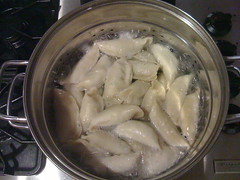
Steamed dumplings in spicy cilantro sauce

That was a big response; per my Tweet last night, here are some pictures and the recipe for steamed dumplings in spicy cilantro sauce.

You can make dumplings by hand -- there are tons of recipes on the internet on how to do it. Essentially you need to get your hands on some skins (easy to do at an Asian market), make the filling of your choice, and crimp and seal the dumplings. If you're looking for a shortcut, however, simply pick up a bag of the Ling Ling dumplings at Costco (in the freezer section in a bright yellow bag); they go from frozen to steamed perfectly in boiling water in about 5-7 minutes. I used the Ling Ling dumplings last night due to the time restrictions and they always work well with this recipe.

Here's what you need for the spicy cilantro sauce:
  • 1 bunch cilantro chopped fine
  • Splash sesame oil
  • Splash rice wine vinegar
  • Juice from 1 lime
  • 1 scoop of minced garlic (2-3 cloves)
  • 1/2 bunch parsley fine chopped
  • 1/3 cup vegetable oil
  • 2-3 hot peppers diced fine (I use either cilantro or jalapeno, though you could use habanero; I also throw in the seeds for more heat)
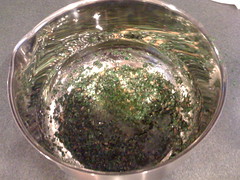
You can and should mix the cilantro sauce in a mixing bowl 30-60 minutes prior to making the dish -- the longer the mix sits with everything combined, the better the flavors combine. If you want, you can shortcut the chopping and dicing process by just throwing everything into a food processor and letting it to the work. I let the sauce sit at room temperature instead of putting it in the fridge, but if you're storing the sauce or making it well ahead of time, it's probably a good idea to refrigerate it.

Regardless of whether you made the dumplings or are using frozen dumplings, all you need to do is steam them so that the skins are soft and the inside filling is hot and cooked. I'll assume that you are using frozen dumplings for the purpose of this post, so get a pot of water boiling and put in the dumplings once it is boiling. Generally the dumplings only need to cook for 5-7 minutes in the boiling water, but that depends on the size of your pot and how many you are cooking -- you can check tenderness with a fork. Once you put the dumplings in, get a large mixing bowl and dump the sauce in the bottom; you're going to be moving all the dumplings into this, so it needs to be large enough to hold them and allow you mix them around.

Remove the dumplings once cooked, drain out all of the water, and put them into the sauce hot. Mix the dumplings into the sauce until they are evenly coated, taking care not to break the dumplings open with your mixing spoon when you are mixing. After you have a good coat on the dumplings, you want to get a large plate or platter and pour out the dumplings and any remaining sauce.

If you are eating this as a main entree, a good rule of thumb is 8-10 dumplings per person; as an appetizer a good rule of thumb is 3-4 dumplings per person.

Amazon Web Services betas physical import/export


Amazon Web Services (AWS) is launching a beta program that allows you to send a physical hard drive for data import to or export from the Standard Storage Solution (S3) program. This is an interesting solution for those that want to get large amounts of data into or out of S3, but do not want to waste the time and bandwidth to do so.

Pricing and specifications are included in the link below.

Link

Tuesday, May 19, 2009

My Neat scanner isn't so neat right now

It's not liking scanning more than 1 page any more; it just hangs after the first page with both lights blinking and I have to restart the machine to get it going again. Not a productive environment, especially given what I was trying to accomplish with it.

I sent Neatco an e-mail this morning and, to their credit, they did get back to me this afternoon with this response:
Ross,

This is a known issue with our software and we are working hard on a fix. As a workaround, we've found that setting the scanner to scan Double-sided helps to reduce the crashing. Also, if you do have a crash with this scanner, instead of rebooting, unplug the scanner and go to Applications > Utilities > Activity Monitor. In there, select Neat ADF Scanner and click on Quit Process. Wait 10 seconds and plug the scanner back into the computer. We're sorry about the inconvenience and we hope to have a fix out there soon.

Thank you,
Ok, am I using a Mac device or has someone somehow switched my operating system to Windows? Seriously, don't the instructions above sound like something you'd have to do with Task Manager in XP?

Guess I'll try this tonight; sure hope that the software automatically deletes the blank page backs from the double-sided scanning.

Book Review: Rules of Thumb

Full Disclosure: I received a free copy of this book for review.

Additional Disclosure: I had already purchased this book myself before I received the free copy.

I remember the first issue of Fast Company: it came out in 1995, just before I started business school in 1996. What I remember most about the magazine as I read it during business school was how interesting and real the stories were, how much they talked about failure and success, and how much different and more relevant the stories were than what I was learning in class. There were many times that I ripped stories out of the magazine and brought them to classes to start discussions (some professors appreciated it, other did not). Fast Company introduced me to Seth Godin, got me more interested in Tom Peters, and made me aware of companies that generally weren't discussed in my classes until 6-12 months after I had already read about them. While I was forced to read Fortune for many of my classes, I chose (at my own expense) to read Fast Company.

Yes, this is a book review. It's a review of Rules of Thumb by Alan Webber, one of the two guys that started Fast Company (now all that stuff above about Fast Company makes sense, doesn't it?). As I stated above, I had already purchased the book before being contacted to review, though I probably would have done so regardless of whether I had been contacted for a review or not.

Put simply: this is a great book; it belongs on the bookshelf, desk, nightstand of every person in business today. The rules of thumb that the book provides are succinct and understandable without really needing to read the chapter -- you can skip to the last few pages of the book and rip out all of the rules in 3 pages, pages 265-267 (you can tell by the graphic with the scissors and perforation marks that these pages are designed to be removed). However, if you skip to doing this, you miss the greatest part of the book: stories and context.

Each rule of thumb is accompanied by a story, something that makes it real, something that makes it come to life. Following each story is a "so what?", in which Webber provides further context and information as why the rule of thumb is important. I'll jump off topic here for a moment and jump back in time to high school where I had a great English teacher that used to write SO WHAT? in big, red, capital letter across the first page of papers and make us re-write them. It took us all a while to realize that by doing that, he was turning us into great writers: we had to explain, had to take a position, had to make an argument, had to make the writing compelling. Jumping back to Webber's book: his adding in the "so what?" makes what could potentially be a good business book an extraordinary business book.

Webber makes no bones about the fact that all of the rules of thumb won't be applicable to everyone right now -- he encourages readers to pay attention to the ones that mean something to them now and to revisit the book later (weeks, months, years) and see what applies and doesn't apply in the future as situations and lives change. I will admit that most of the rules of thumb hit a chord with me, but some of them didn't, so I've gone back to those that didn't to try and figure out why; not that I feel like a failure for them not applying, but Webber's got many more years of experience and knowledge than me and I want to make sure I'm not missing something.

Normally in my book reviews I quote some lessons and main ideas, which is not quite that easy with this book because there are 52 lessons and main ideas. You'll just have to trust me in saying that this is a book you should go buy and read and keep and refer back to. A lot of people might say that the content in the book is common (business) sense, but the longer I live, the more I realize that common sense is just not that common; it's never a bad thing to reinforce what you believe to be common sense.

Kindle version available (and that's how I read it)

Link -- Amazon

PS -- rule 53 is wide open and Webber provides some ideas on a framework for us to start developing and collecting our own rules.

Friday, May 15, 2009

10.5.7 update

Although I've seen reports by others of problems with major Apple updates, I've never had a problem . . . until today.

Instead of using Software Update, I actually downloaded the updater from Apple's site -- took about a hour on a T1. I ran the updater, restarted, and my computer went into an infinitely looping blue screen on my Cinema Display.

Since I figured I was screwed regardless, I opened up my laptop, held down the power button to force a power down, hit the power switch to power up, and ran an errand for about 15 minutes. When I returned, I was presented with the login screen, but my Cinema Display wasn't displaying a picture. I logged in, ran a disk permission repair, restarted, and everything was good.

Now that I'm back up, I did a little Googling and it appears that my problem is not uncommon, so I would suggest doing a little searching yourself and arming yourself with some potential troubleshooting solutions before you run the update.

Good luck.

Thursday, May 14, 2009

This blog will be available in the Kindle Store


(in about 48-72 hours)

Used to be that only the "big" blogs were available for subscription on the Kindle -- Amazon has now opened it up to anyone (i.e., me) willing to go through the effort to publish their blog through the Kindle front-end.

Unfortunately there's no direct link that you can follow to get it, but take a look in the next 2 or 3 days.

What I will do is provide a link for other blogs that wish to do the same thing:

Link -- Kindle Publishing

Wednesday, May 13, 2009

Book Review: The Think Big Manifesto

I've enjoyed Michael Port's books in the past, so I was very interested to read his new book, The Think Big Manifesto.

Let me start off by saying that this book is a pretty radical departure from Michael's previous books. This is not a book with concrete lists of action steps at the end of each chapter, rather it is book that challenges you to change every aspect of your life; it is a book about thinking bigger than you are now about every aspect of your life, including your work.

It's interesting to hear Michael admit some of his fears and small thinking as he was writing the book . . . and how he got past those issues by thinking big. I like that he takes large departures from traditional writing modes by doing things such as using Fibonacci numbers to enumerate points instead of the traditional 1-10 list.

This is not necessarily a self-help book, but it is certainly a worthwhile read.

Think (big) about this not being a hard and fast system, but rather a thinking big framework about thinking big.

Kindle edition available.

Link

"Hey bud . . ."

What's happened with addressing people you don't know? Are people just unsure of how to address someone these days?

These seem to be the popular greetings these days:
  • "Hey bud . . ." (my name is not "Bud")
  • "Hey brother . . ." (you're not my brother, I don't have a brother)
  • "Hey bro . . ." (see comment in parenthesis above)
  • "Hey man . . ." (yes, I am a man)
  • " " (just starting talking to me, especially when not looking me in the eye is not effective)
What's amazing is how we seem to have lost the simple fallbacks of "sir" and "ma'am". To be clear: this hasn't been lost in some states in the South or by some customer service organizations, but, in general, it seems to be the exception rather than the rule. Further, you are very (very) unlikely to upset me (or any other man) by defaulting to "sir".

If all I did was make you pay attention to this and to think about your interactions, then, dude, I declare this mission complete.

Polite doesn't cost a thing.

Tuesday, May 12, 2009

The value equation

I was reading this post by Seth Godin about what he terms as the "value fraction", which is this simple mathematical argument:
Value = benefit/cost
As Seth correctly points out, there are 2 ways to have a net positive impact on this equation:
  1. Decrease cost. This is what everyone seems to be doing these days.
  2. Increase the benefit. This is what fewer people seem to be doing these days.
This equation is mostly applied to the consumer: the consumer wants a better value. However, this equation is equally as applicable to anything where value is required, including your job. If you work for someone else, chances are good that you do not want the cost (i.e., your pay, salary, etc.) to go down, so you need to focus on the benefit you provide to show a higher value.

The equation is easy, the math is simple . . . it's the execution that can be challenging.

Monday, May 11, 2009

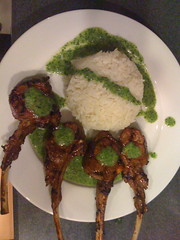
Sake-glazed lamb chops with cilantro-mint vinaigrette

Ok, based on response to my Tweet about it last night, here's how to make the sake-glazed lamb chops with cilantro-mint vinaigrette.

Depending on how many people you're feeding, you'll want to get 4-6 chops per person. Costco actually has surprisingly good chops at a pretty reasonable price under the Kirkland brand -- you can generally find them in their meat section.

Once you're home with the rack of chops, you need to cut them down into individual chops. Use a sharp knife and cut in between the chop bones; use careful and sure strokes so that you don't mangle the meat as you cut it. Once you have them cut down, you will see a fat cap on the bone side of the chop -- cut off just the cap (i.e., only the portion covering the bone, not the portion covering the meat).

For the marinade, combine the following ingredients in a large zip bag with the chops:
  • 1 cup sweet sake (doesn't need to be premium sake)
  • 1 cup soy sauce
  • Dried chili flakes (I usually just dump in a bunch -- maybe a tablespoon)
  • 1-2 tablespoons minced garlic (2-3 cloves if you're doing it that way)
  • 1 minced shallot
  • 1 tablespoon sesame oil
You want the chops to marinade for a couple of hours at least -- the longer they marinade, the better the chops will be.

In a food processor, combine the following for the vinaigrette:
  • 3/4 bunch of cilantro
  • Full handful of mint leaves
  • 3/4 bunch of parsley
  • Chili oil (I pour liberally, but it's up to your heat tolerance)
  • Fresh ginger
  • 1/2 cup rice wine vinegar
  • 1 tablespoon honey
  • 1 cup peanut oil
Mix with the food processor until you get a salad dressing consistency with the bits of the greens still visible.

I made this with some sushi rice on the side, drizzled with the vinaigrette -- the rice or other sides are optional.

Cook the lamb until rare or medium rare on a grill. Let cool for a few minutes and place in a bed of the vinaigrette with a little more vinaigrette drizzled on top (I generally serve a bowl of the vinaigrette on the side as well).

Best eaten by simply picking the chop up -- fork and knife are not required for the lamb.

This is inspired by the famous lamb chops at Chinois on Main in Santa Monica.

Wireless carrier voicemail

I don't use Visual Voicemail on my iPhone. Haven't used it since I got it, don't need it, never plan on using it. In fact, I pay PhoneTag so that I don't have to use it -- when you call my cell phone, if I do not pick up, it actually forwards to the PhoneTag system to transcribe your voicemail for me (technically I use a combination of Google Voice and PhoneTage depending on the number you call, but explaining that would be confusing), so I truly use no capacity in the AT&T voicemail system.

What's interesting to me is that the iPhone data plan includes Visual Voicemail, which presume means that there is some sort of related value -- $3, $4, $5 per month? Actually, AT&T (whenever they launch it) is rumored to be charging $2.99 per month for Visual Voicemail on the BlackBerry, so let's call it $3 per month or $36 per year; that's a pretty good amount for me to put against my PhoneTag service -- it would contribute about 1/3 the cost.

Of course, AT&T won't give me a $3 per month discount even though I've never even initialized the Visual Voicemail service; the cost is just part of the data plan package for the iPhone whether I use it or not.

Perhaps they should make the Visual Voicemal an a la carte option with the next generation iPhone.

PS -- if you're looking for a more productive voicemail solution, I highly recommend trying PhoneTag out (this link will give you a 30-day free trial)

Monday, May 04, 2009

always make new mistakes

Refrigerator magnet with the quote from Esther Dyson:

Buy it here

Good stuff.

Stuck

If you're stuck, read these tips from Seth Godin to try to get unstuck.

It's not that hard folks.

Link

Picture from gonzalo_ar

Friday, May 01, 2009

10 Rules of Client Service

Check out this e-book by Matthew Homann at the [non] billable hour -- just a great, quick primer on providing extraordinary client service. Sure, it's aimed at lawyers, but you can remove the word "lawyer" in the text and insert your service instead.

Link

Tuesday, April 28, 2009

Scared

Chances are good that you are scared. Scared about your job, scared about the value of your home, scared about your investments. It's ok to be scared, but it's very worth turning scared into an opportunity. I would argue that scared is the best opportunity, especially as it relates to your job.

Let's be honest: even once the economy recovers, things are probably not ever going to be the same. Once it's been proven that profitability can be achieved with less people doing more things, most will not quickly go back to excess. How are you reacting to this? If you are continuing to do just enough to get by, you are probably really scared and very likely with good reason: 80% is no longer good enough (for that matter, many of you are probably being asked to or finding that you need to give 110%).

You are easily replaceable in your job because there so many people that don't have one. The focus has never been stronger on what you are achieving on a daily (hourly?) basis because your boss and your customers want high value for their dollar. If you only do the right thing when someone is watching, if you strive for nothing better than mediocrity, if you do as little as possible to just get by . . . it has never been more likely that you'll get noticed and not in a good way.

It's possible that you're lucky. It's possible that you have someone other than yourself (customer, boss, mentor, etc.) leading you that pushes you hard so that you provide high value. The push can make you scared because it can be intimidating and the intimidation may create fear. (i.e., make you more scared) Here's the thing: you wouldn't feel scared if you were already performing at high value. Think about it: if you stepped back from yourself and looked as an independent third party, would you be able to say that you performed at high value every hour? It's one thing to say that you are a high value employee or business owner or service provider, but it's quite another to prove it through observable action.

High value, 110%, however you describe it, may seem unsustainable. I disagree. It is sustainable with proper care and feeding. If you have someone pushing, hopefully whomever that is makes themself available as a resource, allows you to fail as long as you learn, and pushes you to balance your life between your high value work and your personal side. If you're pushing yourself, you have to be careful not to lose yourself to your work or burn yourself out.

It's ok to be scared, but use scared as an opportunity.

Picture from Melissa Segal

Follow-up: Neatco

At the end of my blog post yesterday about the NeatDesk, I mentioned that I was going to contact Neatco to get a credit for the promotional code that they had e-mailed me. I sent them an e-mail requesting a credit in the morning and received a credit memo, no questions asked, prior to the end of business yesterday.

That is the right way to do business.

Monday, April 27, 2009

NeatDesk for Mac

I've waited much too long to get a scanner at home, but I finally took the plunge and got the NeatDesk unit for my Mac. Although I've used Fujitsu ScanSnap scanner pretty extensively in various office environments, I was intrigued by the screenshots of the Neat software and the premise behind Neat's philosophy. Further, I liked the fact that the Neat hardware is incidental to the software -- Neat was started by a bunch of software that were looking to solve a problem and they happen to also make hardware (note that Neat's software for Windows and Mac is compatible with most scanners out there, including the Fujitsu ScanSnaps).

Neat's running a promo on their site right now with $100 off the retail price of the Mac NeatDesk plus free shipping. Normally I would have ordered a product like this from Amazon to get my free 2-day shipping, but the Mac version started shipping the day I ordered it last week from Neat, so it wasn't available for purchase on Amazon. Luckily enough for me, even though the free shipping was ground shipping, it still got to me within 3 days of my order, which was plenty fast.

Similar to the ScanSnap scanners, the form factor of the Neat device is pleasantly small and takes up very little desk space. I followed the quick instructions to install the software first and then plug the scanner into the USB port, and my computer didn't recognize it. Quick plug and unplug of the USB cable and it fired right up -- honestly I don't think that I gave the scanner enough time to power up the first time. I ran the calibration sheet that comes with the instruction packet through the scanner and was good to go; not that I need it yet, but I like the fact that Neat includes the necessary cleaning cloth with the package instead of making it an upsell item.

Once calibrated, I decided to test the scanning capabilities, so I threw in some tax forms that I had sitting on the desk. I must say that I was impressed with the speed at which the documents were scanned, even at the highest quality, and with how quickly they were available on the screen, considering the fact that all of the information had gone through the OCR process.

The Neat software is, well, pretty neat. It is obvious that the software was built as a Mac application and it feels very familiar; it even supports typical Mac views, including CoverFlow. Based on the size of paper, the software attempts to automatically categorize scanned items as documents, receipts, or contact cards; this can be manually overridden as needed. There are pre-created "collections" for what you scan in, but it was very easy to create custom collections (i.e., I created a collection for 2008 tax items so that I can scan in forms and receipts). I tried a business card and the OCR software performed remarkably well, accurately capturing all of the information and sending it directly to Address Book (a connector to Google Contacts would be cool since I've abandoned Address Book).

The scanner itself ships with a pretty interesting feeder attachment that is pre-sized to standard document width, standard receipt width, and standard business card width; the feeder is removable if you're doing high-volume document scanning. I put in the CD cover from the Neat software CD into the document feeder (not adjustable width-wise with the feeder in) and it managed to stay somewhat straight, but came through at a bit of an angle. Although the software did recognize that I put it in (intentionally) upside down and automatically rotated it, the rotation controls inside the software do not allow me to do incremental rotations, only 90 degree turns.

Overall I would say that the NeatDesk solution for the Mac is a worthwhile investment. I primarily bought it to get rid of all the paper in my house and to get a bunch of archived paper into digital format. However, the contact management and expense reporting tools make it a worthwhile investment for business use as well. I also bought it in order to be able to make copies (i.e., scan and print) at my house and to send faxes since I don't have a home phone line or fax machine at my house. For faxing, I just hit the "PDF" button on the front of the scanner and then upload the PDF to my internet faxing service to send it; obviously you can use the same process to send documents via e-mail.

Note: as I was writing this post, I got an e-mail from Neat about an additional $20 off that is good until 4/30/09, so I'll share the promo code with you: NEATDESKPREORDER. Now I need to shoot them an e-mail and get a $20 refund.

Link -- NeatDesk for Mac on Neat's site
Link -- NeatDesk for Mac on Amazon (still in pre-order at the time of writing)
Link -- NeatDesk for Windows on Amazon

Friday, April 24, 2009

Wilson Sonsini Term Sheet Generator

Wilson Sonsini Goodrich & Rosati (I'll always remember growing up hearing about them just as "Wilson Sonsini" from the lawyer in my family) has released a Term Sheet Generator for venture financing . . . free of charge. I played around with it and have to admit that it's extremely comprehensive; not only is it practically valuable, but simply seeing the process, going through all of the questions, and reading the comprehensive explanations seems to be a worthwhile exercise for anyone seeking venture funding. What was especially interesting in the generator was the fact that it highlights the most common question response, making it infinitely easier to evaluate the right decision as opposed to hoping that you are choosing the correct response.

Why would Wilson Sonsini do this? It's not really costing them anything -- by their own admission, it is a web-based, generic version of a tool that they already use in-house. Maybe the end result will work for some venture money, but my guess is that there's enough that's generic that you may need to call Wilson Sonsini for advice and/or customization: give away the artifact (i.e., the term sheet) and make your money on the resultant service. Will some other attorneys use this and charge their clients for it? Probably. But my guess is that Wilson Sonsini is not after the clients that would go to those types of attorneys.

I think there's a massive paradigm shift that needs to happen in the field of law. Instead of charging hours to create what are essentially templated forms, agreements, contracts, etc., why not just sell the template for, say, $200? Buy some Google AdWords and advertise for very little per month, especially if you are selling a very specialized document. People can buy the template 24/7/365 from your website and if it's good enough as is, then you are still making money while you sleep and the purchaser feels like they got a good value. However, if the purchaser needs further advice or reviewed changes or some other service related to the document, then you can work out an hourly (flat?) fee for the services. I would recommend taking it a step further and setting up your site with a blog and an opt-in e-mail list where visitors can receive a once or twice monthly newsletter with tips and information (that send them back to your site for the things that you are selling).

Someone's going to figure this out and Wilson Sonsini's starting the trend.

Hell, if you're an attorney that wants to take a crack at doing something like I described, drop me a note and I'd be glad to partner and help you.

Link

Picture from The Doctr

This is broken

And it's not fixed yet.

I sent this out to all of the Directors and Managers in my company to inspire them to step back and look hard at their operations to make sure that we are not broken.


Seth Godin at Gel 2006 from Gel Conference on Vimeo.

Link to Seth's blog post about this.

Wednesday, April 22, 2009

Book Review: I Will Teach You to be Rich

I don't really remember how I came across I Will Teach You to be Rich by Ramit Sethi. Generally I do not invest money in money management books because not one of the books ever tells you to save money by not buying money management books; in the case of this book, however, I think the $10 or so dollars is well worth the investment.

One of the main things that I like about this book is that Ramit is speaking my language -- we are around the same age and we appear to have many of the same outlooks on life. I like the fact that Ramit is unfiltered in his writing and, in watching some of the video clips of him online, he writes exactly as he talks.

If you follow the book from beginning to end, Ramit has you on a 6 week plan to get you headed in the correct direction to be rich. The first portion of the book dealt with credit cards and I'm lucky enough not to have any credit card issues, but I still read the section and here's the big take-away: you need to do everything possible to eliminate your credit card debt. This principle, of course, should be common sense, but Ramit explains why it is so dramatically important to not carry debt on your credit cards. There are also some good tips on choosing cards, evaluating annual fees vs. benefits, etc.

The real meat of the book and the part that I found most interesting and useful was Ramit's system for automating accounts. Although I had a system in place, it was not nearly as automated as it could have been and I was keeping money in places that were not earning me enough interest. I highly recommend the book for the automation section alone as it will truly open your eyes about how easy it is to use readily available technology to optimize your savings. Additionally, by looking more comprehensively at my accounts, I realized that I was not earning the most possible interest on my savings and have been making adjustments to move money around to keep it liquid, but also earn the maximum interest possible. Here's a great take-away for calculating your return that Ramit calls "The Rule of 72": take 72 and divide it by your interest rate and you'll gate the number of years that it will take to double your principal (pretty sad with most savings accounts offering 1% or less these days).

Ramit's investment strategies are interesting in that he does spend some time showing you how to create an investment strategy and how to reblanace your investments, but I was more impressed with his discussion on lifecycle funds. From a true "fire and forget" retirement savings plan, lifecycle funds automatically rebalance and become more conservative as they get closer to your target retirement date; no action is required on your part except to put money into the fund. Additionally, although I had heard the term "dollar-cost averaging" before, I did not totally understand it until I read this book -- essentially it means investing consistent amounts of money over time instead of all of your money at once to take advantage of market fluctuation.

A lot of what Ramit presents is based on this theory: "I would rather act and get it 85 percent right than do nothing. Think about it: 85 percent of the way is far better than zero percent." He's not necessarily advocating a 100 percent solution, which is what makes so much of his knowledge so useful. In fact, he advocates setting up your finances so that you can have money set aside to do the things that you love. Funny enough, after reading his book, I looked at my monthly expenses and chopped $36 off of my tv expenses, $20 off of dog food, and $30 off of haircuts -- $86 per month is a big deal (and I'm turning around and investing $25 a month of it back into Kiva because that feels like a good charitable vector to me).

I also enjoyed this quote about taxes because I've had some silly conversations with people in the past about income and tax effects: "Listen to me: You pay taxes only if you make money. If you're paying 30 percent in taxes on something, it means you made 70 percent elsewhere, so do not freak out about taxes." Probably the best tax advice that you can get.

Ok, one final quote that doesn't have a lot to do with the overall theme of the book, but I clipped it on the Kindle so that I could look back at it and laugh: "GOD, IF I HEAR THIS ONE MORE TIME, I AM GOING TO JUMP UP AND BEAT SOMEONE WITH AN ONION. (That way it's unclear why they're crying.)" The book's certainly not dry and unexciting.

Kindle version available.

Link

Tuesday, April 21, 2009

On GM remotes and car fixes in the internet age

My keyless entry remote for my Yukon stopped working and I only had the one. Presuming it was not a big deal, I called the dealership and was told it was $65 for the fob and $35 to program it -- $100 + tax for a stupid remote? Unreal.

So what did I do? I Googled it, of course.

Turns out you can get the vehicle to enter programming mode by turn the key a couple of times while holding the unlock button and doing a headstand on the driver seat (I may be exaggerating); the process takes about 30 seconds. Then to program the remote, you hold the lock and unlock button together for 30 seconds on the remote and wait until the door lock and unlock. Turn the key in the ignition again and you're done. That costs $35?

So I grabbed a spare remote that was in the drawer, but, of course, there are different series of remotes and the one I had was too new for my car. I'm sure you can guess what I did next, right? I hopped on eBay. For $15 at the buy-it-now price plus $5 to ship, there are plenty of sellers that will send you the exact remote that you need along with detailed programming instructions and a guarantee that the remote will work. Pretty easy math: $20 vs. $65 any day.

The remote shows up, I program it, and problem solved for $20 vs. the $100 it would have cost at the dealership. Of course, this process would not have worked 7 or 8 years ago because the underlying internet infrastructure wasn't robust enough to find me the right knowledge and enable me to purchase from someone across the country that had what I wanted to sell (and I wouldn't have been blogging about it either).

Game changed.

QED