Monday, July 02, 2007

Plaxo 3.0


plaxo


Ok, Plaxo has just gotten perfect with the 3.0 version of their product.  Now I can use Google Calendar and Gmail as endpoints along with Thunderbird and iCal, Address Book, and Mail.  This means that 2-way syncing between Google Calendar and my other calendar sources is automatic through the Plaxo conduit -- works the same for Outlook, I'm sure.


I really like the new Plaxo web interface as well -- once I turned off all of the Flickr stuff and changed it to a black skin, I've got an amazingly cool web interface that is a single source for all of my calendar items, tasks, and contacts.


I've been a Plaxo user since the service started and the continuing improvements like those found in 3.0 keep my a loyal user.  There's actually been enough of an improvement in the service that I'm trying the premium service for 30 days -- the big hook for me is that they do secure back-ups of all of my information with version control for restorations.  I'm also going to play around with the LinkedIn integration to see how that works.


Link  


Tuesday, June 26, 2007

iTunes activation for iPhone


This is pretty cool:


Apple® and AT&T Inc. today announced that iPhone™ users will be
able to activate their new iPhones using Apple’s popular iTunes®
software running on a PC or Mac® computer in the comfort and privacy of
their own home or office, without having to wait in a store while their
phone is activated. Activating iPhone takes only minutes as iTunes
guides the user through simple steps to choose their service plan,
authorize their credit and activate their iPhone.


Read the rest of the press release via the link below.


Link 


iPhone data pricing announced


iphone


All plans include visual voicemail, 200 sms messages, RollOver, unlimited M2M, and unlimited data:


  • $59.99 includes 450 voice minutes (only 5,000 night and weekend minutes)


  • $79.99 includes 900 voice minutes (unlimited nights & weekends)

  • $99.99 includes 1,350 voice minutes (unlimited nights & weekends)


Family plans will also be available and presumably there will be an iPhone data plan buy up for heavier voice users.


I might be one of the few, but based on what I pay Cingular now for voice and data, these plan prices look to save me quite a bit of money . . . if I decide to make the investment in the hardware.


Link -- InfoSync World 


Thursday, June 21, 2007

Empower your BlackBerry with HTML e-mail


blackberry


One of the major gripes about BlackBerry devices is that they only support plain text e-mail, meaning that HTML-based e-mails come through looking pretty strange as all of the HTML code is displayed.  However, a company called Empower is developing a suite of BlackBerry add-ins, and one of them specifically addresses the rich e-mail problem.


The first portion of the suite available from Empower is the HTML e-mail viewer, which just launched as a public beta on June 17th.  I downloaded the Empower viewer on my BlackBerry and I have to say that I am very impressed.  To configure the Empower viewer, you simply hit the Applications button in your Message Inbox and set things like font, etc. (use a different font than your normal display font so that you know when you are seeing a message through the Empower viewer).  When you go into an individual e-mail, hitting the Application button allows you to toggle between plain text and HTML.


This program solves a major issue for me and if you're a BlackBerry user, you should definitely check it out.  My guess is that RIM will add in this functionality in the next BlackBerry OS, but it's sure nice to have right now.


Direct download OTA (e-mail this to yourself on your BlackBerry and just click the link) -- www.getempower.com/emv.php


Link -- Empower main site


Tim Armstrong from Rancid has his own CD


I happen to like Rancid and Tim Armstrong's new CD, A Poet's Life, isn't bad; the new CD is a collaboration with Armstrong and The Aggrolites , which gives it more of a ska sound.


Check out his site by clicking the image below.  Note that the link takes yu to Hellcat Records, a label in which Armstrong is very active managing -- he signs the bands.  Interestingly, Tiger Army is on the Hellcat label as well.


tim armstrong


Wednesday, June 13, 2007

Getting Spotlight to index Thunderbird e-mails


spotlight thunderbird


Ok, I'm going to consolidate how to do this in a bunch of easy steps:


  • Download Thunderbird 2

  • Download Mozilla Mdimporter

  • Get Thunderbird all set up how you want it

  • Unpack the Mozilla Mdimporter and leave the uncompressed file on your desktop where it's easy to find

  • Press F11 to clear your screen so that you can see your desktop


  • Double-click your hard drive icon

  • Click "Library" (I'm assuming you're in column view here, so if you're not, you should probably just switch to it)


  • Click "Spotlight"

  • Drag the Mozilla Mdimporter file (probably named "Thunderbird" with no extension) into the Spotlight folder

  • Close the Finder window

  • Hit F11 again to restore everything

  • Open Thunderbird

  • Go to the "Thunderbird" menu

  • Select "Preferences"

  • Click the "Advanced" icon

  • Click the "General" tab

  • Click the "Config editor" button next to "Advanced Configuration"

  • Scroll down to "mail.spotlight.enable" -- click it and change it to "true"

  • Shut down Thunderbird

  • Restart your computer

  • Launch Thunderbird

  • If everything is working correctly, then you did everything correctly

  • Give the computer 30 minutes to do some indexing and enter in some search terms from an e-mail into Spotlight -- you should see the results show up as "Mail"


As with all of these sorts of things that I post, your mileage may vary and I'm happy to help with an further questions.


Some sources that I pulled information from:


Link -- dennis.ca has a post on how to do this with more detail than mine


Link -- MacOSXHints has a thread about this and though it's about the Thunderbird 2 beta, I don't think that anything's really changed 


Thunderbird image from Max Boss  


Using Parallels 3 SmartSelect


One of the cool features of Parallels 3 is the SmartSelect feature that allows you to use Windows applications to open files in OSX and OSX applications to open files in your Windows virtual machine.  Although I read the documentation, it took me a while to figure out how to get the feature working, so here's my quick instruction manual on how to set a Windows app to open files in OSX (I specifically needed this for Visio files):


  1. Make sure that Parallels is running. (I know that seems obvious, but none of this works if Parallels is not running)

  2. Open the application -- Visio in my case -- in the Parallels Virtual machine.

  3. You will see that the application now has an icon in the OSX dock.

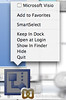
  4. Ctrl-click (or for MacBook users that have it enabled, hold down to fingers on the mouse and click) the application icon in the dock.smarselect dock

  5. The contextual menu will pop up and click "Smart Select".

  6. In my case I have OmniGraffle on my OSX machine, which is an analog to Visio on the OSX side, so I had to actually change the settings to have all Visio documents opened with Visio rather than OmniGraffle.osx smarselect

  7. Once you've saved your changes, if you run Parallels in Coherence mode and double-click a file that you've designated be opened by a Windows application, the application will automagically open as if it were simply a native OSX application.


If you click the pictures on the side, they will link through to larger images.


Link -- Parallels 3 


Monday, June 11, 2007

Safari now available for Windows


safari


No, you didn't read the title wrong, Safari, Apple's web browser is now available for Windows.  I personally use Firefox on all platforms because, well, it works on all platforms, but I may be reevaluating that decision.


Link 


Monday, June 04, 2007

Beer for bags


b4b wheel


Crumpler Bags does one of the coolest promotions ever: you can go into their retail location in New York on June 9th and trade beer for one of their cool computer bags.


The tradition started 5 years ago in Australia and this is the second year in the US.


I love this kind of stuff and hope that no matter how big they get that Crumpler never stops doing it.


Note: be sure to visit the Crumpler link below to use the online decoder; you wouldn't want to show up with the wrong kind of beer or not enough to trade. 


June 9, 2007 is the date this year, so only 5 more days to get to the liquor store. 


Link -- Crunpler beer for bags 


Link -- Gizmodo post (where I grabbed the image) 


A get a lot of e-mail about my review of Seth Godin's The Dip


the dip


Here is a great, general response (not written by me), which, not surprisingly comes from Seth Godin's blog about The Dip:


The one possible weakness of this otherwise terrific little volume
is that it is aimed solely at people who are creative, intelligent and
want to succeed. Those who are mediocre, unmotivated or just coasting
through life will probably not get much from Godin. He is not an
elitist, but his message is squarely aimed at those who want to succeed
or at least achieve excellence.


This was originally written by Richard Pachter.


Link -- The Dip blog post


Link -- original article by Richard Pachter 


The blurry line between personal blogs and the business you work for when people know where you work


Read the post on this topic by Chris Sacca at Google.


Interesting to see that he's moved a lot of his conversations to Twitter.


Link -- post


Link -- Sacca's Twitter 


Pay off your mortgage more quickly to save money


money


If you have extra money laying around, you may want to consider paying down the principal on your mortgage to save on long-term interest -- Lifehacker has some information on how to do this.


Jus tmake sure your mortgage company knows that any extra money that you pay is towards principal (i.e., if you use your bank's bill pay function, you might want to sign up with your mortgage holder to give you the ability to designate).


Link 


Photo by EricGjerde  


Rich e-mail signatures in Gmail


5ThirtyOne has detailed instructions on how to do it via the web client.  Be sure to read my post about Better Gmail and get that installed before visiting the link below as you'll need Better Gmail to make everything work.


Link  


Doing PR yourself


bullhorn


Guy Kawasaki shows you how and you might be surprised at how easy it can be.


Read this before you even think about hiring an agency. 


Link  


Picture from cheetah100  


Sunday, June 03, 2007

What's the big deal about Google Gears?


Google Gears


Google Gears takes things like Gmail (although Gmail's not available this way yet) that normally require you to be online and moves them to your desktop.


Why Google will be likely to succeed:


  • Lightwieght program -- doesn't tie up a lot of resources on your computer.  If you can automagically use web-based programs without being connected to the web, they should move at the same speed you would expect when connected.

  • Open source software -- Google is releasing the software for anyone to be able to use.  This is as important for consumer-facing sites as it is for internal sites.  For Google, if you get everyone on your standard, then you wind up with dependent users and monetization opportunities.

  • Support for major browser platforms -- Internet Explorer, Firefox, and Safari are all supported now and Opera support is promised.  This will be increasingly important in the mobile space with users running versions of IE on Windows Mobile, Opera on all kinds of devices, and Safari on Apple's soon-to-be-released mobile offerings.

  • Test base of applications that are consumer-facing and corporation-facing -- Gmail, Google Docs, and Google Calendar for consumers and the same suite of applications offered in Google Apps Basic and Premium.  Consider being able to deploy Google Apps in your organization to users that needed offline access without having to support Thunderbird or Outlook -- everything happens through the browser whether the user's online or offline.

  • Strong partners -- Mozilla, Adobe, and Opera for now.  Adobe's done pretty well at creating the PDF standard and with their Apollo platform they have a heavy interest in offline capabilities.


So consider this:


You have a flash drive/portable storage device that runs a browser like Firefox (you can already do this).  When you get to work, you plug it into your machine and do everything online.  At the end of the day, you take just the portable storage device home with you and plug it into your machine at home that might not be connected to the internet and get some work done.  The next morning you come in and plug in your device and everything automagically synchronizes. 


Of course in the scenario described above, if you were to apply the Google Apps suite, you might wonder why most people would needed anything other than a machine running open-source Linux with a pretty good processor, an ok video card, and a keyboard and mouse.  If you were really thinking about it, you might even wonder why you couldn't accomplish an awful lot wit, say, a Google Phone and the recently announced Palm Foleo .


David Berlind has a great article on Google Gears with some key interviews with folks at both Google and Adobe, so check it out through the link below.


Link -- David Berlind


Link -- Google Gears 


Better Gmail


Better Gmail just, well, makes Gmail better on Firefox .  You'll have to get Greasemonkey installed on your Firefox browser in order to use Better Gmail as Better Gmail is really just a compilation of individual Greasemonkey scripts.  Sidebar: Greasemonkey allows you to run lightwieght javascript on top of webpages; if none of that makes sense to you, then Greasemonkey allows you to run Better Gmail and that's all you need to know.


One of the most important things that Better Gmail does is force Firefox to use https to connect to Gmail, meaning that your e-mail connection is secure.  If I were deploying Google Apps in an organization, I would force everyone to use Firefox with Better Gmail only for this reason.  Luckily Better Gmail does all kinds of other cool stuff.


Download direct from the Better Gmail site link below as the Mozilla add-on site goes down a lot.


Link  


Twitter: worth your time?


twitter


I've had people ask me whether or not I think Twitter is worth the time -- that question can be asked about anything.  Here's how I answer that kind of question and how I specifically answer about Twitter:


Whether you believe it is or not, you're right.


New music to check out: Tiger Army


Chances are good that you haven't yet heard of Tiger Army . . . chances are good that if you live in LA and listen to KROQ , you probably have.  Tiger Army isn't yet getting national radio play, but the band has one of the top 5 most requested songs on KROQ, which says a lot.


band picture


I got myself a copy of the Tiger Army album and have to say that it is pleasantly surprising to listen to: the songs range from decent to really good, but unlike many albums, you can listen to the whole thing without skipping tracks.  The band has members with hispanic background, so a couple of the tracks are in Spanish, but I think that's what adds to the whole disc being pretty good.


Link -- website


Link -- MySpace Page 


Thursday, May 31, 2007

Google Reader offline access


So I launched Google Reader this morning (it's been a couple of days) and saw this at the top:


google reader top bar


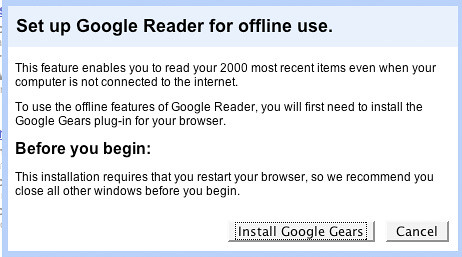
I clicked the "Offline" link and got this pop-up window:


google reader offline pop-up


This just makes Google Reader all that much more useful.


Link  


Friday, May 25, 2007

Stuff like this cracks me up


Here's text from an e-mail I got from Qwest:


Your bill will now reflect one of these new Qwest Broadband names:


  • Qwest Choice™ DSL is now Qwest Connect®


  • Qwest Choice™ DSL Deluxe is now Qwest Connect® Silver


  • Qwest Choice™ DSL Premier is now Qwest Connect® Platinum


Launching a New E-mail Domain: @q.com


I had an English teacher that used to write  "SO WHAT?" in huge letters across our papers -- I only wish I could do this on the Qwest e-mail and send it back to them.


Sunday, May 20, 2007

Best gum I've had


I chew a lot of gum and have previously been a Trident fan, but have to say that Orbit's mojito mint is the best tasting gum I've had.


orbit mojito


Unfortunately they don't have it by the case at Costco yet, but you can find 3-packs at Target. 


Friday, May 18, 2007

Celebrating Spiderman III in controversy


I'd never heard of a comiquette before, but here's one that features Mary Jane from Spiderman:


spiderman comiquette


Not surprisingly there are a bunch of people that are upset about the comqiuette based on the imagery, but, of course, that's what makes it even more desirable.


Apparently enough people were not offended by the comiquette to not buy it because it's currently sold out and they manufacturer has a waiting list.


Pretty remarkable -- I always thought that comic books and comic book-based movies were memorialized in the comics themselves. 


Link  


Payphones


Payphones actually cost money.  


Most people have a cellphone and don't use payphones much any more. 


Payphones are disappearing at a pretty rapid clip.  Phone companies are outsourcing their payphones to third parties that contact businesses with payphones on their property and give businesses the option to pay to keep the payphone or the third party comes and removes it.  Most businesses don't want to pay to provide payphones and elect to have them removed.


payphone


So what's the next payphone?  If they don't figure out how to improve battery life on mobile devices, it could very well be a per minute rapid charging station. 


Photo by Grant Neufeld  


Feature request for WriteToMyBlog


I'm a pretty heavy user of IMGRed, which caches images for me in my posts.  Below is a cached version of the WriteToMyBlog logo image:


writetomyblog


To you as the reader, you see the image and the IMGRed caching is invisible, which is how everything should work.


Here's what I'd like to see on WriteToMyBlog:


When I click the "Insert/edit image" button and get the dialog box to put in the image URL, give me a check box that automatically appends "http://imgred.com/" before the URL that I paste in.


I love WriteToMyBlog and this truly is a wishlist feature request.


Link -- IMGRed


Link -- WriteToMyBlog 


Microsoft releases a .docx converter for Mac, but no support for other apps yet


It's a little hard for me to believe that this converter only converts to Rich Text files, but I guess it's better than nothing.  Note that the beta is set ot expire in December of 2007, so presumably MS will have a better solution that hopefully extends to all types of Office 2007 application document types before that.


Link 


Wednesday, May 16, 2007

Amazon to sell DRM-free music


amazon primeTechCrunch is reporting that Amazon will open a DRM-free music store later this year.  Quite frankly if Amazon doesn't have a catalog that is different than Apple's and if the pricing is identical, I will probably stick with iTunes Music Store.


Be interesting to see how it turns out.


Link


Monday, May 14, 2007

Thunderbird 2.0 reply position fix


Thunderbird defaults the position of your replies to an e-mail to appear below the e-mail that you are replying to.  While this makes sense fundamentally, Outlook, which most people are use to, does exactly the opposite: putting your replies above the original e-mail.  Obviously the Thunderbird default is disconcerting not only for the user of the Thunderbird client, but also the person receiving the reply as most of the e-mailing population is used to seeing the reply on top.  Furthermore, if you are deploying Thunderbird as an Outlook replacement (perhaps in conjunction with Google Apps), you want to make sure that it is as "Outlook-y" as possible.


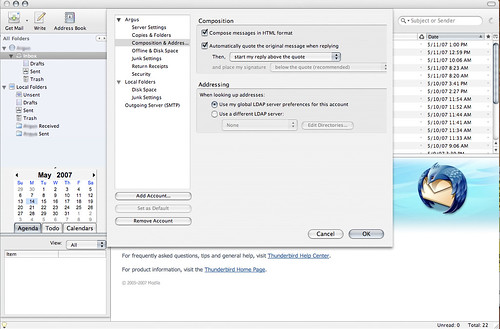
Here's how to fix it (click the picture to get to the larger size):


thunderbird reply config


  • Go to "Tools"

  • Select "Account Settings"

  • Click "Composition and Addressing"

  • As per the image above, you'll see that "Automatically quote the original message when replying" is checked

  • Below that check box, you'll see the selection drop-down starting after "Then,"

  • Change the drop-down to "start my reply above the quote"

  • Note that if you are using a signature, you'll probably want to have that above the quote as well to be as "Outlook-y" as possible even though Thunderbird recommends putting your signature after the quote 


Monday, May 07, 2007

firedog Across America -- help out firefighters


firedog across americaThis is not a sponsored post, but rather an informational post with a call to action about what I believe to be a pretty cool program.  Those that have seen Circuit City ads have seen the firedog services that are offered such as network configuration, tv installation, etc.  Owing to the fact that "fire" is in the name, firedog is running a program that encouraged firehouses across the country to write stories that described ways that they went above and beyond the course of duty.  Ten finalists have been chosen and each firehouse will receive $20,000.00 in free equipment along with the essay writer receiving a $10,000.00 technology makeover for his or her house.


Following the selection of the 10 winners, firedog made videographies of each firehouse and now wants America to vote on the winning firehouse, which will receive an additional $100,000.00 in funding.  Here's the absolute best part: for every vote that is made, firedog will donate $1 to the chosen firehouse.


My wife was a firefighter/paramedic in both Arizona and Colorado, so I can definitely get behind a program like this.


Click the link below to vote and please share this.


Link  


Friday, May 04, 2007

On syncing your Blackberry and your Mac


I guess I didn't address this before, but have received some e-mail about it, so here are my thoughts on synchronizing your Blackberry and your Mac:


There are currently 2 sync solutions available to synchronize your Blackberry and Mac: PocketMac and  The Missing Sync.  Although I have use The Missing Sync for Windows Mobile, I have not yet tried the Blackberry version for this simple reason: PocketMac is free.  That's right, RIM licensed PocketMac as their official Blackberry OSX software, so you can get it free of charge.  I've been using PocketMac since I got my Pearl and it work great -- the interface looks just like iSync and synchronizing couldn't be easier.  The Pearl actually detects when it is connected via USB and allows me to choose if I want to enable mass storage mode for the memory card, which allows me to easily add/remove ringtones, wallpaper, pictures, etc.


The Missing Sync seems to perform many of the same functions as PocketMac and I would highly recommend it if you are a basic or non-advanced user as the interface is very polished and interaction with everything on the device happens via its application.  Bear in mind, however, that you pay $40 for that convenience.


My vote's for PocketMac, so that's the link you'll find again below (note that the download link will take you to RIM's site where you'll have to give them some personal info in order to download the software).


Link  


Contactify


Contactify allows you to easily create a simple form that people can use to reach you via e-mail rather than posting your actual e-mail address (or an image of your e-mail address or a version of your e-mail address with things spelled out with goofy characters).  So here's the link for my blog e-mail address:


www.contactify.com/b5bd9


This would be much cooler if I could put a widget directly on my blog, but it's still pretty cool.  Actually, it would also be cool if you could just send an e-mail to my Contactify ID, but then there are already a bunch of services that offer that.


What's super-funny is that on the "Contact Us" page, Contactify provides an actual e-mail address rather than forcing you to use their service -- makes me nervous that they don't trust their own product enough.


Link  


Wednesday, May 02, 2007

Monday, April 30, 2007

What do they paint HUMMVEEs with?


hummveeEver noticed how you never see pictures of scratched up military vehicles?  Further, you never see pictures of military personnel out with Turtle Wax to protect the shiny finish of their vehicles.  I started wondering what the military paints their vehicles with and was actually able to find out. 


Hentzen Coatings is the supplier of paint for military HUMMVEEs.  The particular coating product used on military vehicles is called Zenthane, a urethane-based flat coating and is CARC (Chemical Agent Resistant Coating).  According to literature on the Hentzen site, Zenthane is normally the top coat layer of paint, applied over a couple of epoxy-based primer layers.  Not surprisingly, Zenthane can be applied via traditional spraying methods, but can also be directly applied via brush for touch-up; my guess, though it doesn't state it anywhere on the site, is that you could probably touch up a pretty significant-sized area with a spray paint can of Zenthane.


Digging a little more, I found a reference on this site that claims Imron paint and AwlGrip paint are nearly the same as Zenthane, especially for those of us that don't need the CARC.  If you use Imron, you have to do this apparently:


If you hace trouble locating Zenthane, then
just have a body shop supplier mix up some Black Imron or Awlgrip and
add the flattening agent.


Have you gotten to the point where you ask: "So what, Ross?"  Here's the point: this hard-use paint is available, but not used on civilian vehicles because it would probably disrupt the entire body shop industry. 


Ever wanted to go touch up a nick in your paint with a brush?  Pretty hard to do now, but pretty easy to do with these products.  Do you need a shiny finish?  I sure don't care about it -- flat's perfectly fine with me.


Link -- Hentzen Coatings


Link -- Zenthane product page


Link -- AwlGrip 


Hat tip to jonwedd for the picture 


Are blogs a fad?


Whenever I hear this question (or someone turning this question into a statement) I'm always reminded of this quote from Only the Paranoid Survive by Andrew Grove:


"Is the internet a big deal? Or is it an over-hyped fad?


I think it is a big deal.  I think anything that can affect industries whose total revenue base is many hundreds of billions of dollars is a big deal."


I wonder how Andy would answer this question about blogs -- I'm guessing the answer would be exactly the same. 


Friday, April 27, 2007

Twitter on Blackberry without SMS charges


Anyone want to guess what it's called?


TwitterBerry, of course.


Does exactly what it says in the post title -- download options via the link below (I'm an OTA guy myself).


Link  


It's the experience that matters: Voce is trying to capitalize on it


voce


Voce is marketing itself as the first "Premium Wireless Service."  For a $500 initiation fee and $200 per month you get unlimited voice services and text services across the United States.  In addition, you get free 411 service, a new handset and upgrades every 12 months (yes, free), 24/7 mobile assistant, and personalized training and device set-up.  I don't like that you don't get data in the all-inclusive plan (if you do, I don't see it on their site), but there are plenty of people out there that are spending $200 per month in voice and messaging without using data. 


In addition to domestic services, Voce will also help you out with international roaming and international phones (free loaner phones if needed).  It's not clear what technology Voce is using in the US, but from the phone offerings it appears to be GSM, so I'm not entirely clear why you would need an international handset, but it's cool that they'll give you a free loaner.


Here's what's important to understand about this service:


IT'S ALL ABOUT THE EXPERIENCE!


Voce will not get you any better coverage than any other carrier because they're buying time on someone's network (likely Cingular).  Just like a Green American Express card has the same purchasing power as the Platinum card, it's about the experience of using it and to some degree the amenities that come along with it (I know a lot of people that have a Platinum Amex and have no idea that they get all kinds of cool services; even people that pay to belong to Hertz Number One Club Gold when it's included free with the Amex Platinum).


Will Voce be successful?  Maybe.  But they have to make the experience worth it in such a way that the fact that they are a MVNO is irrelevant.


Link  


GC Mobile


gc mobileIn the footsteps of Google Mobile, GrandCentral now has a lightweight, mobile-specific version located at grancentral.com/mobile.


Don't get confused: this is not yet a Java app (though I'm hoping they're going that way with it), but rather a very convenient way to access most GrandCentral features on your mobile device.


In order to really use the service effectively, it's best to have a device that has the capability to play MP3 files so that you can listen to voicemail messages -- works great on my Pearl.


One thing that I haven't tested, though it is listed as a feature, is that if you get voicemail files sent to your e-mail and receive them on your mobile device and listen to them on your mobile, using the GC Mobile client will synchronize those activities.  Because I don't have my GrandCentral messages forwarded to the e-mail addresses I access on my Pearl, I haven't tested this, but it sounds pretty cool if it does what I think it does.


As I said above, hopefully they'll package this up in an application just like the Google applications on the Blackbeery; it would be very cool to simply have a little GrandCentral icon rather than having to launch the browser.


Link 


Monday, April 23, 2007

Blackberry Pearl user now


pearlAs much as I've tried to use Blackberry alternatives over the past few years, I am now a Blackberry Pearl user on Cingular.  Previously I've defended not using a Blackberry because it makes it look like you're talking into a pocket calculator (I still think that, by the way, about the non-Pearl form factor Blackberrys) and because a lot of my mobile e-mail interaction in the past has been simply cleaning out my inbox.  However, I now find myself needing to be able to send responses that extend beyond the abilities of T9 text input.


Cingular provides an unlimited Blackberry plan aimed at consumers for $29.99 per month, which is $10 more than the unlimited MediaNET plan that also includes 300 SMS messages -- the net cost effect for my changing to Blackberry is $10 per month in additional data charges + $4.99 per month for the 200 SMS message package for a total of $15 per month.  A lot of the people that I used to interact with via SMS have Blackberries, so I may drop the SMS as we start doing pin-to-pin communication, but it's going to take me a few months to figure out the best option.


The Pearl is an impressive device and from a form factor perspective it is not any larger than my 2125 and is much thinner with a better camera and a bigger screen.  I had no problem setting up the BIS service with Cingular (actually did it on the phone rather than their site), but I have a word of caution: if you purchase a Pearl (or Blackberry for that matter) on Craigslist, eBay, etc., you need to ensure that the PIN has not been previously registered or you'll wind up spending a bunch of time with RIM support to try and get a new PIN.


A few gripes about the Pearl:


  • No HSDPA (i.e., not 3G)

  • No wifi

  • No software reset (rectify this with SoftReset, which you can find here along with some other cool software -- donate if you use it)

  • Relatively low megapixel camera (I'd like to see it 3MP+, but that's just me)


I don't gripe about SureType because I've been using T9 for so long that I don't feel like SureType is too much of a departure from a QWERTY keyboard; I think you either love (or learn to love) SureType or you hate it.  Bear in mind that you'll not currently find a phone with full keyboard capabilities that has the same form factor as the Pearl.


In trying to determine the optimal configuration for Gmail, here's what I came up with:


  • Use Gmail's automatic forwarding feature to send a copy of each e-mail to my BIS address

  • Use the BIS filters to ensure that any mail sent from my Gmail address is not sent back to the device (this ensures that e-mail replies are not sent back to the Pearl)

  • Use BIS settings for mail sent from my BIS address to look as if it was sent via my Gmail address (this ensures that the reply-to and sent from addresses are my Gmail address, which keeps my BIS address out of circulation)


Although the method described above still requires me to access Gmail to mark items as read, etc. it's pretty effective in pushing e-mail to the Pearl in real time.


Speaking of Gmail, Google has an amazing software suite available for the Pearl.  Although I still get a network access challenge for their apps from the phone, what I love is that the Gmail, Google Search, Maps, and News show up as real applications on the Pearl as opposed to having to go to the MIDlet Manager on the 2125.


Overall I'm pretty happy with the phone.  More to come I'm sure. 


Friday, April 20, 2007

Thunderbird 2 is official


Seemed to go pretty quickly from Release Candidate to full version, but still it's pretty cool that Thunderbird 2 is out.  I've been using Thunderbird 2RC1 with an IMAP account for the last few days and couldn't be happier with the product.  Unless you're locked into an Exchange environment, you should definitely check out Thunderbird -- Gmail users will appreciate the quick setup for Gmail accounts.


Note that for some reason the release candidate update engine isn't working right now, so you may want to download the application directly to update. 


Click the picture below to download.


thunderbird


If you're like me and hate the idea of voice cellular calls on airplanes, then check this out


Qantas is doing a test of service that allows you to access GPRS data service (read: send and receive e-mail) and send SMS messages on planes.  This system only works for GSM carriers and essentially creates a mini GSM tower on the plane that acts like a virtual country (read: international roaming must be enabled and expect to pay international roaming fees).  Furthermore, GSM phones self-regulate their power, so by having the mini tower within the plane, the RF output from the phones will be minimal.


I wouldn't mind having the ability to send and receive my e-mail (I'm assuming that Blackberries would also work by using the GPRS data connection) and to send and receive text messages while flying nor would I mind if anyone else on the plane was interacting with the data portion of their phones; lots of flyers, me included, will queue up messages on their phones now so that they can be sent as soon as the phone can be turned back on.


I've posted about voice service on planes and had some people disagree with me being against it, but I have to say that the small experience of calls made on planes prior to take-off and after landing are enough for me to maintain being against voice capabilities while flying. 


While this solution works well in countries where GSM is the predominant or only technology in use, implementing a similar system might prove to be much more expensive and complicated due to the competing technologies.


Link  


La Caja China


I was watching Throwdown with Bobby Flay and he was doing a competition around roast pork; both he and the competitor were using La Caja China:


la caja china


La Caja China allows you to cook a variety of meats, including whole pigs, within the box.  The box is lined with metal and the coals are put on top of the box, which creates indirect radiant heat throughout the enclosed cooking area.


I don't frequently need to cook whole pigs or large pieces of meat, but if I did need to even once or twice a year, I would look hard at buying one of these boxes. 


Link  


Monday, April 16, 2007

The Hotels.com experience


hotels.com


I have to admit that my recent trip to San Antonio was the first time I had actually booked a hotel through Hotels.com, which is surprising to me upon reflection due to the amount I travel.  Here are a couple of things that I found interesting about the experience:


  • No points at the Wyndham chain when you book with Hotels.com.  I don't know if this is unique to Wyndham, but I tried to get them to add my number when I checked in and they told me I was ineligible due to the fact that it was an internet booking.  Based on the fact that there was around a $90 price differential, I wasn't too upset about not earning points or getting other amenities, but I was still a guest in their hotel, so what should they care?

  • Hotels.com doesn't actually print out the phone number of the hotel on their confirmation sheet.  Not a big deal if you don't need to call the hotel, but if you're like me, even with the GPS system you sometimes need to call to get some directions.  Furthermore, it makes it very challenging to call and request an early check-in or late check-in.

  • No receipt available when checking out.  Again, I don't know if this is unique to the Wyndham chain, but I was told that the Wyndham could not generate a receipt as it was an internet booking.  After I thought about it for a few minutes, it did make sense that Wyndham probably had no idea what Hotels.com charged me for the room, but it's important to ensure you keep your Hotels.com confirmation if you need to expense the room.


Would I use Hotels.com again?  Sure I would now that I know the process.


Link -- Hotels.com 


Fat wallets


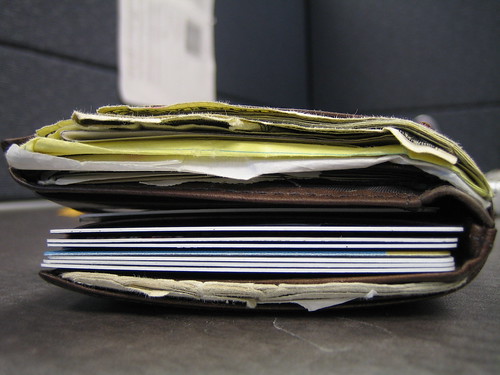
Does your wallet look like this?


fat wallet


If it does, do you actually sit with it in your back pocket?


I do just about everything I can to have the smallest wallet possible and I still find myself taking it out on long car drives, sitting in the office, etc. -- have you ever seen someone with a wallet like the one above actually sitting tilted?  It usually happens on a non-cushioned chair, but you can actually see a guy sitting cockeyed because his wallet it offsetting his equilibrium.


I'm sure that there are studies showing how fat wallets can have a negative impact on your spine, etc., but really this is just common sense: if you were sitting with one side of your butt on a brick and another not on a brick, and you had the ability to massively reduce the size of or eliminate the brick, wouldn't you do it?


Outside of the sitting issue and potential health problems, fat wallets just don't look good; there is absolutely nothing impressive about carrying around an enormous wallet.


Just my $0.02, of course, you may disagree with me. 


PS -- do yourself a favor and visit Just One Club Card to consolidate your club cards as a start.  Do you really go to Petco often enough to carry the card in your wallet?  I didn't think so.


Picture from mikeying88.


Use Thunderbird 2.0 with Google Apps to take on MS Outlook and Exchange


thunderbird


Thunderbird 2.0 is going to be a killer Outlook competitor, but you can already use the Thunderbird 2.0 RC1 to synchronize between Google Calendar and Thunderbird bidirectionally.  Find full instructions via the link below and understand that it's sort of kludgy right now, but will become more and more polished as additional release candidates are put out by Mozilla.  Furthermore, understand that you should probably be backing up your calendar data before assuming that this will just work correctly.


Link  


Wednesday, April 11, 2007

Populate mail into Gmail using MailTraq Server


Let me start this post off by saying that all credit for these instructions goes to Robert Ciaccio who had the idea to set up MailTraq on his computer, populate in his e-mail, and use Gmail's Mail Fetcher to POP into the server and retrieve all of his e-mail.  Most importantly, I would like to thank Robert for providing me with these directions and allowing me to share them with all of my readers.


Note that the method described below will allow you to keep all of the date and time information intact from your original e-mails as opposed to other methods that I have previously described.  Further note that  Robert used this on a connection that provided him with a dynamic IP address, but the IP address changes infrequently and his provider is not NATing behind a group of IP addresses.


Here are the instructions:


  • Download and install the mailtraq 30 day trial version from http://www.mailtraq.com (choosing complete as your setup option is fine).

  • After installation, the setup wizard should start automatically (if it does not, go ahead and start mailtraq by clicking on its icon in the windows start menu).

  • Go ahead and let the wizard create a new database for you at the default location.

  • When you get to the screen that asks for your domain name, enter any domain you like, such as oitotheworld.net (this will be used later as part of your login username).

  • The next screen asks for a string which identifies IP addresses on your local network. If you don't understand what this means, just go ahead and enter 192.168.0.* (assuming you have a home network, this gives machines on it the ability to access the mailtraq server). Click 'next'.

  • Leave the sending mail selection as "I wish to send mail directly..." and click 'next'.

  • On the "Mail Collection" screen, choose "I am my own mail host..." and click 'next'.

  • Type the username that you would like to use as the part of your login before @yourdomainname.com, enter your full name, choose a password and click 'next'.

  • Click "finish" to exit the wizard.

  • Now you'll import the Gmail messages that you have downloaded into Thunderbird to make them accessible through the mailtraq email server.

  • Go to the mailtraq administration console (it should already have popped up after the wizard, but if not, go to the start--->all programs--->mailtraq), and choose tools--->message import wizard, and click 'next' on the first screen.

  • Choose "Mozilla Thunderbird Mail File" and click 'next'.

  • Note: At this point, I made a copy of my Thunderbird inbox file that I used for importing the messages into mailtraq, just so I would have a backup copy in case I screwed something up. Your Thunderbird mbox file is located at 'Documents and Settings[yourusername]Application DataThunderbirdProfiles[somecrazytextstring].defaultMailLocal FoldersInbox. Copy this file to a location easy to browse to, such as c:temp.

  • Back in the wizard, click 'browse', then navigate to the location where you have stored your inbox file, select it, click 'open' and then 'next'.

  • Choose the mailbox you would like to import the messages into, which will be the username you created earlier in the previous wizard, and click 'next'.

  • Select "Assign all messages to the folder selected below", click 'next' and 'next' again.

  • While mailtraq is busy importing your Gmails into your new mailtraq mailbox, go to your Gmail settings page for the account you will be checking from now on.

  • Click on "Accounts", and in the section labeled "Get mail from other accounts", click "add another mail account".

  • In the popup that appears, enter the username that you created in the earlier wizard, ie "myusername@oitotheworld.net", and click 'next step'.

  • In the "username" field, enter the full email address, not just the part prior to the @ symbol. Enter your password. For POP server, enter the IP address of your home network or your computer, depending on whether you have a router or not. Leave the port at "110", and make sure that your router and/or software firewall is allowing/forwarding incoming connections on this port to your computer. I also checked the box "Label incoming messages" and typed in the username of my old Gmail account, so all the imported messages are labeled as such. If you don't want all the imported messages clogging up your inbox, also choose "archive incoming messages". Check to see that the mailtraq wizard has completed the task of importing your messages into your mailbox. When it is complete, click "add account".

  • At this point, Gmail should begin downloading the messages from your computer, in groups of 200. In my case, it took about 2 days for Gmail to retrieve everything (3500 messages?) from the the mailtraq server. Once gmail is finally done, go ahead and uninstall mailtraq and you're through!


Allow me to point out a few more things:


  1. Mailtrq is only available for Windows, so all of the instructions above specifically relate to Windows.  I'm pretty sure that you should be able to get all of this to work with Parallels , but I haven't tested it, so no guarantees.  I'm guessing that you might be able to pull off something similar on any platform with the open-source version of Zimbra -- if you do, please send instructions -- or possibly with some other application, but I haven't tested it.

  2. If your high-speed provider NATs behind IP addresses or constantly reassigns dynamic addresses, you may want to check out NO-IP -- the free version should be sufficient for a simple mail server.

  3. Be aware that you are potentially opening up your network/computer for port attacks by disabling security on the 110 port.  You can configure a random port in Mailtraq, but be aware that you will have to also specify that port in Gmail in order for Mail Fetcher to work correctly.  Instructions for this are not provided here, but are probably easily obtained by doing a Google search.

  4. Although Robert presents these instructions as a way to consolidate multiple Gmail accounts, provided you can get your e-mail into Thunderbird, this is a very effective way to populate e-mail into a Gmail account from a non-Gmail account.


Robert, thanks again for putting this together for everyone.


These instructions are mirrored on the Gmail Options Squidoo Lens


Sunday, April 08, 2007

Drobo


droboIncreasingly the biggest challenge for home consumers will be managing their data storage.  As broadband speeds continue to accelerate to allow rapid downloads of larger files, as we start to store multiple gigabyte video files, as we continue to store increasingly large photos at higher and higher resolutions, and as simple software takes more and more space, the need to store massive amounts of data and to do so in a redundant manner will become increasingly necessary.  Currently most home consumers use external drives to store files and more sophisticated consumers use multitudes of external drives as software RAIDs; some consumers use hardware RAID devices as they become more and more popular and cheaper.


Unfortunately hard drives eventually fail, meaning that if you are using non-redundant external drives, you constantly face the risk of data loss.  Furthermore, some RAID configurations require the use of identical drives, meaning that failures can cause you to have to redesign your entire RAID configuration.


Drobo is an intelligent storage solution that seeks to solve all of the problems traditionally associated with external storage.  There are 4 bays in the Drobo device that accept SATA drives and no requirements that the drive be the same speed, manufacturer, or size.  In order to function correctly, Drobo really requires 2 drives for data redundancy, but is designed for 1 drive to fail and to give you time to replace the drive in a single drive configuration.


User interaction with Drobo does not necessarily require software: status of the available storage and the state of each drive is shown through the use of colored LEDs on the front of the unit.  For drive status, Drobo uses a very simple stoplight methodology: green means everything is fine, yellow indicates a warning, and red means there is a problem.


If you install 4 drives in Drobo and begin to run out of space, Drobo will actually visually indicate the smallest drive that needs to be replaced in order to add more storage, which is really cool.  Furthermore, because the SATA drives slide into the ports on Drobo without any sort of adapters or cables needed, you can keep your eyes open for the best SATA deals and only upgrade, replace, or add drives when there are acceptable deals for you.  Drobo winds up being infinitely expandable and will be as expensive or cheap as you make it based on the best SATA drive deals that you can find.


I'd like to see whether or not Drobo could be effectively used when connected to a server/computer and shared over a network -- I don't see nay reason why this would not work and it could be a very elegant and simply managed solution for non-complex LANs (i.e., small business).


Cost of the Drobo without any drives is $700, which seems expensive until you think back on the amount of money that you've spent on external drives and the fact that once you have the Drobo unit, you have infinite expansion options.


Link -- Drobo main page


Link -- video of how Drobo works (worth watching) 


Friday, April 06, 2007

The Dip


the dipI was fortunate enough to receive a galley edition of The Dip, Seth Godin's newest book.  As the book is a pre-production version, there may be some changes to the final language, etc., but I'm going to try not to really quote anything and just give you my $0.02.


First off, the book is small.  Not small as in iPod Nano small, but small as in not a ton of pages (so maybe "short" is a better term, though I don't want to give the wrong impression), which is a refreshing change from the majority of business books, many of which seem to infer that the author or publisher derives the value of the hefty price by the overall number of pages.  Quite frankly, by making the book short and to the point, the book is far more readable and for more impactful -- there's no need to put in language about skipping chapters like some books do as you simply do not need to.  I know a lot of executives that skip the middle part of books and/or get book summaries: those of you that engage in chapter skipping or book summaries need not worry, this book can be read and understood in less than 2 hours.


The edition of the book I received was paperback, though it is listed as a hardback edition on Amazon.  Due to the fact that the book is small, the price of the hardback is only around $10, which makes it the best value for a business book that I have seen in a long time: skip Starbuck's for 3 days between now and May, and you'll have the cash to afford The Dip.  Furthermore, if you buy no other business book this year, make sure that you read The Dip because even at twice the price, it's that worthwhile.


I actually read Seth's book twice: I read it from cover-to-cover in 1.5 hours and started right back at page one and read it again.  The Dip, boiled down to the essence of its message is simply about this: knowing when to quit and when not to quit.  You might read those 9 words preceding this sentence and think to yourself that you already know when to quit and when to stick around, but my guess is that you don't.  Chances are good that you will read Seth's book and a lot of the information will seem totally obvious to you, but it takes someone like Seth Godin to put it together in such a way that makes it seem obvious.  My first experience in reading the book caused me to reflect on my life experiences while reading thinking things like, "I knew I should have quit" and "I probably should have stuck in there."


The principle of a dip is very straightforward: it is the area of time, work, etc. that exists between starting something and the mastering something.  In this dip is when you have to make the decision as to whether or not to quit.  When I first read the book, I immediately tried to compare Dips to Andrew Grove's Strategic Inflection Points ("SIPs"), but Dips are not the same as SIPs.  SIPs are periods where you choose to make a decision that has an impact on an alternate outcome; one of the decisions you might make in a SIP is to quite, while another might be not to quit, but SIPs can also encompass many other types of decisions.  Dips, on the other hand, are absolute in the decision that mus be made: you quit or you stick.


One of the most important things to understand about Dips is that they create scarcity: people that make it through Dips are more scarce then people that start something and wind up quitting.  Professional athletics are a perfect example of the scarcity created by Dips as the Dip itself, the barriers to entry (i.e., athletics, performance, mental toughness, etc.) make it unlikely that those that are not fully committed to making it through the Dip will succeed.


Quitting is scary stuff, but read The Dip so that you too can figure out how to evaluate when you should quit (and you should do it often).


This blog post gives some small amount of background about The Dip: I think it's enough to do 2 things -- (1) Make you want to go buy the book, and (2) Be able to understand Seth's blog about the book until you have a chance to read it.


Links below will take you to places where you can read more about the book, more about Seth, and some options on where to pre-order/buy the book.


Link -- The Dip blog (note that you can subscribe to this blog via e-mail) 


Link -- Dip tour details  


Link -- pre-order from Amazon


Link -- Seth Godin's main page  


Thanks to the Penguin Group, specifically Allison Sweet, and Seth Godin for allowing me to preview this book.


Juge says Vonage cannot get new customers


vonageCNN reports that a federal judge has ruled that Vonage can continue to infringe on Verizon's patents for all existing customers, but cannot add new customers and must post at $68mil bond.  The CNN article does point out that although Vonage feels that this is not an equitable solution, this really is a "middle-road" solution that allows Vonage to continue to service existing customers rather than completing shutting down the Vonage service and allows Verizon to not worry about additional patent infringements while knowing quantifiably the amount Vonage is infringing.



I used to love Vonage and would recommend it to everyone until I had that horrible experience trying to cancel my service (and, no, I have not had any response at all from Vonage).  The big challenge for Vonage in the face of the national attention that they're receiving is going to be existing customer retention as there are certainly going to be customers that want to switch off of the service to ensure no interruptions, they get to keep their number, etc.  If I were Vonage, I would take all of my marketing and business development and new customer acquisition people and stick them down in the call center so that they are fully bought into the process of retaining existing customers.  My guess would be that if they don't, they will continue to produce the same sort of lousy customer service experiences for their customers who will then convert into not being customers and tell everyone they know to stay away from Vonage.


Link 


Tuesday, April 03, 2007

iScroll2


iscroll2If you're like me and have an older (read "pre-2005") iBook or Powerbook and you miss the ability to enable the feature set that allows you to use 2 fingers on the trackpad to do various things, you'll definitely want to check out iScroll2.



iScroll2 enables all of the functionality that users of newer MacBooks and iBooks have on their trackpad.  The specific feature that I was missing the most was the ability to put 2 fingers on the trackpad and click to get the equivalent of the ctrl+click combination that is normally required.  Due to the fact that my Powerbook is running 10.3.9 it's hard for me to know if the ctrl+click functionality is something that is unique to 10.4, but I'm guessing that it is.   I can enable the "Clicking" gesture in the Mouse & Keyboard control panel and that does enable the ctrl+click gesture previously described, but it also enables the ability to click by tapping the trackpad, which drives me crazy -- on Windows machines with trackpads, the first thing that I disable is tapping.


I don't really use and of the other two finger gesture shortcuts on my MacBook Pro, but I know people that do, so certainly check this program out if you need/want to enable that feature set on an older machine.


Note that this program is open-source, but does accept donations.  Furthermore, rest assured that the installer package runs a check on your hardware to ensure that your hardware is compatible before running installation.


Link  


Monday, April 02, 2007

Doing the real math on success


chalkboard math


Matt McCall posted a great clip this morning about doing the real math on success.  I think I've seen something like this before, but this is a cool presentation, so I'm republishing the whole thing:


"Mathematics 
  
From a strictly mathematical viewpoint
it goes like this: 
What Makes 100%? What does it mean to give MORE
than 100%? Ever wonder about those people who say they are giving more
than 100%? We have all been to those meetings where someone wants you
to give over 100%. How about achieving 103%? What makes up 100% in
life? 

Here's a little mathematical formula that might help you answer
these questions: 


If: 
A B C D E F G H I J K L M N O P Q R S T U V W X Y Z 

is
represented as: 
1 2 3 4 5 6 7 8 9 10 11 12 13 14 15 16 17 18 19 20 21
22 23 24 25 26.


Then:

H-A-R-D-W-O-R-K 
8+1+18+4+23+15+18+11 = 98%


and 

K-N-O-W-L-E-D-G-E
 11+14+15+23+12+5+4+7+5 = 96% 


but, 

A-T-T-I-T-U-D-E
 1+20+20+9+20+21+4+5 = 100%


and B-U-L-L-S-H-I-T 
2+21+12+12+19+8+9+20 = 103% 


BUT, look how far ass kissing will take you.


A-S-S-K-I-S-S-I-N-G
 1+19+19+11+9+19+19+9+14+7 = 118%


So, one can conclude with mathematical certainty that, while Hard
work and Knowledge will get you close, and Attitude will get you there,
it's the Bullshit and Ass kissing that will put you over the top."


QED


Link  


Photo from Mister Bisson  


EMI tracks DRM-free on iTunes


drm warning


Consumers now have a choice in music encoding when they purchase EMI songs on iTunes: pay $0.99 and get the song with standard DRM or pay $1.29 and get the song encoded at 256kbps AAC (DRM-free).  Apparently any full album purchases will still be at the same price, but will be DRM-free.  As an added bonus, customers that previously purchased DRM'd songs for $0.99 will be able to "upgrade" to the non-DRM tracks if they pay the $0.30 upgrade -- I'd like to actually see Apple create a filter for my library that shows me the tracks that are available for upgrade and offer me the ability to do so with a single click.


All of this is great and is likely where the industry is headed.  To summarize what Jobs said: they really are offering nothing more than the consumer expects when they rip a CD.  Good point.


Here's something interesting to think about: Where's the extra premium going?  EMI has created a premium choice for consumers that want to purchase individual tracks and, sure, they've encoded the songs at a higher sampling rate, but in actuality it doesn't incrementally cost EMI more to encode tracks at a higher sampling rate without DRM.  My guess is that they extra $0.30 goes straight to the record company (i.e., no split on the incremental lift with iTunes or the artist).


Something else interesting to think about: For years people have wanted Apple to license out their FairPlay DRM scheme, but Apple had never done it.  If Jobs is correct and 50% of music available on the iTunes store is DRM-free by the end of the year, Apple never will have to license FairPlay because it will simply fade away, at least for music.  I think that Apple no longer see FairPlay as the lock-in to Apple hardware; they've got such penetration and such a loyal audience, that their hardware sales will continue provided they continue to innovate.  Furthermore, Apple can lead the new market in video and lock people to the iPod standard in that market while still capturing music sales through iTunes.


Here's where I net out on this: I'm probably not going to pay to "upgrade" any of my previously purchased songs.  If I ever get to the point where FairPlay is negatively impacting my experience, I'll just burn a CD and rip the music off of it.  It's unlikely that I'll stop using iTunes for my music management and unlikely that I'll stop using the iTunes Music Store; I may think about paying for the "premium" version of individual tracks, but then again, I might not.  I'll probably continue to buy iPods and AppleTVs and iPhones, but perhaps I'll be happier that my music can play on other AAC-capable devices (Sonos would be a good reason to think about purchasing "premium" and being happy that albums will be DRM-free). 


Link -- TechCrunch coverage