Tuesday, February 14, 2006

Size sometimes does matter

I did the last-minute Valentine’s day card shopping today.  Albertsons was out of cards (at least the kind I could give to my wife), but there were about 10 guys in the aisle trying to figure out how to make what was there work for their special someone.  Disappointed, I went to Walgreens, which still had a good selection of cards, though most of them were very large.

The guy in the aisle with me kept grabber progressively larger cards, and so I made the effort to inform him that most women say that size doesn’t matter, which he found not funny at all.  I was amused by the fact that he walked away with a 8x14 card after I made the comment — apparently size matters to him (or to his wife/girlfriend).

Happy Valentine’s Day!

Using a scaler for better tv

I was reading a post on Engadget that has detailed instructions on how to build a scaler.  It got me thinking that I actually have a scaler lying around (don’t ask) and that maybe I should try to use it to make the signal from my TiVo to my plasma more crisp and defined.  One of my big frustrations with TiVo is the lack of HDMI, DVI, or component outputs; I am using s-video, but I can visibly see the difference between the component video connection and the s-video connection.

If the external scaler I have works as well as the screen grabs on the Engadget post, I’ll be pretty excited.

I’d love feedback from anyone out there that is a video whiz on whether or not the scaler will make a difference and anything that I need to think about when using a scaler.  Basically, just to provide a little more info, I’m looking at taking the TiVo feed into the s-video in on the scaler and sending the signal through the component video out (I’m not sure that the scaler I have actually has a HDMI out on it).

Link

Sunday, February 12, 2006

Google calculator

Just enter what your are trying to convert from (i.e., “1/4 teaspoon”) and what you are trying to convert to (i.e., “ml”) and the first result will have a little calculator symbol next to it with the correct result.  The link below is an example that converts 1/4 teaspoon to ml.

Link

Google Talk keeps appearing and disappearing from my Gmail accounts

It’s really strange: sometimes when I log in the interface exists on the left-hand side and sometimes when I log in it’s not there anymore.  This seems to be happening on both of my accounts, so I’ll just have to assume that they’re still ironing out some bugs.

Seth Godin has a new plan for dealing with spam

Read all about it on his post through the link below — it all makes sense to me.  I actually liked his previous idea about every Gmail user having to pay a buck by credit card and use their real name, but we’re past that now.

Link

Go listen to Scoble's talk at Lift

I did and it’s a great listen.  Sure, it’s available in video too, but I couldn’t get it to work on 2 different PCs or my Mac.  Believe me that it’s worth just hearing without the visuals.

Link

What exactly are customer service surveys measuring?

They don't measure how good your service is. Or how optimal your product is.

They measure how well you did compared to expectations. They measure how well people rank you in the survey.

That’s what Seth Godin says and he’s not wrong.  Remember how you used to take tests that you could game if you were a good test taker?  Basically those kinds of tests only tested how well you took tests, not how well you knew the material.  Same difference.

Link

Getting more traffic and how long people actually pay attention to your site

Seth Godin has 2 great posts about getting traffic and about how long people actually pay attention to your site.

Regarding getting more traffic:

The problem, of course, is in the "get." The request has at its foundation the assumption that what you've built has somehow earned attention. "Our business model is working great--we just need more traffic..."

People never say, "how can I earn more traffic?" or "How can I rethink the core of what I'm offering so that it organically attracts people who want to see it?"

Getting traffic is a little like getting a date. You can probably manipulate the system for a little while (I had a roommate in college who was great at it) but self-reinvention is a markedly better long-term strategy.

If you believe Seth’s next post, then you will have left before you even get close to reading this part.  Why?

Fact: about half the visitors to your website leave after less than five seconds.

Do you see the correlation?  If you are earning traffic, chances are good that you are earning more of people’s time.  And hopefully if you’re doing things right, then people are opting to subscribe to your feed and you’re not worried about them visiting your site directly.

Link — How can I get more traffic?

Link — Wait!

Unschooling

Chris O'Donnell published a post that excerpts some thoughts originally published on this post by David Friedman:

One of the assumptions built into the conventional version of K-12 schooling, private and public, is that there is some subset of human knowledge, large enough to occupy most of twelve years of school, that everyone needs to know. That assumption is false. There is a very short list of skills-reading, writing or typing, and simple arithmetic are the only ones that occur to me-that almost everyone will find worth learning.

I’ve go to agree with Chris in that I really like the shorter explanation:

 I sometimes describe it as throwing books at them and seeing which ones stick.

Link

Put your employees more first when you are putting customer first

Church of the Customer posted the image below, which is originally from this post on the Beyond Robson blog:

Link

Is your company ready for a blog crisis?

Steve Rubel asks that question and provides a primer for when (not if) your company is faced with a blog crisis.  It’s sure nice when someone else does the work for you.  Check it out.

Link

Costco on a Saturday

I generally try to avoid Costco on the weekends because it’s just a madhouse.  However, yesterday I just needed to go, so I braved the crowds at 1PM.  Here are few observations:

  • Cutting people off in the parking lot is not a good idea; chances are that you will run into the person you cut off many times during your shopping experience.
  • If you have one of the very large flatbed carts and you have loaded it up to the handle with cases of soda, it’s probably not the best idea to let your 10 year old son push the thing around, especially if your son cannot see over the handlebars.  It is an even worse idea to walk in front of your son so that you cannot see him and then scream at him when he runs it into your ankles.
  • Speaking of screaming at people in Costco: try not to scream at your kids or spouse in the aisles as someone might say something.
  • Having your child hang on to the front of the shopping cart and using your child as a battering ram is probably a good way to get your child hurt and have someone call child protective services about you.
  • Sample carts are for samples.  Take your sample and move along — do not hang out in front of the sample cart and block everyone else while waiting for the next batch of samples when you are the person that ate the entire last tray of samples.  The hot dog and soda at the concession stand are only $1.50.
  • I have never been to a Costco that has enough room by the entrance for you to walk in 5 feet and stop.  Please realize that all the people that you were competing with for a parking spot are also trying to get into the store.
  • You can get into Costco without a Costco card fairly easily (I accidentally used my Safeway card yesterday), but you will need it when you go to check out.  Have your card available when you check out.
  • Costco only takes American Express or Costco cards, so don’t get upset when you can’t use your Visa.
  • Costco has a nifty little device that will print all of the information on your check, so if you’re paying by check, sign it and hand it to the cashier and let the technology do the work for you.
  • When buying raw meat at Costco, use the bags that they provide to drop the meat in.  I know that the meat is already wrapped in plastic, but the bags are there for a reason and it will keep you from getting meat juice all over your 400 pound box of Tide and your bag of beef jerky.

Most of all, if you go to Costco during a busy time, simply acknowledge to yourself that it’s going to be busy and try to slow down and relax.

StikiPad

Steve Rubel posted about StikiPad, which is a really cool site for creating wikis.  Rubel has screenshots on his post, so check it out.

Link

SkypeWeb is oficially available

Show your Skype status on a blog.

Link

Google is this month's cover story on Time

Check out the full article.

Link

Friday, February 10, 2006

Beatport

This was originally posted on my HOBDenver blog, but I wanted to share it with all Strategize readers as well.

I bet that you’ve never heard of Beatport.  Beatport is a local Colorado company serving paid downloads to the somewhat niche market of dance music.  You will find remixes of popular artist tunes and original content all available for sale.  It used to be that you couldn’t get a lot of the great dance music and DJ remixes in an easy way, but Beatport has changed all that.

No special software downloads required, everything works directly in the browser and works perfectly with Firefox.  As you would expect with any digital music store, you can play track samples, some songs are available as singles, and some songs are only available as part of an album purchase.

I was checking out “Their Low The Singles 1990–2005” Parts I & II by The Prodigy, a band I still enjoy listening to — haven’t seen those albums on iTunes.

Beatport offers a variety of delivery methods: instant delivery (mp3 or mp4 tracks), mail delivery (mp3, mp4, or wav CDs).

Oh, and Beatport averages something like 75,000 downloads per week.

Link

Gmail for your entire domain

Very interesting: Google is offering Gmail accounts for your entire domain.  They note right on the front page that all of the e-mail is hosted on Google’s servers.  Please note that you will have to go through a qualification procedure to qualify your organization for the beta (and you’ll need a Google ID to access the qualification procedure).

Link

Did you know that you can actually see the plain text version of passwords you store in Firefox?

I didn’t until I read a post about it on Lifehacker.  Luckily you can secure everything stored in Firefox by setting a master password — full instructions in the link below.

Link

If you don't start publishing feeds, a user is going to do it for you

Steve Rubel’s done it for AdWeek and Mediapost using Google News and Feedburner.  Check it out.

The simple solution, of course, is simply to RSS-enable your news site.

Link

Essential laptop utilities -- all of them free

Check it out.

Link

Blackberry Multi-Mode Edition

That’s the name of RIM’s work-around solution if the existing Blackberry service is shut off.  See the links below if you want more information.

Link — RIM

Link — BusinessWeek

More great posts from Guy Kawasaki

The Art of Recruiting — The art of recruiting is the purest form of evangelism because you're not simply asking people to try your product, buy your product, or partner with you. Instead, you are asking them to bet their lives on your organization. Can it get any scarier for them, and tougher for you, than this?  Guy has a lot of great points and things to think about if you a responsible for any type of recruiting/hiring at your company.

The Art of Schmoozing — It's taken me twenty years, but I've figured out that it's much easier to make a sale, build partnerships, create joint ventures--you name it--with people that you already know than with people you just met.  The key is to establish a relationship before you need it. And this is why I'd like to provide the art of schmoozing.  Schmoozing is tough stuff and it’s hard to do right because there isn’t a lot of information on how to do it right, which is what makes this such a great post by Guy — 20 years of experience distilled into a blog post.

The Effective Emailer — I have strong feelings about email etiquette and what it takes to get your email read--and answered. As someone who gets dozens of emails every day and sends a handful of emails every day to get strangers to do things (“digital evangelism”), I offer these insights to help you become a more effective emailer.  I have strong feelings about effective e-mailing as well that tend to be nearly the same as Guy’s.  Please read his post and apply his rules today.

The Art of Rainmaking — You can blow all the smoke that you like about brand awareness, corporate image, and feedback from early adopters, but you either make it rain or you don't.  Sales is just damn important.  In many companies, salespeople report to people with lots of other stuff on their plate and those supervisors fail to realize that the most significant bottom-line revenue impact that they can make is spending most of their time supporting sales.


Thursday, February 09, 2006

Google Desktop Search 3.0

The Google Desktop Blog has a post detailing a lot of the new features in Google Desktop Search 3.  One of the big, new features of Google Desktop Search is the ability to search files remotely, called “Search Across Computers.”  It is very important to note that if you use the Search Across Computers function, you hard drive index data is loaded onto Google servers unlike in previous versions of Desktop Search where it was specifically stated that none of your data was stored on Google servers.  The upside of storing on Google servers is that you can search data even if the machine you are trying to search is turned off; the downside is that your information is stored on Google’s servers.  Search Across Computers specifically makes the following files searchable:

  • Web history (from Internet Explorer, Firefox, Netscape, and Mozilla)
  • Microsoft Word documents
  • Microsoft Excel spreadsheets
  • Microsoft PowerPoint presentations
  • PDF files and Text files in My Documents

Link — Google Desktop 3 beta

Link — Google Desktop Blog

Wednesday, February 08, 2006

Warren Buffett is getting animated for a series of DVDs for kids

Hell, I’ll probably buy them for my daughter.

Link

Engadget provides full instructions on how to stream music to your TiVo

The cool part is that you can do this with any audio source, including DRM’d iTunes files; the bad part is that it’s pretty complex.

Link

Zillow

After a morning of getting absolutely crushed and overwhelmed by the response to its debut, Zillow is back up.  Essentially Zillow provides instead valuations and data on homes all over the country.  To test the service, I pulled up my house and was amazed to see the Google Maps satellite integration on my house and houses on my street with home values floating over each house.  Going further, I checked out comp data, sales data, home facts, etc. and everything was right on.

This changes everything in the real estate business — now people will be as educated about home buying as they are about car buying: the curtain has been lifted.

Link

Transfer e-mails from uReach to Gmail

I could not find a cohesive set of instructions on how to transfer e-mail from uReach to Gmail, so after figuring out how to do it myself, I’m posting the full primer.  All of the following instructions involve using a machine running Windows XP SP2 — I’m sure there are ways to do this with other operating systems and earlier versions of Windows might work exactly the same way; I’m just telling you what I used as your mileage may vary.

The following instructions assume you have a uReach account that you want to transfer mail from and a Gmail account that you want to transfer e-mails to.

Preparation

  • Be sure the computer you are using has WinZip.  If for some reason it doesn’t, download it and install it — I suggest that you install it in Classic Mode.
  • Download gExodus.  Once done, you will have a zip file — be sure to use the WinZip Extract button instead of dragging and dropping the files out of the archive.  The first time I installed, I did a drag and drop and the program could not find the Python dll file.  Once you have extracted to whatever folder you have chosen, go ahead and double-click the gExodus exe file to make sure it works.  Keep gExodus minimized throughout this process until I call for it in the instructions.
  • Download and install Thunderbird.  Once installation is done, launch Thunderbird and cancel out of the wizards.  Unless you are going to continue to use Thunderbird, there is no reason to waste time filling in any information.  Keep Thunderbird minimized throughout this process until I call for it in the instructions.
  • Make sure there’s a copy of Outlook Express installed on the machine that you are using.  Open Outlook Express and cancel out of all the wizards unless you plan on continuing to use Outlook Express.  Keep Outlook Express minimized throughout this process until I call for it in the instructions.
  • You need to be using a broadband connection to make this process easy.  I cannot speak to how easy or hard this process would be if you are using dial-up; go sit in Starbucks if you have to.

uReach E-Mail Extraction

  • Log into uReach
  • Click “Message Center” on the left side
  • Click “All” under the “Message Folders” subheading on the left side
  • Each one of your various folders will appear
  • Click the radio button next to the folder you want to archive
  • Click the “Archive” button
  • Follow the instructions in the pop-up window to save the archive to your desktop
  • Be sure to archive each folder — Inbox, Sent, Saved, and any other folders that you have created by repeating the process above

Outlook Express E-Mail Import

  • Maximize Outlook Express so that you can sell all of the message folders in the right-hand pane
  • Open the Inbox archive from uReach in WinZip
  • Select all of the files in WinZip
  • Drag and drop all of the .eml files from the archive into the Inbox in Outlook Express
  • Repeat this process for each of your archives.  Due to how Gmail works, I would suggest consolidate all non-Sent items into the Inbox.
  • Close Outlook Express

Thunderbird E-Mail Import

  • Maximize Thunderbird
  • Go to the “Tools” menu
  • Select “Import”
  • Click the radio button next to “Mail”
  • Click “Next”
  • Select “Outlook Express” and click “Next”
  • Once the process is done, you will see a subfolder under “Local Folders” labeled “Outlook Express” with all of the items that you transferred into Outlook Express from the uReach archives.  Note that all items will show up as unread (i.e., there will be a number next to “Inbox”, which is a good error checking mechanism if you were paying attention to how many items you archived from uReach)
  • Close Thunderbird

gExodus transfer to Gmail

  • The most important thing to do is to located where the Thunderbird mail files are on your computer.  In order to do this, you must have invisible files and folders activated in your Windows view options and you should have the hidden file extension option de-selected (Google this if you don’t know what I’m talk about).  I highly suggest locating the folder before using gExodus, but it depends on your level of comfort.  The files are located here:
    • C:\Documents and Settings\xxxx\Application Data\Thunderbird\Profiles\xxxx.default\Mail\Local Folders\Outlook Express Mail.sbd
    • Note that the red letters represent items that will be unique to your system.
    • Note that there will be a regular version of a file and a .msf version of the same file in the folder (i.e., “Inbox” and “Inbox.msf”)
  • Maximize gExodus
  • Under “Account Setting” enter your Gmail address
  • Under “Import From” either paste in the path from your Explorer window or click the “Browse” button and navigate to the file that you want to import.  Note that you should select the file that does not have the .msf extension (i.e., “Inbox”)
  • Under “Label”, you can add a label if you really want to, but read the example below the box — I did not use this when I did my imports.
  • Leave the “SMTP server” alone and click “Import into Gmail”
  • The “Progress” box will let you know about any errors, when everything is complete, etc.
  • Repeat this process for all files you want to import into Gmail

Here’s what you need to know about gExodus:

  • gExodus essentially forwards all of the e-mails in the file you have decided to import into your Gmail account — while the To and From information is retained, the date information that shows up in Gmail will be the date and time the you run gExodus; there is no way that I could find to fix this issue.
  • Every e-mail shows up in Gmail as an unread e-mail, so you will need to do a select all on every page and mark every e-mail as read.
  • Gmail is smart enough to organize everything into conversations, however, mail from you in uReach will not show up as from “me” like conversation originating in Gmail do when you are sending mail from your Gmail account.

If you have any questions, feel free to let me know and I’ll do my best to help.  I accept no responsibility at all if something gets screwed up by your trying to follow these instructions; it’s obviously a complex process — you should feel good about the fact that, unless you delete the e-mails from your uReach account, uReach does not immediately delete items in your account during archiving.

Good luck and have fun.

Songbird is flying

Even though their website is completely overloaded, Songbird, the open-source alternative to iTunes, has launched for Windows today.

Link

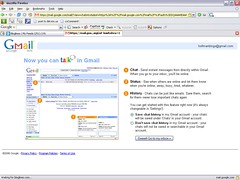
Google Talk activated from within my Gmail account

Here’s the splash page I saw when I logged in:

Click for a larger image.

As it says on the button — “Sweet”

Tuesday, February 07, 2006

Google Talk is active in my Gmail account

Although it’s not supposed to be official until tomorrow, Google Talk is active in both of my Gmail accounts.  The interface is clean and simple and I like having Google Talk integrated into Gmail with a written, searchable record of my conversations.  Further, I like having the ability to interact with chats the same way that I do with e-mails.

Apple introduces the $69 Shuffle and $149 Nano

The demise of the CD accelerates.

Link — Nano

Link — Shuffle

Waiters notice what you drink

And Waiter Rant is here to define you by what you order.

Link

Monday, February 06, 2006

Om Malik provides advice on how to give your old phone smartphone qualities

Ok, what Malik suggests are not going to give you a full keyboard, but they are going to provide you with a lot of functionality.  Note that his suggestions will probably not work on Verizon phones as Java support is required.

Link

State of the Blogosphere by Dave Silfry

Dave Silfry of Technorati has posted an updated “State of the Blogosphere” report.  Key numbers that I extracted:

  • Technorati currently tracks 27.2 Million weblogs
  • The blogosphere Technorati tracks continues to double about every 5.5 months
  •  The blogosphere is over 60 times bigger than it was only 3 years ago
  • Technorati tracks over 75,000 new weblogs created every day
  • 13.7 million bloggers are still posting 3 months after their blogs are created
  • 2.7 million bloggers update their blogs at least weekly
  • Spam blog pings sometimes account for as much as 60% of the total pings Technorati receives
  • Technorati tracks about 1.2 Million posts each day, which means that there are about 50,000 posts each hour

There are a lot more figures and details in the post, so if you are interested, I suggest reading it.

Link

Sunday, February 05, 2006

Google Video is hosting all the Super Bowl commercials

You can watch them separately, or watch them all back-to-back.  No sponsorship on the Google Video page.

Link — separately

Link — back-to-back

Qwerky

Qwerky provides explanations for a lot of Web 2.0 company names.  Check it out.

Link

Superbowl XL ads are already popping up

Just check out the Superbowl page on iFilm.

Link

My web-based applications collection update 1

It occurs to me that I neglected to name some of the services that I use all of the time in my original post, so here are the stragglers:

  • SnipURL — Is it just me or do some companies just generate the most ridiculously long URLs?  SnipURL turns long URLs into short, manageable URLs.  I’ve just started using SnipURL, but I’ve got to say that I am really impressed; I definitely like the ability to track click volume through the snipped URLs, so expect to see more snipped URLs on my blogs (please note that I will never snip links that go direct to other blog posts that I might be referencing, only really long and stupid URLs).
  • ClipMarks — Web content clipping service that allows you to clip portions of pages, entire pages, text, pictures, etc.  I’m not sure why I neglected to include this on the initial list because I use it quite extensively.  The vast majority of my clips are private, but I am going to be working on tagging and getting a lot of the content public over the next month.
  • YouSendIt — A service that hosts large files and sends an e-mail link to those files to and e-mail address rather than killing someone’s e-mail box.  I’ve found that as Powerpoint files and graphics get larger there are less and less peoples’ mailboxes that will accept massively large files.  YouSendIt hosts your files on their server and allows people for whom you provide e-mail addresses to access the file via a web interface.  Certainly I think about the sensitivity of items that I post to their site, but it’s a great service that I’ve been using for a few weeks.
  • Meebo — A website that allows you log on to AIM/ICG, GTalk/Jabber, Yahoo! Messenger, and MSN.  I’ve been using this so much more than Trillian that I’ve uninstalled Trillian from my computer.

Part of the reason that I forgot the services above in my original post is because I don’t have them cohesively organized.  What I’m thinking about doing because I keep all my bookmarks on del.icio.us is putting all my critical web apps in my bookmarks folder on Firefox and then using the bookmarks sidebar so that I can easily access them.  In addition, I’m going to come up with a unique del.icio.us tag for all of the sites so that I can open the del.icio.us site in a tab if I’m not using my computer.  If anyone has another suggestion on how to do this, I’d love to hear it.  I suppose that I could use a personal start page like Pageflakes (which, by the way, is now working with Firefox) or Protopage, but I have not yet found a favorite.

coComment

I first read about coComment yesterday on Scoble’s post about it, so I headed over to check it out.  coComment is in beta, but is accepting e-mail addresses for invites, so I left mine and was surprised to find an invitation this morning when I checked my e-mail.

coComment is designed to allow you to track your comments on blogs no matter what blog you leave them on, which, for those of you that leave lots of comments, know can be a total pain in the ass.  After signing in and activating my account, I was instructed about the process:

  1. Install a coComment bookmarklet on your toolbar — bookmarkelts are available for Firefox, IE, and Safari.  Note that this is a one-time process and does not need to be repeated.
  2. Go to a blog where you want to leave a comment
  3. Enter the comment in the comment space on the page
  4. Click the bookmarklet on your browser
  5. Submit the comment in the normal fashion on the blog’s page

From the FAQ, here’s what you do if you forget to click the bookmarklet:

  1. Go to the blog post you just commented on, and find your comment.
  2. Select the text of your comment in the page.
  3. Click on the coComment bookmarklet you installed in your browser.
  4. If the relevant blog information (eg website address) does not show up automatically in the given fields, enter it.
  5. Click the "Add" button

Seems way easier to try and do this correctly the first time.

Due to the fact that coComment is in beta, it is only supporting the following blogging platforms:

  • Blogger.com
  • MSN Spaces
  • MySpaces
  • TypePad
  • Wordpress
  • Xanga

So here’s what I’m going to do: I’m going to publish this post, leave a comment on it, and then come back and edit this post with my experience from both the user side and the site administrator side.  The edit will be slanted towards Blogger because that’s the platform that I use.

Stand by . . .

Link — coComment

UPDATE:

. . . ok, so I entered the test comment that you can find by clicking the comment link.  I entered the text of the comment, selected the radio button to designate it as an anonymous comment, and then input the text for the optical barrier (not sure if I needed to do that).  After I had entered everything into the blog, I clicked the coComment bookmarklet, which brought up a small, green window that prompted me to enter my nickname/e-mail and password for the coComment service.  After I entered that information, I noticed that a small logo had appeared next to the “Login and Publish” button on the blog comment page that had white “CO” lettering on a blue background with my nickname to the right of it.

Not seeing anything else happening, I hit the “Login and Publish” button and got an error message about cookies, which is when I realized that the eTrust Firewall was blocking the cookies from coComment.  I added coComment to the firewall, disabled cookie blocking, and hit the “Login and Publish” button again — a small khaki-colored window showed up telling me that my comment was being submitted to the original blog and coComment and that was that.

Now here’s something interesting: I moderate my comments on Blogger as the blog administrator.  The post below immediately showed up in coComment even though I had not yet actually approved comment publishing in Blogger.  I suppose this doesn’t really matter too much, but it’s interesting to note.

I then commented on the post while logged into my Blogger profile and without using the coComment bookmarklet.  Now, nothing showed up in coComment because I did not use the bookmarklet, exactly as I expected.  There is a way to set up alerts, but I have not done that.

A few more things that I noticed:

  • Comments can be published as RSS or ATOM feeds, which is pretty cool.  This is what drives the alert functionality
  • There is “Blog Box” that I could install on my blog to share the comments that I make with all of my readers

TechCrunch has a post about coComment with some screenshots.

I have to say that I’m pretty impressed with the product and will be using it extensively.

Friday, February 03, 2006

Anyone running Pandora on their Nokia 770?

I’m just curious because I can’t seem to get it to work on mine.  I think it has something to do with Pandora being a Flash-based player.

Please let me know if you’ve figured out a way to get this working.

Thursday, February 02, 2006

I've launched a new blog

No, I’m not replacing Strategize.  The address of the new blog is http://hobdenver.blogspot.com and I would appreciate if you give it a look.  Content is a little light at this point as I recently finished locking in the template, making adjustments to the template, building a supporting Squidoo lens, etc.

I work for House of Blues Concerts in Denver, so the content on my other blog will be House of Blues Concerts and music-focused.  I’m happy to address any questions that anyone has (to the point that I can do so legally) and would appreciate any questions to get the content flowing.

In perusing the blogosphere, I’ve found that the music business is very under-represented, so I’m going to attempt to give as much of a view “behind the curtain” (or behind the barricade) as I can.

Any feedback is much appreciated.

Microsoft Windows Automotive to debut in Geneva

AutoBlog is reporting that Microsoft Windows Automotive, named “Blue & Me” to characterize bluetooth integration and a one-to-one relationship with the driver, will debut at this year’s Geneva Auto Show.  There are apparently all kinds of features like voice operated controls and a USB port in the glove compartment that is compatible with all kinds of smartphones, MP3 players, and memory sticks.

No mention of how the ctrl-alt-del combination is entered if you have to reboot.

Link

Screenshots direct to Flickr

Check out Grabbr — it’s for Win 2000 and XP

Link

Thomas Hawk reviews 30 Boxes complete with screenshots

I still haven’t received an invite to 30 Boxes, but Thomas Hawk e-mailed me about his post reviewing the service and it is complete with screenshots.

After reading his post I’m even more excited to be able to try out the service.

Thanks Thomas!

Link

Google SMS messaging to any phone

Google has a tool that allows you to send a text message to any cell phone in the United States.  Check it out.

Link

Tuesday, January 31, 2006

My web-based application collection

I like a lot of my applications that I use to be completely web-based with no application install required; this is especially important as I try to interact with the web more and more via my Nokia 770.  Here’s the first version of my list, which I plan on updating from time-to-time as I make changes:

  • Bloglines — RSS/ATOM feedreader.  Yes, it has been having some problems recently and I have been “interviewing” alternatives, but on the whole I’ve been pretty happy with my experience.  This is a free service.
  • Gmail — e-mail from Google.  Lots has been said about by lots of people, but the simple fact of the matter is that it is a pretty great e-mail service with lots of storage and the storage grows incrementally on a daily basis.  This is a free service.
  • uReach — I’ve been using uReach since the service started.  Although I do pay a nominal monthly charge and the storage is pretty low for the price, I do like the toll-free number that allows people to leave me voicemails, allows people to send me faxes that go direct to my inbox, has a following function that allows people to reach me at various phone numbers through forwarding, and a bunch of other nifty functions.  There is a SSL login option, which makes me feel pretty good and the spam function seems to catch most of the stuff coming in.  This is the address and phone number that I use on my resume.  This service  is $6.99 per month.
  • Spongecell — Although I just started using this yesterday, it’s currently my social calendar of choice.  I will be evaluating other calendar services over the course of the next few months, so we’ll see if I stay with it.  This is a free service.
  • Flickr — I just like how Flickr works.  Granted I have yet to populate my Flickr account with lots of pictures, but it’s my choice for social picture sharing.  Once I have some time to run the iPhoto uploader, my Flickr account will be huge and I’m really trying to take some pictures to get up on the blog, which will be hosted on Flickr.  This is a free service.
  • del.icio.us — This is my social bookmarking service of choice and there’s really not much more to say about it.  There were some service issues as they worked through the absorption into Yahoo!, but I haven’t experienced any problems in the last couple of weeks.  This is a free service.
  • Google — This is and has been since it launched my search engine of choice.  This is a free service.
  • Technorati and IceRocket — I use both of these services equally to search blog content because they provide such different results.  Usually I’ll open up both of these in browser tabs and search the same topic on both.  Both of these services are free.
  • Blogger — This is the current hosting platform for this blog.  There is a WYSIWYG editor through the Blogger site and I generally haven’t had any service issues.  There are some key functions that Blogger does not include, but overall I guess I’m pretty happy with the service.  This is a free service.
  • Feedburner — This is my feed service of choice.  If I had it my way, I would go back to when I started my blog and would have encouraged everyone to subscribe to the Feedburner feed rather than the Blogger ATOM feed.  I like that I can view circulation and various other tracking mechanisms through Feedburner.  Further, I like the fact that my Feedburner feed address will never change even if I change my blog service provider.  Lastly, I really like all the tools that allow me to make my feeds more robust and easy to subscribe to.  This is a free service.
  • Squidoo — I have a couple of lenses on Squidoo.  You really have to go take a look at some examples of lenses to understand the purpose of the site, but it’s damn powerful.  This is a free service.

Stuff I’ll be signing up for next month:

  • Box.net — 1GB for $2.99 a month is hard to beat.  The more I look at the service, the better it looks and I especially like the RSS feed for files, I haven’t seen anyone else doing that effectively.  As I said, this service is $2.99 per month.
  • MP3Tunes — Once I have some time on a weekend, I’m going to upload my entire iTunes library to my locker.  I can’t wait to try this out streaming on my 770; I bet it’s going to be damn cool.  I’m also assuming that at some point they will upgrade the service to support video, so that’s something else to look forward to.  The premium version of this service is $40 per year.

I’m sure I’m missing some things, but I see this as a “living post.”

Getting paid for social bookmarking

If you want to monetize what you are doing with del.icio.us, then check out Simpy, which lets you run Google AdWords on the bookmarking site they are hosting for you and allows you to keep all the revenue from those ads and Raw Sugar, which pays between $25 and $500 per month to the top 20 most visited user bookmark sites.

I like del.icio.us, so I’m not planning on switching.

Online storage round-up

TechCrunch has a great round-up of all the new online storage services.  It seems that OmniDrive is getting high marks, but I have yet to receive an invite to beta test the service, so I guess I’ll just have to take TechCrunch’s word for it at this point.

Very useful and contains an easy-to-read comparison grid.

Link

A far more public beta of IE7

Check it out — you can download direct from the link below.

Link

Livestrong rubber bracelet + thumb drive = Imation Flash Wristband

Uncrate reports on the Imation Flash Wristband that is rubberized like the ever-popular Livestrong bracelet and includes a 256mb flash drive.  Ahh, the future is here.  Remember when the geeks used to say, “That will happen when I can wear a hard drive on my wrist.”?  Me neither, but apparently that’s what is about to happen.  No word on pricing, but the picture does show the bracelet in a blue and black color.  Seems like they should make it Livestrong yellow and donate some amount of the purchase price to the foundation.

I wonder how well this thing stays latched together on your wrist.

Link

Monday, January 30, 2006

Russell Beattie lists his essential Windows apps

I don’t really use a lot of Russell’s list, but it’s interesting to look at just the same — to be honest, I hadn’t even heard of some of the applications.

Take a look, you might discover something new like I did.

Link

SRQ

SRQ means “Self Reference Quotient” and is defined as this:

. . . the blogger tendency to self reference

I had never read the term before reading it on Shawn Conahan’s blog, so I can honestly say that I cannot self reference back to one of my previous posts.

Shawn has some strong opinions about self referencing:

Let me say now that although you feel smart when you reference yourself, you actually seem lame to whomever you are quoting yourself, particularly when you are quoting your blog. Think about what you are doing when you refer to a blog post you made last month: You are asserting that you could find no more worthy source to quote than yourself, which makes you appear either dubiously confident or too eager to establish your position as a valuable source.

Additionally, Shawn questions whether your SRQ is inversely proportional to your IQ.

Please note that Shawn self-references himself in his post about SRQ and I have not self referenced myself in referencing Shawn’s post about SRQ, meaning that, perhaps, my IQ has taken a slight leap forward.

Go and read Shawn’s whole post as SRQ is just a small part of it.

Link

More great posts from Guy Kawasaki

He’s just got a lot of knowledge to give.

Link — The Art of Bootstrapping

Link — The Art of Execution

Box.net

I like the concept of Box.net, which is 1GB on online storage for $2.99 per month.  Unfortunately the service seems to be capped at 1GB per month, which is less than I would prefer if I was paying for storage; 3–5GB feels a little better for me and I would be willing to pay around $3 a GB for it per month (though I would hope that I would get a volume discount).  I guess I could get a few boxes to separate different files, which wouldn’t necessarily be such a bad thing.

I definitely like the fact that Box.net is a web application and requires no application download, making it truly platform-independent.  What I really like is the ability to syndicate files via RSS using what Box.net calls filefeed.

I’m still debating, but I’ll probably wind up signing up for the service, so stay tuned for future reviews.

Link

LicketyShip

Have you ever paid the same amount or more than the item you’ve ordered just to have it delivered via NextDay Air?  I haven’t since I joined Amazon Prime, but I will admit that I have in the past.  LicketyShip is a same-day delivery service that reminds me a lot of Pink Dot in Southern California.  Unfortunately, I don’t live in any of the test markets, so I won’t be able to post a review, but you should check it out and see if you can register (assuming you live in one of the test cities).

Link

Does the coffee at Starbucks taste like crap to force an upsell?

To be honest, I’ve never had a plain cup of coffee at Starbucks, but Marketonomy has and the author thinks that the horrible taste of the plain coffee is designed to push the buyer into buying a more expensive coffee beverage:

When a Starbucks opened right next to my office, I found myself buying more of their crappy coffee, and then upgrading more frequently to a Latte just to avoid the torture. When I finally graduated completely from coffee to the poodle drinks, it struck me: Crappy coffee is an upselling opportunity. It's what everyone initially comes for, it's the cheapest thing on the menu, and it sucks. But for just a few dollars more, you get flavor. Any flavor you want. Any combination. And once you make the initial leap, a banquet of delights appears before you. Add a little chocolate, a little orange, a little cinnamon and whipped cream. It's just money. And once you buy a Starbucks' loyalty card, you won't even tally up the transactions any more. Just dump some cash on the card every payday and you're good to go.

Read the rest of the post because it’s an interesting take on Starbucks.

Link

PCMover -- a solution for switching PCs

Engadget is carrying a full review of PCMover, a $50 program (priced per migration, not for unlimited use) that moves all of your applications, data files, and registry settings to a new (or another) PC and even works when upgrading from older to newer operating systems.  Having done computer switches several times over the last few years, I can tell you that $50 is a small price to pay for the headache and pain in the ass of having to reinstall programs and customizing your system to how you want it (I personally have a lot of RegEdit stuff that I’ve done that I like to retain and have to duplicate when changing machines).

The Engadget post gives the software a fairly favorable review:

Every application on the new computer worked. All settings were intact. The issues that cropped up were pretty trivial.

You should read the full post about all of the tester’s experiences and some of the issues, but overall, it seems like a pretty impressive product; I’ll certainly be trying/using it the next time I have to switch machines.

It would be interesting to see a cost analysis on the $50 software cost vs. the effective hourly wage for an IT person at a company that performs these sort of services; my guess would be that the PCMover option is cheaper (if you look at a $30K per year salary, which is an effective hourly wage of around $15 not including benefits, and assume that it takes about 4 hours to do a migration — that’s about $60) and leads to a better user experience.

Link

Mark Cuban's new movie distribution model: it's only changing the industry

Mark Cuban’s studio, Magnolia Pictures, recently released Bubble simultaneously in theatres, on DVD, and in 2 showings on HDNet Movies — Cuban even gave fair warning that he was going to do this in a blog post on January, 19.  Apparently some theatres are refusing to screen the movie because it is messing up what they perceive as their core business model.  Cuban recently posted about Bubble on the 25th and noted the following about theatre owners from big chains and theatre trade organizations prior to Bubble’s release:

NOT ONE stood up and said, “screw him, our product is great. We don't care what he does”. Not a single person said  “It could hurt our business, but we will just have to work harder to bring people in to our theaters”. Not a single person said, “It will make us have to work harder and create a better value and experience for our customer”

They stood up and indirectly said….OUR PRODUCT SUCKS WE CANT SURVIVE WITHOUT HELP.

Geek News Central did the math on Cuban’s new distribution model and essentially concluded that a $19.95 charge for a DVD not only makes the money go further, but leaves enough left over for a big screen tv so that you can watch the DVD in near-theatre goodness if you choose.  Check out the full math on the post and compare your yearly movie viewing to their numbers to see where you come out.

In related news, Lockergnome reports that movies 24 movies from Sundance will be released simultaneously in theatres and on IFC (the International Film Channel).

Link — Geek News Central

Link — Lockergnome

Spongecell

While I’m waiting for 30 Boxes to launch, I’m playing around with spongecell for comparison purposes.  I certainly like the statement on their main page:

Spongecell is a new kind of calendar for you and your friends.  We are focused on making it the most usable calendar in the ocean.

My initial impression is that spongecell is pretty cool — to be honest, I’ve only played with it for about 5 minutes.  The function I immediately checked was the import function: I can import iCalendar files with no problem, which is a format I can export my Outlook calendar to, but spongecell does not yet handle recurring events.  What I’m really looking for is some sort of conduit that allows real-time sync to their service from my Outlook calendar, with the ability to tag calendar events not to be displayed on the web service.  Plaxo currently had a conduit to my Outlook calendar, but does not allow me to share it and so does not allow tagging because it’s not required.

Whichever service comes out with the Outlook conduit will probably be the one that I use.

Link

3000+ buttons for your site

Check it out.  Great for Blogger users.

Link

Sunday, January 29, 2006

Chewbacca is blogging

Steve Rubel caught it.

Link — Steve Rubel’s post

Link — Chebacca’s blog

Cleaned up my blog template

I think it looks a little better and a little cleaner and is the culmination of a lot of the other little changes that I’ve been making.

E-mail address change

I’m changing my e-mail address for my blogs.  Too much spam and too little storage space on the free account I’ve been using.

I have updated the e-mail address on my blog, but there may be individual posts that will still have the old address — please be sure to click the “E-Mail Me” link if you are trying to reach me to ensure you are using the correct address.

Flipping the Funnel

Flipping the Funnel is a new e-book by Seth Godin about how Web 2.0 can be combined with Ideaviruses and Purple Cows.  If you visit the link below for Seth’s post, you will find the companies version of Flipping the Funnel as well as a version for politicians and a version for non-profits.

Here’s a very small preview from the e-book:

Marketing is a funnel. You put undifferentiated prospects into the top. Some of them hop out, unimpressed with what you have to offer. Others learn about you and your organization, hear from their peers, compare offerings, and eventually come out the bottom, as customers.

What if we flip the funnel and turn it into a megaphone?

What if you could figure out how to use the Internet to empower the people who like you, who respect you, who have a vested interest in your success? I call this group of people—your friends and prospects and customers who are willing to do this—your fan club.

As with all of Seth’s e-books, you can freely download the e-book, post the e-book on your site for distribution, and/or e-mail the e-book to anyone (you just can’t change it or charge for it).

Link — Download Company Version Immediately

Link — Seth’s full post with education and non-profit versions

Gotrump.com

He’s got to be kidding.

Link

NewsAlloy continued

Ok, so I’ve come back to check out NewsAlloy again.  I was able to get the site to load and logged in to find that my OPML file had actually fully imported.  Even better, NewsAlloy was able to read all of my folder information from Bloglines and keep all of my blogs categorized exactly how they are in Bloglines — this has been one of my major frustrations with other aggregators that I’ve tried.

Going back to my rant about Bloglines, I’d like to address how NewsAlloy meets what I was looking for:

  • I’m not really looking to install an application; I really like browsing on the web only.  NewsAlloy is fully web-based.  If I choose to go with NewsAlloy, I will lose the mobile version of Bloglines, but to be honest, I don’t use that at all right now — I much prefer to read my feeds on a full screen.
  • Ideally it would be a service that would retain the folders that I have things organized into on Bloglines.  That worked amazingly well.  In the past, I’ve totally abandoned even evaluating new readers because they couldn’t keep everything organized the way I had them in Bloglines.
  • Just like Jeremy, I like how Bloglines displays feeds as one massive page by folder.  NewsAlloy allows many different ways to look at feeds.  When you log in, your “Inbox” displays all new posts as a massive list — you can set the number of posts per page and whether to display headlines, summary, or detail.  It is important to note that because NewsAlloy does not use frames, if you set to a certain number of posts per page, you will have to click the next page arrow to continue reading posts.  Alternatively, you can read new posts by category simply by clicking on the Subscription category label, much like how I currently read posts in Bloglines.  Further, you can click the expansion button on your categories (just like Bloglines) and read new posts from individual subscriptions.

There are all kinds of view options and all kinds of tools that I have yet to play with, but I have to say that this is looking like a very viable alternative to Bloglines.  I love the fact that I don’t have to refresh anything and I don’t have to wait for anything to load because of the Ajax programming.  I love the floating tool bar that follows when I scroll up and down the screen.  I’m not sure that I’m used to having to click checkboxes and mark items as “Read” to get them to disappear as new posts, but it’s not at all different from using Gmail and doing the same sort of operations with e-mail.

It is important to note that NewsAlloy is still in beta (what isn’t these days?) and some of the service issues that I’ve experienced today are probably related to the beta status.  There are not a ton of users yet (you can see the total number of users any time on the main page), so hopefully the service will be able to effectively scale if they experience massive growth.

More to come, especially if I decide to make the permanent switch.

NewsAlloy

I just ran across NewsAlloy, which is an AJAX-powered newsreader.  In order to test the functionality, I signed up for an account.  The interface is great and somewhat reminiscent of Bloglines, but because everything is AJAX, I don’t have to wait for full screen or site reloads.

I exported my subscriptions from Bloglines (to do this, click on “Edit” in the left window, scroll all the way to the bottom and click “Export Subscriptions”, a new window will launch with the OPML file, and go to “File” and then “Save” and make sure that the file is saved as a complete XML file with an XML extension) and then tried to import it into NewsAlloy.  Unfortunately, although the OPML file was verified as valid, the subscriptions did not import — of course, I think that the whole NewsAlloy site took a big crap during my import process because now I can’t even get any of the site to load.

I’ll keep you updated on my further experiences, but it looks like I may have found a replacement for Bloglines.

Link

Thursday, January 26, 2006

Bloglinker is gone

I’ve removed my Bloglinker links on my page because of the objectionable sites that have been linking to me.  Sorry to those folks that came up with Bloglinker because I initially thought it was a really cool service, but I just can’t link to the kinds of sites that are showing up in my list and I don’t have the time to be the human filter.

Strategize Feedburner vs. ATOM feeds

I know a lot of you are subscribers to the ATOM feed to Strategize and I have no plans to shut that feed off.

All of the above having been said, I really think that the Feedburner feed for Strategize is a bit more robust, displays things better, and has a lot more features than the ATOM feed.

As I said, I am not shutting off the ATOM feed, I’m simply suggesting that you think about switching to the Feedburner feed.  From the selfish side of things:

  • The Feedburner feed is blog host independent, meaning that I could change my blogging service, and you would still receive my feed seamlessly.
  • The Feedburner feed allows my to perform some analytics on reading and subscribers, which ultimately helps me develop content.

Clicking the icon below will allow you subscribe to the Feedburner feed.

Small site changes

I’ve done a few more things to my blog site:

  • Added links to some more of my content
  • Further modified references to my e-mail address to cut down on spam
  • Removed the full blogroll from Bloglines and just provided a link.  The length of the blogroll on the page was getting crazy and making the site look too busy.  If you want me to add a HTML link to your blog, just let me know and I’ll be happy to.

I’m just trying to make everything look a little bit more clean and tidy.  If anyone has any further suggestions, please feel free to leave me a comment.

TiVo and DirecTV's XM channels

Let me preface this post with the statement that this is just something that I was wondering about and not something that I am encouraging or condoning.

DirecTV replaced all of my digital music channels with XM channels sometime late last year; I assume that they did this because:

  • Hughes owns both companies
  • It was a way to move some money between the 2 companies
  • It was a massive stated number of subscriber boost for XM in the face of serious competition from Sirius

Ok, so I have a TiVo (not a DirecTiVo) hooked up between my DirecTV and my television.  I can set my TiVo to record any channel, including XM channels — chances are good that I could probably record a XM channel until I filled up all 80 hours on my TiVo.

Here are some pretty good instructions on how to get video from your TiVo onto your iPod, so I would question why you couldn’t just use these instructions to convert the audio.  I’m assuming that you would be carrying a whole lot of extraneous video information, but I’m also assuming that there are some programs out there that could strip the video data and simply preserve the audio tracks.

Alternatively, it would seem that you could hook up a computer with a sound card to the audio out jacks on your TiVo and use any sort of audio recording program to record the audio that you want.  Sure, you could probably just hook up a computer with a hard drive directly to the audio out on your DirecTV receiver and just record, but with TiVo, you would be able to use the fast forward function to skip songs that you don’t want to record down to your music library because of the graphical changes on the screen that tell you what is playing when the songs change.  Yes, I do realize that with a nice DirecTV receiver, you could get an optical audio out and run that directly into a nice computer sound card, but I would think that RCA outs from the TiVo into a good sound card would provide a perfectly acceptable song recording.

Surely I’m not the first person to think of this. 

Apple is not killing the album/CD business

There are tons of stories about how the iTunes Music Store is killing the album/CD business because everyone is buying singles (go search on Google News if you want to read one of the stories).  In order to combat this, labels are locking popular singles and requiring people on iTunes to purchase the whole CD to get the single that they want — this probably makes people go steal the music and doesn’t engender a whole lot of good will towards the artists or record labels.  Furthermore, labels want to charge a lot more than $0.99 for top singles in order to recoup what they are losing in full album sales.

Here’s the simple fact of the matter: if record labels were scouting talent and investing in and backing artists that could produce more than 1 good song, people would do the math and probably buy a CD.

I’m already from an older era (and I’m not really that old) where I am used to hearing one song and buying the entire CD.  I used to buy CDs at Tower during high school — CD singles that had between 1 and 3 songs were usually $4.99–$5.99 and the whole CD was usually $9.99–$11.99, so it made sense to me to just spring for the whole thing.

When iTMS launched and all the CDs were $9.99, I was perfectly happy to pay $9.99 for the whole CD — I figured that I was saving the record company production and distribution costs, so it made sense for a constant $9.99 price.

Today I went to download the new POD album on iTMS — I liked the last POD album, so I figured that I would check out some of the 30 second clips on some random songs and, based on those samples and the songs I had already heard, I would probably just buy the whole album.  Unfortunately the album is priced at $13.99, which is probably exactly what the CD would cost at any retailer.  A little disenchanted, I went to check out the new Yellowcard album — the last album that I bought from them was $7.99 on iTMS — and found that it was $11.99, which, after listening to some of the songs, didn’t seem totally worth it.

Here’s what’s going to happen: the record labels are going to cause me to turn into a consumer of singles rather than a consumer of full albums.  Sure it will be a little difficult for me to change my buying behavior, but I bet it won’t take too long — chances are good that I’ll probably even wind up saving a bunch of money over the course of a year.  Oh, and by the way, I haven’t heard a single in a long time that was worth $2.99.

Bob Lefsetz has one of his rants on this very issue and if you’re interested, you should read what he has to say.

INGDirect TiVo offer gets you $25

For those of you that use TiVo, INGDirect is running a promotion where they will give you $25 for opening a new savings account.  Follow the link at the bottom of this post to get to the TiVo promo page, but note that you will need to provide the last 4 numbers of the phone number registered on your TiVo account, your zip code (I’m assuming this needs to be the zip code in your TiVo account), and the reference code from your TiVo service.  This promotion is valid until 4/3/06, but I’m not sure where I can tell you to find the promo code; I noted it when it first showed up on my TiVo screen — perhaps they’ll run it again in the next few months.

Here’s the great parts of this promotion:

  • It’s essentially free money and starts earning interest as soon as the account creation is complete (you can’t withdraw it for 30 days, but that seems like a small trade-off).
  • ING’s current savings yield (no minimum balance required) is 3.8%, which is an amazing return rate on a normal savings account.  Chances are really good that you are not getting even close to this rate from your current bank — maybe you can get it with a CD or money-market, but none of the restrictions associated with those kinds of accounts exist with ING.
  • This is the best part: ING is running a “Winter Save Up Sale” that will pay 4.75% on all deposits made between January 19, 2006 and April 15, 2006.

Link

Wednesday, January 25, 2006

More Hindisghts from Guy Kawasaki

If you haven’t read the original Hindsights post, read it before following the link below.

Kawasaki has posted Hindsights II, which brings the original post up-to-date.

Link

Monday, January 23, 2006

Your life in cache

As I go into Google News to get this link that will take you to all 222 (at the time of me writing this post) stories related to Google fighting with the Feds about releasing search history, I am creating a cache trail.

Om Malik probably has one of the better-written posts about this subject and I encourage you to follow the link below to read the whole thing.  Probably my favorite quote from Malik’s post is this one:

“You have zero privacy anyway… Get over it.” — Scott McNealy , CEO of Sun in 1999

As Malik points out, every time we interact with something that has the ability to track us, it’s going to track us and save that cached data somewhere: from iTunes purchases and listening habits, to TiVo recording and viewing habits, to what we search for on any search engine, to this blog post that you are reading right now, everything is being cached and stored.

We have traded privacy for convenience and lack of cost for so long that we tend to forget that we have done so.  It is important to remember that nothing is really private any more.  In many cases it is easy to remember because so much of what we are doing now is public: blogging, posting pictures to Flickr, posting bookmarks to del.icio.us.  Bear in mind that your work e-mail is not private, that your other e-mail accounts (for the most part) are not private, and that for the most part, we do not have to worry about the fact that some of the things we think are private actually are not.

The simple fact of the matter is that more and more useful features on free sites are going to depend on you logging into the service and giving up even more privacy in exchange for the cooler stuff.

As an aside, you can read this post on BoingBoing about how you can use some tools to maximize some of your privacy on Google.

Link — Om Malik

NBC and ABC saw ratings bumps for programs that they sell on iTunes

TVWeek.com has the full story.

Link

What is going on at Starbucks these days

Lots of posts about Starbucks partnering with Lions Gate Films to promote the movie Akeelah and The Bee.  Ok, I had never heard of the movie prior to reading some of these posts and I haven’t seen any merchandising or advertising in my local Starbucks.

Brand Autopsy posts on the upside of this deal for Starbucks:

The financial upside for Starbucks with this partnership is tremendous. It’s my understanding Starbucks is paying Lions Gate NO MONEY. Instead, Starbucks is trading real estate space in its 5,500+ North American stores to promote this movie. By placing signage in-stores ranging from posters, to coffee cup sleeves, and placards alongside muffins in the pastry case, Starbucks will receive a share of box office sales, merchandising revenue, television rights, soundtrack sales, and DVD sales (including sales at non-Starbucks locations). We are talking about Starbucks potentially receiving millions upon millions of incremental dollars that can go directly to the bottom-line.

And they also post about the downside:

. . . violating the trust of customers and store employees. Customers and employees have come to expect Starbucks not to treat them like tools in the marketing promotional game.

I haven’t seen any of the advertising yet, so it’s hard for me to how invasive it is or isn’t.  However, I agree with Brand Autopsy that Starbucks thus far has been very careful about how they market non-Starbucks products and seem to be moving away from that to chase dollars.

Then I saw a post on Church of the Customer that provided more information on how invasive the advertising is going to be:

. . . you plan to advertise movies on cup sleeves, offer trivia games on chalk boards, and feature words from films in the pastry cases

Wow, that’s sounds a lot like McDonald's to me.

I especially like this quote that Church of the Customer offers up:

The underlying foundation of this company is not about growth. It is about the passionate, soulful connection we have with our people, [and] our customers...No matter how many avenues [we pursue], and now matter how much we grow, our fundamental core values and purpose won't change.

Captures the essence of exactly why Starbucks shouldn’t be doing this, doesn’t it?  I bet you might not be able to guess where it’s from.  It’s from Pour Your Heart Into It: How Starbucks Built a Company One Cup at a Time by Howard Schulz, CEO of Starbucks.

Link — Brand Autopsy

Link — Church of the Customer

Post dump

So many things to write about, so little time:

  • All kinds of Web 2.0 goodness from TechCrunch:
    • Top 10 Sources, which is a blog index that is edited by humans.  Pretty good stuff on here, but it’s causing a controversy by fully copying blog posts.
    • BillMonk — keeps track of IOUs between friends with all kinds of fun notification features like e-mail and SMS.  Lots of built-in intelligence that allows you to fully track what people owe you (an, of course, what you owe others).
    • bluepulse — the “meebo of cell phones”.  Enough said.
    • FeedXS, which goes straight to the core of RSS as a simple syndication method.  It’s easier to see than to describe, so take a look.
    • nuvvo allows educators to create courses with Ajax.  In addition, there is a payment engine that allows educators to charge students for courses.  Further modules allow educators to create tests, post grades, etc. — all the things you would expect from an online education engine.  Interesting stuff.
  • Tom Peters Wire Service reports on Adam Kalkin’s push-button house that essentially involves a shipping container with motorized walls that fold down to reveal an amazing interior.  I think that this even cooler than some of the fold-out semi trailers that I’ve seen and it’s much more ADA-accessible.
  • HispanicTrending reports that Busch series car racing in Mexico City is becoming more and more popular in Mexico and is creating opportunities for more and more Mexican drivers.
  • the[non]billable hour provides a list of all kinds of things that companies and people have given away for free and how that has resulted in increased sales.
  • TabletPCTalkNews provides instructions on how to boot your computer without a CD drive.  This is great for users of tablets and other computers that do not come with CD drives built-in.
  • Bleezer is a free blog authoring application that works equally well on Mac, Windows, and Linux.  I haven’t switched over yet, but I will within the next month.
  • Nokia is testing running a web server on a phone.  I’m not sure why this is practical, but I guess it’s cool to conceive of.
  • Yahoo Local Maps are providing traffic reports.  I’m guessing this will shortly be available on Google Maps.
  • I loved the bathroom pictures in the men’s room at a hotel when I first saw them, but Steve’s Nude Memphis blog has re-posted the picture to make it easy to find.
  • On Thinking By Peter Davidson there is a post that details the GoGoKidz TravelMate that is no much more than a luggage carrier specifically made for child seats.  For those that have had to travel with a car seat in the airport, this is a great thing.

A thought on terrorists purchasing nuclear material

The United States spends tons of money on all kinds of programs.  What if the United States simply made a worldwide statement that we would pay top dollar for all nuclear material?  In this way, anyone with even trace amounts of nuclear material would approach the United States first because it is far more likely that we would pay and that we would pay well (as opposed to dealing with people that might kill you during the transaction).

Just a thought.  Probably applicable to biological agents as well.

Anonymous internet browsing with Tor

Tor helps you anonymize the following:

web browsing and publishing, instant messaging, IRC, SSH, and other applications that use the TCP protocol

Essentially the Tor software bounces communications around to a variety of what they call “onion routers” and actually allows you to decide whether or not to identify yourself when you communicate.

You’ll just have to go to the site and read more about how people are using Tor to really understand it.

Tor is available for Win, Mac, and various Linux builds.

Link

CNNMoney reports the best time to buy everything

Airline tickets, televisions, houses, and more.

Link

Need to do a domain search?

Try instantdomainsearch.com that starts matching as you type.  It only matches for .com and .net right now, but it’s still pretty cool.

Link — found on this post at evhead

Thursday, January 19, 2006

Judge a website in a blink of an eye

That’s what most of us do according to Nature.com:

Like the look of our website? Whatever the answer (and hopefully it was yes), the chances are you made your mind up within the first twentieth of a second.

This is relevant to anyone with a website.

Link

Great posts on Guy Kawasaki's blog

Instead of trying to write about them individually, here are some of my favorites from the last couple of weeks:

Link — How to Get a Standing Ovation

Link — The Art of Branding

Link — Hindsights  This is really good if you are a young professional or just graduating college.

Link — The Art of Innovation

Link — The Art of Intrapreneurship


Is BellSouth making a big mistake?

Apparently BellSouth is planning to try and charge internet content companies for using bandwidth on their networks.  I first saw this story on Om Malik’s post and was trying to figure out exactly how BellSouth was thinking they were going to pull this off.  As Malik points out:

. . . Apple maybe asked to pay a nickel or a dime to deliver the song. Yahoo will have to do the same for its reality TV streams. I wonder what is the ramification of this? Will it mean increased price of songs on the iTunes store, hence slower sales of iPod, and hence the slowdown of that ecosystem. . . . if there is no money out of consumer pocket, fine. Silicon Valley is still going to pay the price!

Then I read a post on Geek News Central that clarified even further exactly what BellSouth is doing:

The Bells are loosing ground and they are not happy about it. In return they want to start charging a two way toll on the net connected lines. First they charge Joe Customer for Internet access, second they want to charge companies like Google for driving so much traffic through their network lines.

Finally, I read Jeff Pulver’s advice for Google, which I find to be extremely viable — essentially, Pulver suggests that Google put BellSouth in the penalty box for their outrageous scheme:

Given the market power that Google has today, they are more relevant to the Internet community than BellSouth. Given that, if I were running Google today, I would choose to implement a BellSouth Boycott and stop offering access to Google to BellSouth customers and would start advertising Cox Cable service on any requests that came from BellSouth customers in their regions. I’m willing to wager that by Q3 2006, BellSouth’s DSL group will feel the effects of their grave error in judgment.

It will be interesting to see what actually transpires in the near future.

Installing Windows unattended

I once had to update about 20 Windows machines.  Luckily I was able to use a cloning program on 1/2 of them that were exactly the same machines; on the other half I had to install Windows from the CD, then install Office from the CD, and then run Windows and Office Updates through about 30 restarts before the machines were ready to use.  Suffice to say that I was pretty excited to find instructions on how to build a Windows install CD that includes patches, updates, and even applications.

Link

How to add Google Maps to your site

Easy to follow instructions.

Link

How much Blackberry stopping service in the US would cost per user

BBHub reports the it would be $845 per user, which factors in $300 for new equipment, some amount of money for accessories, 4 server hours per user for switch over, and productivity losses.  Read the post on BBHub for more details, but it’s interesting to see that at least someone has tried to quantify the potential service stoppage.  Based on your company’s Blackberry deployment, how much would this cost you?  I bet it’s an awful lot of money.

One thing this doesn’t calculate (at least I don’t think it does) is the sunk cost of the Blackberry server and the cost of either buying Good or activating ActiveSync on an Exchange server.

Link

Wednesday, January 18, 2006

Run Windows cheaply on a new dual-core Mac

Check out OpenOSX WinTel 2.0.  $25 for the basic package is much cheaper than Virtual PC.

Link

Google Talk = "Open Federation"

Google has announced an “open federation” between Google Talk and other IM services.  Essentially Google is trying to combine disparate services to create a seamless instant messaging service similar to what e-mail is now.  For the techies, Google is federated with services that operate over the XMPP protocol. Interestingly, if you click the open federation link, you will find that Google Talk also plans to support SIP, which is very interesting from a VOIP perspective.

Very interesting.

Link

Newton running on 770

This is very interesting.  As you are probably aware from my blog, the Nokia 770 is built on an open-source Linux OS.  There is a beta Apple Newton emulator that you can load onto the Nokia 770 available here.

Andy Diller actually got this working on his 770 and has complete pictures on his post.  What is not clear is whether or not any of the PIM functions work.

Link

Monday, January 16, 2006

Alaska Air to begin charging $10 for reservations made by phone

Effective Jan. 18 and non-refundable $10 non-refundable fee will be charged for tickets purchased through their 800 number or at the airport.  My wife pointed this out to me today when she went to purchase a ticket through the 800 number, so I called myself and the message is played before you enter the IVR system.  The message further directs you to visit AlaskaAir.com where there are never fees and the prices are usually lower.

There is no information about this change on the Alaska Air website, but, as my wife pointed out, this change does not affect anyone using the website, so there’s no reason to publish it there.

I’ve go to tell you that I don’t have a problem with this new system except for 1 instance: the reason my wife was calling today was to change a ticket that I had purchased and not used, which already comes with a $50 change fee.  Does this now mean that because there’s no way to change a non-used ticket on their website that it would have been $50 + $10 + whatever the difference in fare is?  Not cool to direct people to use your website for everything if you can’t do everything on their websites.

If I had to pay $10 for ticketing on Alaska and I knew it before I called the 800 number, I would expect to speak to someone in less than 30 seconds.  After all, if I’m funding the call center, then I would expect immediate service, not an IVR system.

It will be interesting to see how Alaska implements this fee structure and what customers’ reactions are to it.  In the hypercompetitive airline business, it doesn’t seem like a sustainable program to me — everything else being equal (i.e., I could fly at about the same time for exactly the same price) and I wanted to book over the phone, I would never choose Alaska.

Call the number yourself — 800–252–7522 and you can hear the announcement.

Bonus miles or gifts if you fly United out of Denver

I’m sure that this is to help retain loyal flyers with Southwest having started their service on January 3rd, but United is offering bonus miles for flying out of Denver from January 11, 2006–December 31, 2006.  There are all kinds of nifty prizes or bonus miles that you can choose from, but note that flights need to cost more than $150 (so you’ll have to decide if you want to spend $150 on United to go to Vegas or if you want to spend $88 on Southwest).

Oh, and double credits are available on select routes through April 11, 2006; all of the routes seem to mirror the places that Southwest services out of Denver — imagine that.

Mileage Plus number required to register.

Link

Sunday, January 15, 2006

The sympathy quote

I was reading Secret Sanction by Brian Haig and this jumped out at me:

. . . that timeworn phrase about “sympathy” being found in the dictionary between “shit” and “syphilis.”

Think about it.

Coca Cola is made differently in Mexico

And therefore it tastes differently than American Coke.  And therefore, it stands to reason, that Mexicans in America are looking for that different flavor profile.  The simple fact of the matter is, that unlike American Coke that is made with high fructose corn syrup and bottled in plastic bottles and cans, Mexican Coke is made with sugarcane and bottled in glass bottles.

Reveries is reporting that Coke is prosecuting truckers that are “bootlegging” Mexican Coke into America to sell as it is negatively affecting the Coca Cola bottlers in the US.  Read the whole post on Reveries because there’s a lot more information there along with an interview of someone selling the Mexican Coke at a premium in the US.

The interesting thing is the Coke has no plans to actually cater to the Mexican taste profile and re-work their lines to cater to demand.  Instead, Coke would rather spend their money prosecuting.  It’s my understanding that the Hispanic/Mexican population is only supposed to increase in the US, so it seems very short-sighted to not cater to this population.  Perhaps Coke knows something that the rest of us don’t.

Link